


Python PyQt实现右下角弹出窗口及动画效果

发布时间:2026-10-13 |
4人浏览过
本文介绍了使用Python和PyQt库实现窗口右下角弹出及动画效果的具体方法。通过QPropertyAnimation类控制窗口位置与透明度的渐变,结合QTimer实现定时自动关闭,并处理信号槽以完成资源清理。代码展示了从初始化位置到动画执行及最终退出的完整流程,适用于需要轻量级提示窗口的场景。
本文分享使用PyQt实现右下角弹出窗口的具体代码示例,供读者参考。
在构造函数中,首先获取桌面可用几何区域的大小,将窗口初始位置移动至屏幕右下角。具体实现为:self.desktop=QDesktopWidget(),随后调用self.move((self.desktop.availableGeometry().width()-self.width()),self.desktop.availableGeometry().height())将窗口定位至右下角,最后调用self.showAnimation()启动动画。
self.desktop=QDesktopWidget()
self.move((self.desktop.availableGeometry().width()-self.width()),self.desktop.availableGeometry().height()) #初始化位置到右下角
self.showAnimation()
#弹出动画
def showAnimation(self):
  #显示弹出框动画
  self.animation=QPropertyAnimation(self,"pos")
  self.animation.setDuration(1000)
  self.animation.setStartValue(QPoint(self.x(),self.y()))
  self.animation.setEndValue(QPoint((self.desktop.availableGeometry().width()-self.width()),(self.desktop.availableGeometry().height()-self.height()+self.SHADOW_WIDTH)))
  self.animation.start()

  #设置弹出框1秒弹出,然后渐隐
  self.remainTimer=QTimer()
  self.connect(self.remainTimer,SIGNAL("timeout()"),self,SLOT("closeAnimation()"))
  self.remainTimer.start(10000) #定时器10秒
#关闭动画
@pyqtSlot()
def closeAnimation(self):
  #清除Timer和信号槽
  self.remainTimer.stop()
  self.disconnect(self.remainTimer,SIGNAL("timeout()"),self,SLOT("closeAnimation()"))
  self.remainTimer.deleteLater()
  self.remainTimer=None
  #弹出框渐隐
  self.animation =QPropertyAnimation(self,"windowOpacity")
  self.animation.setDuration(1000)
  self.animation.setStartValue(1)
  self.animation.setEndValue(0)
  self.animation.start()
  #动画完成后清理
  self.connect(self.animation,SIGNAL("finished()"),self,SLOT("clearAll()"))

#清理及退出
@pyqtSlot()
def clearAll(self):
  self.disconnect(self.animation,SIGNAL("finished()"),self,SLOT("clearAll()"))
  sys.exit()    #退出
或者,可以直接连接动画完成信号与关闭槽函数:self.connect(self.animation,SIGNAL("finished()"),self,SLOT("close()"))。
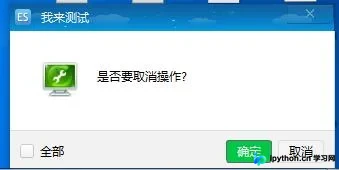
运行效果如下图所示:
以上就是本文的全部内容,希望对大家的学习有所帮助,也希望大家多多支持本站。
本站声明
本文内容仅供参考,不代表本站观点。转载或引用请注明出处。如发现内容问题,请通过联系我们页面反馈。















