


Python基于二叉树结构的堆排序实现详解

本文介绍如何使用Python实现基于二叉树存储结构的堆排序算法。与常见的数组实现不同,该方法通过显式构建二叉树节点来管理数据,重点解决了节点间复杂的交换逻辑。文章提供了完整的Tree类代码示例及运行结果,适合希望深入理解树结构排序原理的开发者参考。
本文通过具体实例展示了如何在Python中实现基于二叉树存储结构的堆排序算法,供读者参考学习。
既然已经实现了二叉树的构建,接下来通过编写相关代码来巩固练习。
网络上关于堆排序的教程众多,但绝大多数采用数组作为存储结构,直接通过下标访问元素。这种实现方式虽然简单、访问速度快且易于理解,但并非唯一的实现路径。
然而,从练习和深入理解数据结构的角度出发,本文选择实现基于二叉树存储结构的堆排序算法。
在此过程中,最具挑战性的环节在于交换二叉树中任意两个节点的位置。
由于二叉树中的每个节点最多与三个其他节点相连(父节点、左子节点、右子节点),交换两个节点时,必须同时考虑这五个相关节点之间的连接关系,并准确判断左右子节点的身份。这一过程逻辑繁琐,极易出现错误。
class Tree:
  def __init__(self, val = '#', left = None, right = None):
    self.val = val
    self.left = left
    self.right = right
    self.ponit = None
    self.father = None
    self.counter = 0
  #前序构建二叉树
  def FrontBuildTree(self):
    temp = input('Please Input: ')
    node = Tree(temp)
    if(temp != '#'):
      node.left = self.FrontBuildTree()
      node.right = self.FrontBuildTree()
    return node#因为没有引用也没有指针,所以就把新的节点给返回回去
    #前序遍历二叉树
  def VisitNode(self):
    print(self.val)
    if(self.left != None):
      self.left.VisitNode()
    if(self.right != None):
      self.right.VisitNode()
  #中序遍历二叉树
  def MVisitTree(self):
    if(self.left != None):
      self.left.MVisitTree()
    print(self.val)
    if(self.right != None):
      self.right.MVisitTree()
  #获取二叉树的第dec个节点
  def GetPoint(self, dec):
    road = str(bin(dec))[3:]
    p = self
    for r in road:
      if (r == '0'):
        p = p.left
      else:
        p = p.right
    #print('p.val = ', p.val)
    return p
  #构建第一个堆
  def BuildHeadTree(self, List):
    for val in List:
      #print('val = ', val, 'self.counter = ', self.counter)
      self.ponit = self.GetPoint(int((self.counter + 1) / 2))
      #print('self.ponit.val = ', self.ponit.val)
      if (self.counter == 0):
        self.val = val
        self.father = self
      else:
        temp = self.counter + 1
        node = Tree(val)
        node.father = self.ponit
        if(temp % 2 == 0):#新增节点为左孩子
          self.ponit.left = node
        else:
          self.ponit.right = node
        while(temp != 0):
          if (node.val < node.father.val):#如果新增节点比其父亲节点值要大
            p = node.father#先将其三个链子保存起来
            LeftTemp = node.left
            RightTemp = node.right
            if (p.father != p):#判断其不是头结点
              if (int(temp / 2) % 2 == 0):#新增节点的父亲为左孩子
                p.father.left = node
              else:
                p.father.right = node
              node.father = p.father
            else:
              node.father = node#是头结点则将其father连向自身
              node.counter = self.counter
              self = node
            if(temp % 2 == 0):#新增节点为左孩子
              node.left = p
              node.right = p.right
              if (p.right != None):
                p.right.father = node
            else:
              node.left = p.left
              node.right = p
              if (p.left != None):
                p.left.father = node
            p.left = LeftTemp
            p.right = RightTemp
            p.father = node
            temp = int(temp / 2)
            #print('node.val = ', node.val, 'node.father.val = ', node.father.val)
            #print('Tree = ')
            #self.VisitNode()
          else:
            break;
      self.counter += 1
    return self
  #将头结点取出后重新调整堆
  def Adjust(self):
    #print('FrontSelfTree = ')
    #self.VisitNode()
    #print('MSelfTree = ')
    #self.MVisitTree()
    print('Get ', self.val)
    p = self.GetPoint(self.counter)
    #print('p.val = ', p.val)
    #print('p.father.val = ', p.father.val)
    root = p
    if (self.counter % 2 == 0):
      p.father.left = None
    else:
      p.father.right = None
    #print('self.left = ', self.left.val)
    #print('self.right = ', self.right.val)
    p.father = p#将二叉树最后一个叶子节点移到头结点
    p.left = self.left
    p.right = self.right
    while(1):#优化是万恶之源
      LeftTemp = p.left
      RightTemp = p.right
      FatherTemp = p.father
      if (p.left != None and p.right !=None):#判断此时正在处理的结点的左后孩子情况
        if (p.left.val < p.right.val):
          next = p.left
        else:
          next = p.right
        if (p.val < next.val):
          break;
      elif (p.left == None and p.right != None and p.val > p.right.val):
        next = p.right
      elif (p.right == None and p.left != None and p.val > p.left.val):
        next = p.left
      else:
        break;
      p.left = next.left
      p.right = next.right
      p.father = next
      if (next.left != None):#之后就是一系列的交换节点的链的处理
        next.left.father = p
      if (next.right != None):
        next.right.father = p
      if (FatherTemp == p):
        next.father = next
        root = next
      else:
        next.father == FatherTemp
        if (FatherTemp.left == p):
          FatherTemp.left = next
        else:
          FatherTemp.right = next
      if (next == LeftTemp):
        next.right = RightTemp
        next.left = p
        if (RightTemp != None):
          RightTemp.father = next
      else:
        next.left = LeftTemp
        next.right = p
        if (LeftTemp != None):
          LeftTemp.father = next
      #print('Tree = ')
      #root.VisitNode()
    root.counter = self.counter - 1
    return root
if __name__ == '__main__':
  print("本站测试结果")
  root = Tree()
  number = [-1, -1, 0, 0, 0, 12, 22, 3, 5, 4, 3, 1, 6, 9]
  root = root.BuildHeadTree(number)
  while(root.counter != 0):
    root = root.Adjust()
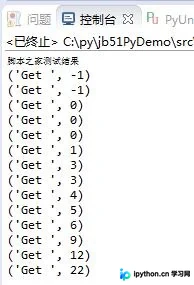
程序运行结果如下:
此外,推荐一款排序算法演示工具供读者参考:
在线动画演示插入/选择/冒泡/归并/希尔/快速排序算法过程工具: http://tools.jb51.net/aideddesign/paixu_ys
更多关于Python相关内容感兴趣的读者可查看本站专题:《Python数据结构与算法教程》、《Python加密解密算法与技巧总结》、《Python编码操作技巧总结》、《Python函数使用技巧总结》、《Python字符串操作技巧汇总》及《Python入门与进阶经典教程》
希望本文所述内容能对大家的Python程序设计有所帮助。
本站声明
本文内容仅供参考,不代表本站观点。转载或引用请注明出处。如发现内容问题,请通过联系我们页面反馈。















