


Python实现微信跳一跳自动辅助脚本详解

发布时间:2026-10-13 |
2人浏览过
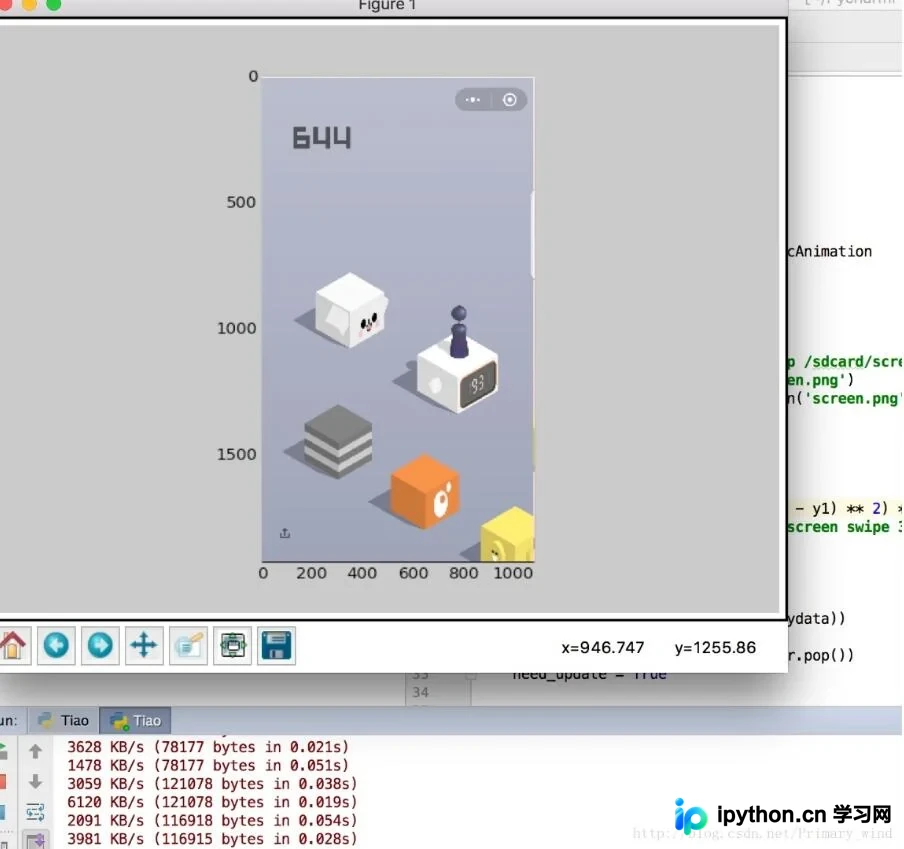
本文提供基于Python的微信跳一跳游戏辅助代码,利用ADB进行手机屏幕截图与触控模拟。通过PIL和NumPy处理图像获取棋子与目标位置,计算距离后执行跳跃指令。结合Matplotlib实时显示画面,支持手动点击辅助校准,实现自动化游戏过程,供开发者参考学习。
本文分享了一套使用Python编写的微信跳一跳游戏辅助程序代码,旨在为读者提供具体的实现参考,详细内容如下所述。
import os
import PIL
import numpy
import matplotlib

matplotlib.use('TKAgg')
import matplotlib.pyplot as plt
import time

from matplotlib.animation import FuncAnimation

# 是否需要进行图片更新
need_update = True

def get_screen_image():
 # 截取手机当前图片
 os.system('adb shell screencap -p /sdcard/screen.png')
 # 拉取到PC端
 os.system('adb pull /sdcard/screen.png')
 # 将图像转成数组返回
 return numpy.array(PIL.Image.open('screen.png'))


def jump_to_next(point1, point2):
 x1, y1 = point1;
 x2, y2 = point2
 distance = ((x2 - x1) ** 2 + (y2 - y1) ** 2) ** 0.5
 # 计算按压指令和按压时长
 os.system("adb shell input touchscreen swipe 320 410 320 410 %d" % (distance * 1.35))


def on_clack(event, coor=[]):
 global need_update
 coor.append((event.xdata, event.ydata))
 if len(coor) == 2:
 # 执行跳步指令
 jump_to_next(coor.pop(), coor.pop())
 # 进行图片刷新
 need_update = True


def update_screen(frame):
 global need_update
 if need_update:
 time.sleep(2)
 axes_image.set_array(get_screen_image())
 # 已刷新,设置为false
 need_update = False
 return axes_image,


figure = plt.figure()
axes_image = plt.imshow(get_screen_image(), animated=True)
figure.canvas.mpl_connect('button_press_event', on_clack)
# 定时更新
ani = FuncAnimation(figure, update_screen, interval=50, blit=True)
plt.show()
如需进一步了解相关技术细节,可参考《微信跳一跳》专题中的更多内容进行深入学习。
以上即为本文分享的全部技术内容,希望能为读者的学习与开发带来帮助,同时也欢迎对本站给予持续支持。
本站声明
本文内容仅供参考,不代表本站观点。转载或引用请注明出处。如发现内容问题,请通过联系我们页面反馈。















