


Python实现Photoshop风格黑白图像转换算法

本文介绍利用Python实现Photoshop风格的图像黑白转换功能。通过矩阵运算替代传统循环,显著提升处理效率。文章详细解析了基于红、黄、绿、青、蓝、洋红六色比例调节的算法原理,并提供了完整的Python代码实现及运行效果对比,适用于需要高质量黑白照片转换的开发场景。
本文详细介绍如何使用Python代码实现类似Photoshop的图像黑白调整效果。内容包含算法解析与代码示例,旨在为读者提供实用的参考方案。
此处演示的Python实现对应Photoshop中的“黑白”调整功能。需注意,PS的黑白转换并非简单地将彩色图像转为灰度图,而是经过精细的色彩比例处理。具体的算法原理及视觉效果可参考后续附录说明。
相较于之前的版本,本次代码进行了优化,完全采用矩阵运算取代了for循环,从而大幅提升了运算效率。具体实现代码如下:
import numpy as np
import matplotlib.pyplot as plt
from skimage import io
file_name='D:/Image Processing/PS Algorithm/4.jpg';
img=io.imread(file_name)
img = img * 1.0
Color_ratio = np.zeros(6)
Color_ratio[0]=0.4;   # Red
Color_ratio[1]=0.6;   # Yellow
Color_ratio[2]=0.4;   # Green
Color_ratio[3]=0.6;   # Cyan
Color_ratio[4]=0.2;   # Blue
Color_ratio[5]=0.8;   # Magenta
max_val = img.max(axis = 2)
min_val = img.min(axis = 2)
sum_val = img.sum(axis = 2)
mid_val = sum_val - max_val - min_val
mask_r = (img[:, :, 0] - min_val - 0.01) > 0
mask_r = 1 - mask_r
mask_g = (img[:, :, 1] - min_val - 0.01) > 0
mask_g = 1 - mask_g
mask_b = (img[:, :, 2] - min_val - 0.01) > 0
mask_b = 1 - mask_b
ratio_max_mid = mask_r * Color_ratio[3] + mask_g * Color_ratio[5] + mask_b * Color_ratio[1]
mask_r = (img[:, :, 0] - max_val + 0.01) < 0
mask_r = 1 - mask_r
mask_g = (img[:, :, 1] - max_val + 0.01) < 0
mask_g = 1 - mask_g
mask_b = (img[:, :, 2] - max_val + 0.01) < 0
mask_b = 1 - mask_b
ratio_max= mask_r * Color_ratio[4] + mask_g * Color_ratio[0] + mask_b * Color_ratio[2]
I_out = max_val * 1.0
I_out = (max_val-mid_val)*ratio_max + (mid_val-min_val)*ratio_max_mid + min_val
plt.figure()
plt.imshow(img/255.0)
plt.axis('off')
plt.figure(2)
plt.imshow(I_out/255.0, plt.cm.gray)
plt.axis('off')
plt.show()
附录:Photoshop图像黑白调整算法解析
黑白调整机制
Photoshop CS的黑白调整功能,通过对红、黄、绿、青、蓝和洋红这6种颜色的比例进行调节来实现。这种方式能够更精细地将彩色图片转换为高质量的黑白照片。
Photoshop CS图像黑白调整功能的计算公式如下:
gray= (max - mid) * ratio_max + (mid - min) * ratio_max_mid + min
公式中各符号含义如下:gray代表像素的灰度值;max、mid和min分别对应图像像素R、G、B分量颜色的最大值、中间值和最小值;ratio_max表示由max所代表的分量颜色(单色)比率;ratio_max_mid则表示由max与mid两种分量颜色形成的复色比率。
默认的单色及复色比率设置如下:
Color_Ratio(1)=0.4; %%%% Red Color_Ratio(2)=0.6; %%%% Yellow Color_Ratio(3)=0.4; %%%% Green Color_Ratio(4)=0.6; %%%% Cyan Color_Ratio(5)=0.2; %%%% Blue Color_Ratio(6)=0.8; %%%% Magenta
程序实现部分:
%%%%% 程序实现图像的黑白调整功能
clc;
clear all;
close all;
Image=imread('9.jpg');
Image=double(Image);
R=Image(:,:,1);
G=Image(:,:,2);
B=Image(:,:,3);
[row, col] = size(R);
Gray_img(1:row,1:col)=0;
Sum_rgb=R+G+B;
%%%% 各种颜色的默认比率
Color_Ratio(1:6)=0;
Color_Ratio(1)=0.4;   %%%% Red
Color_Ratio(2)=0.6;   %%%% Yellow
Color_Ratio(3)=0.4;   %%%% Green
Color_Ratio(4)=0.6;   %%%% Cyan
Color_Ratio(5)=0.2;   %%%% Blue
Color_Ratio(6)=0.8;   %%%% Magenta
for i=1:row
  for j=1:col
    r=R(i,j);
    g=G(i,j);
    b=B(i,j);
    Max_value=max(r,max(g,b));
    Min_value=min(r,min(g,b));
    Mid_value=Sum_rgb(i,j)-Max_value-Min_value;
    if(Min_value==r)
      Index=0;
    elseif(Min_value==g)
      Index=2;
    else
      Index=4;
    end
    ratio_max_mid=Color_Ratio(mod(Index+3,6)+1);
    if(Max_value==r)
      Index=1;
    elseif(Max_value==g)
      Index=3;
    else
      Index=5;
    end
    ratio_max=Color_Ratio(Index);
    Temp=(Max_value-Mid_value)*ratio_max+(Mid_value-Min_value)...
           *ratio_max_mid+Min_value;
    Gray_img(i,j)=(Max_value-Mid_value)*ratio_max+(Mid_value-Min_value)...
           *ratio_max_mid+Min_value;
  end
end
imshow(Image/255);
figure, imshow(Gray_img/255);
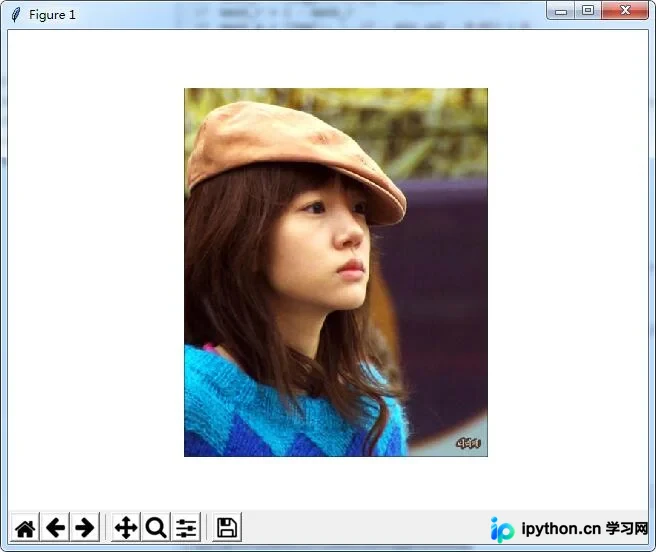
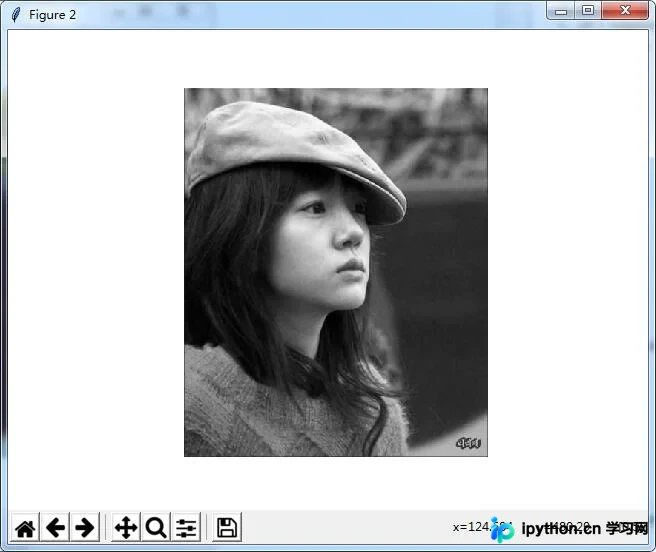
本例Python代码的运行结果如下所示:
原图展示:
运行后的效果图:
如果您对Python技术感兴趣,还可查看本站专题:《Python图片操作技巧总结》、《Python数据结构与算法教程》、《Python Socket编程技巧总结》、《Python函数使用技巧总结》、《Python字符串操作技巧汇总》、《Python入门与进阶经典教程》及《Python文件与目录操作技巧汇总》。
希望本文所述内容能对您的Python程序设计工作有所帮助。
本站声明
本文内容仅供参考,不代表本站观点。转载或引用请注明出处。如发现内容问题,请通过联系我们页面反馈。















