


Django结合JavaScript实现表格局部刷新详解

发布时间:2026-10-13 |
2人浏览过
本文介绍如何在Django项目中利用JavaScript实现页面的局部刷新。通过为表格设置特定ID,结合jQuery的$.post方法向后端发送IP参数,并在回调函数中动态替换指定DOM元素的HTML内容,从而在不重载整个页面的情况下更新进程信息表格,提升用户体验。
本示例以显示机器进程信息的表格为例,当需要获取不同机器的进程数据时,仅需更新该展示表格的内容,具体效果如下所示:
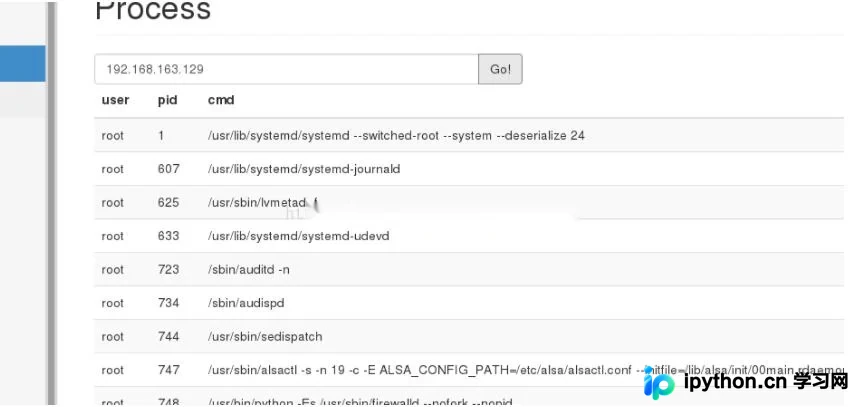
若在输入框中输入IP地址,期望仅更新该表格而保持页面其他部分不变,具体实现方式如下:
首先,在原页面中为该表格设置唯一的ID属性,命名为pstable。
<table class="table table-striped" id="pstable">
 <thead>
 <tr>
  <th>user</th>
  <th>pid</th>
  <th>cmd</th>
 </tr>
 </thead>
 <tbody>
 {% for ps in info.ps_data %}
 <tr>
  {% for item in ps %}
  <td>{{ item }}</td>
  {% endfor %}
 </tr>
 {% endfor %}
 </tbody>
 </table>
其次,编写前端JavaScript逻辑代码。
<script type="text/javascript">
$(document).ready(function(){
 $("#gobtn").click(function(){
 var ip=$("#ip").val(); //获取输入框中的ip
 $.post("/process/",{'hostip':ip}, //post函数到后端
 function(data,status){ //回调函数
 $("#pstable").html(data); //将id为pstable的标签的html替换为返回的data
 $("#ip").val(ip) //将输入框的值改为查询的ip
 });
});
});
接着,配置后端的view处理函数。
def process_view(request):
 hostip = request.POST.get('hostip')
 logger.debug("host:%s" % hostip)
 if hostip is None:
 ps_data = GetHostPs('192.168.163.128')
 info = {'username':request.user,'ps_data':ps_data}
 template = 'process.html'
 #return render(request,'process.html',{"info":info})
 elif hostip:
 ps_data = GetHostPs(hostip)
 info = {'username':request.user,'ps_data':ps_data}
 template = 'pstable.html'
 #return render(request,'pstable.html',{"info":info})
 else:
 ps_data = GetHostPs('192.168.163.128')
 info = {'username':request.user,'ps_data':ps_data}
 template = 'pstable.html'
 return render(request,template,{"info":info})
最后,创建pstable.html文件,用于定义根据IP获取进程信息后生成的HTML结构。
<thead>
 <tr>
  <th>user</th>
  <th>pid</th>
  <th>cmd</th>
 </tr>
 </thead>
 <tbody>
 {% for ps in info.ps_data %}
 <tr>
  {% for item in ps %}
  <td>{{ item }}</td>
  {% endfor %}
 </tr>
 {% endfor %}
 <tbody>
当用户点击按钮查询指定IP的进程信息时,process()函数会校验该IP是否存在。若IP有效,则将pstable.html的内容赋值给JS函数中的data参数,随后JS调用回调函数,将ID为pstable的标签内的HTML替换为data所保存的HTML内容(即pstable.html),以此实现页面的局部修改并展示最新的进程信息。
以上即为Django结合JavaScript实现部分页面刷新的完整示例代码,供各位读者参考,欢迎大家支持本站。
本站声明
本文内容仅供参考,不代表本站观点。转载或引用请注明出处。如发现内容问题,请通过联系我们页面反馈。















