


Python调用tcpdump与grep实现高效抓包过滤

发布时间:2026-10-13 |
5人浏览过
本文介绍利用Python subprocess模块调用tcpdump和grep进程,通过管道交互实现网络抓包过滤。重点解析-B参数对解决丢包的关键作用,结合select非阻塞IO实现高效数据轮询,提供完整代码示例供参考。
本文分享了一段使用Python调用tcpdump进行抓包过滤的具体代码实现,供读者参考学习。
此前在Linux环境下开发抓包分析工具时,为避免引入libpcap或pypcap等复杂库,作者采用tcpdump配合grep的方式简化处理。核心思路是分别启动tcpdump和grep两个进程,并通过管道(pipe)在进程间交换数据。基础实现代码如下:
#! /usr/bin/python

def tcpdump():
 import subprocess, fcntl, os
 # sudo tcpdump -i eth0 -n -s 0 -w - | grep -a -o -E "Host: .*|GET /.*"
 cmd1 = ['tcpdump', '-i', 'eth0', '-n','-B', '4096','-s', '0', '-w', '-']
 cmd2 = ['grep', '--line-buffered', '-a', '-o', '-E', 'Host: .*|GET /.*']
 p1 = subprocess.Popen(cmd1, stdout=subprocess.PIPE)
 p2 = subprocess.Popen(cmd2, stdout=subprocess.PIPE, stdin=p1.stdout)

 flags = fcntl.fcntl(p2.stdout.fileno(), fcntl.F_GETFL)
 fcntl.fcntl(p2.stdout.fileno(), fcntl.F_SETFL, (flags | os.O_NDELAY | os.O_NONBLOCK))
 return p2


def poll_tcpdump(proc):
 #print 'poll_tcpdump....'
 import select
 txt = None
 while True:
 # wait 1/10 second
 readReady, _, _ = select.select([proc.stdout.fileno()], [], [], 0.1)
 if not len(readReady):
  break
 try:
  for line in iter(proc.stdout.readline, ""):
  if txt is None:
   txt = ''
  txt += line
 except IOError:
  print 'data empty...'
  pass
 break
 return txt


proc = tcpdump()
while True:
 text = poll_tcpdump(proc)
 if text:
 print '>>>> ' + text
运行效果如图所示:
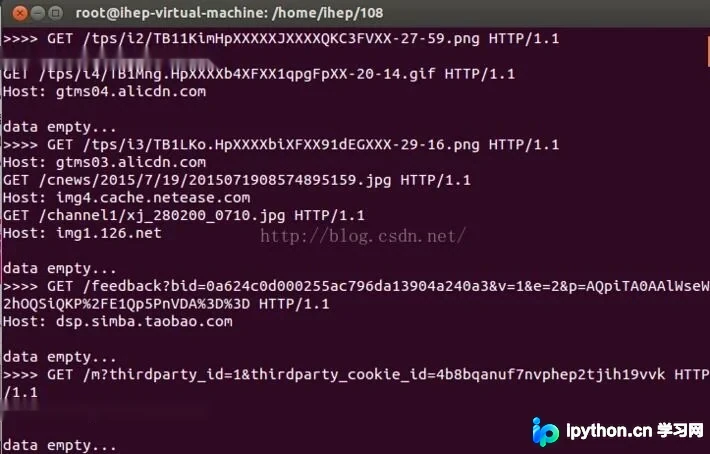
代码中需特别关注tcpdump命令中的'-B'参数(如'-B 4096')。尽管官方文档未对此做明确强调,但该参数是解决抓包过程中丢包问题的关键因素之一。此外,'-s'参数也需合理配置以优化捕获效果,其他参数可根据实际需求灵活调整。
以上内容为本文的全部分享,希望能为读者的学习带来帮助,同时也欢迎继续支持本站。
本站声明
本文内容仅供参考,不代表本站观点。转载或引用请注明出处。如发现内容问题,请通过联系我们页面反馈。















