


Python Tkinter实现大转盘抽奖程序详解

发布时间:2026-10-13 |
6人浏览过
本文介绍使用Python Tkinter库构建大转盘抽奖界面的完整方案。通过多线程控制按钮高亮循环,结合start和stop按钮实现交互逻辑。文中包含完整的坐标布局代码及界面效果展示,适用于Python初学者练习GUI与线程同步知识。
本文分享一个使用Python实现大转盘抽奖功能的完整示例代码,供读者参考学习。
核心功能在于选中转盘上的特定方框以完成抽奖动作。
import tkinter
#导入线程模块
import threading
import time #导入代码的sleep 代码休眠

root = tkinter.Tk()
root.title('大转盘')
root.minsize(300,300)

#摆放按钮
btn1 = tkinter.Button(root,text = '樱桃',bg = 'red')
btn1.place(x = 20,y = 20,width = 50,height = 50)

btn2 = tkinter.Button(root,text = '香蕉',bg = 'white')
btn2.place(x = 90,y = 20,width = 50,height = 50)

btn3 = tkinter.Button(root,text = '苹果',bg = 'white')
btn3.place(x = 160,y = 20,width = 50,height = 50)

btn4 = tkinter.Button(root,text = '西瓜',bg = 'white')
btn4.place(x = 230,y = 20,width = 50,height = 50)

btn5 = tkinter.Button(root,text = '鸭梨',bg = 'white')
btn5.place(x = 230,y = 90,width = 50,height = 50)

btn6 = tkinter.Button(root,text = '榴莲',bg = 'white')
btn6.place(x = 230,y = 160,width = 50,height = 50)

btn7 = tkinter.Button(root,text = '柚子',bg = 'white')
btn7.place(x = 230,y = 230,width = 50,height = 50)

btn8 = tkinter.Button(root,text = '葡萄',bg = 'white')
btn8.place(x = 160,y = 230,width = 50,height = 50)

btn9 = tkinter.Button(root,text = '草莓',bg = 'white')
btn9.place(x = 90,y = 230,width = 50,height = 50)

btn10 = tkinter.Button(root,text = '芒果',bg = 'white')
btn10.place(x = 20,y = 230,width = 50,height = 50)

btn11 = tkinter.Button(root,text = '荔枝',bg = 'white')
btn11.place(x = 20,y = 160,width = 50,height = 50)

btn12 = tkinter.Button(root,text = '甘蔗',bg = 'white')
btn12.place(x = 20,y = 90,width = 50,height = 50)

#将所有选项组成列表
fruitlists = [btn1,btn2,btn3,btn4,btn5,btn6,btn7,btn8,btn9,btn10,btn11,btn12]

#是否开启循环的标志
isloop = False
#是否停止标志
stopsign=False #是否接收到 stop信号
#存储停止id------用于进行stop后的重新启动
stopid=None
def round():
 global isloop
 global stopid
 #判断是否开始循环
 if isloop == True:
  return
 i=1
 if isinstance(stopid,int):
  i=stopid
 while True:
  #延时操作
  time.sleep(0.2)
  #将所有的组件背景变为白色
  for x in fruitlists:
   x['bg'] = 'white'
  #将当前数值对应的组件变色
  fruitlists[i]['bg'] = 'red'
  #变量+1
  i += 1
  print('当前i为',i) #当前i,用来追踪当前位置
  #如果i大于最大索引直接归零
  if i >= len(fruitlists):
   i = 0
  if stopsign == True:#当停止标志 为真时
   isloop=False
   stopid =i#赋值stopid
   break
def stop1():
 global stopsign

 if stopsign ==True:#当多接收stop1()函数时 ,直接跳过
  return
 stopsign=True
#建立一个新线程的函数
def newtask():
 global isloop
 global stopsign
 #建立线程
 stopsign=False
 #print(stopsign) #打印 点击开始时的stopsign
 t = threading.Thread(target = round)
 #开启线程运行
 t.start()
 # 设置循环开始标志
 isloop = True


#开始按钮
btn_start = tkinter.Button(root,text = 'start',command = newtask)
btn_start.place(x = 90,y = 125,width = 50,height = 50)

#停止按钮
btn_stop = tkinter.Button(root,text = 'stop',command=stop1)
btn_stop.place(x = 160,y = 125,width = 50,height = 50)

root.mainloop()
程序运行后的界面效果如下所示:
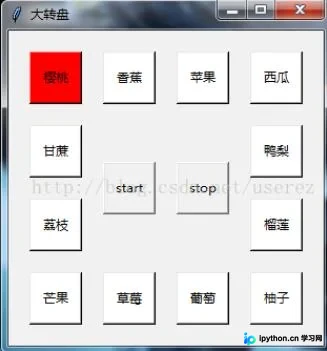
具体界面布局如上图所示。
界面中包含一个标记为start的开始按钮。
界面中同时包含一个标记为stop的结束按钮。
以上即为本文的全部内容,希望能为读者的学习提供有益帮助,同时也欢迎大家继续支持本站。
本站声明
本文内容仅供参考,不代表本站观点。转载或引用请注明出处。如发现内容问题,请通过联系我们页面反馈。















