


Python连接ActiveMQ实战:stomp.py库安装与配置详解

本文介绍如何在Python环境中通过stomp.py库连接ActiveMQ消息队列。涵盖库的安装方法、STOMP协议版本选择(1.0/1.1/1.2)、连接参数配置(如IP与端口61613),以及点对点队列和发布/订阅主题的消息发送与接收示例。
本文基于Windows 10家庭中文版环境,使用Python 3.6.4版本,并依赖stomp.py 4.1.21库进行开发。
ActiveMQ原生支持通过Python客户端进行访问,其核心机制是基于STOMP协议,默认监听端口为61613。
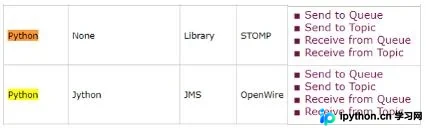
ActiveMQ官方文档“Cross Language Clients”章节提供了更详尽的技术说明及示例代码,具体参考如下图片所示内容。
文档中的示例代码分为两部分:第一行展示标准Python环境的调用方式,第二行展示通过Jython环境调用的方式,主要涵盖四个基本操作。
在Python中访问ActiveMQ需使用stomp.py库,开发者可访问其官方网站获取最新资源。
安装过程包括从官网下载代码包并解压,随后在命令行中进入解压目录,执行python setup.py install命令即可完成安装,之后即可在项目中导入并使用stomp.py。
官方提供的示例代码演示了向名为test的队列发送消息的过程。需要注意的是,第7行代码中的destination参数若将“/queue/”前缀移除,仅保留test也能正常工作。
import stomp

conn = stomp.Connection()
conn.set_listener('', MyListener())
conn.start()
conn.connect('admin', 'password', wait=True)
conn.send(body=' '.join(sys.argv[1:]), destination='/queue/test')
conn.disconnect()
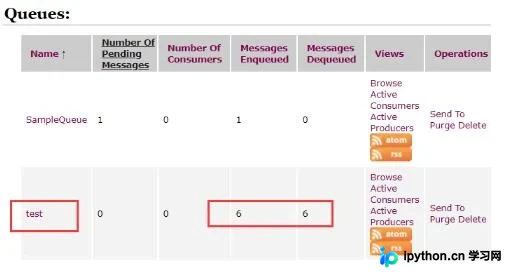
经测试验证,执行发送操作后,test队列中接收到的消息数量确实有所增加。
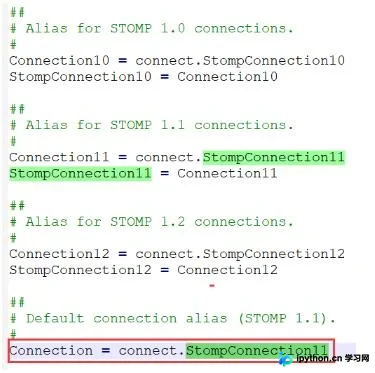
调用stomp.Connection()时,默认实例化的是connect.StompConnection11,即使用STOMP 1.1协议;开发者也可根据需求选择1.0或1.2版本。
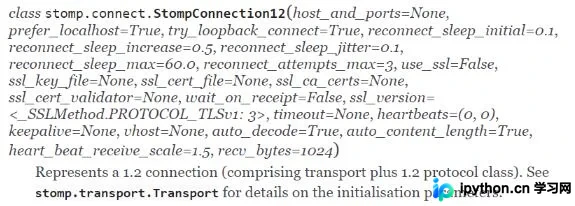
在官方示例代码中,stomp.Connection()构造函数未传入参数,但实际上该函数支持多个配置参数,例如指定Broker的IP地址和端口号,具体通过host_and_ports参数进行设置。
以下是配置IP地址和端口号的具体代码示例。
c = stomp.Connection([('127.0.0.1', 62613)])
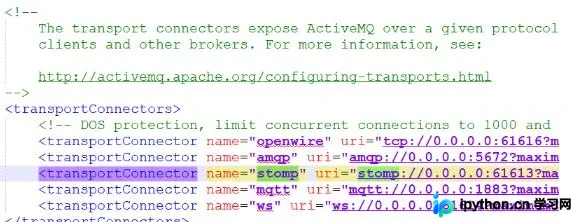
在配置过程中曾出现错误,误将端口设置为8161(这是ActiveMQ Web管理界面的访问端口)。经查询StackOverflow等社区资源后确认,STOMP协议通信应使用配置文件中的61613端口。
ActiveMQ官网提供了四个标准测试用例供参考。
向队列(Queue)发送消息属于点对点(Point-to-Point)模式,该模式下消息一旦被消费者接收处理,即被视为已消费,不可重复消费。
向主题(Topic)发送消息属于发布/订阅(Publish/Subscribe)模式,该模式下消息可被多个订阅者接收,支持重复消费。
# Send a Message to an Apache ActiveMQ Queue
import stomp

conn = stomp.Connection10()

conn.start()

conn.connect()

conn.send('SampleQueue', 'Simples Assim')

conn.disconnect()

# Receive a Message from an Apache ActiveMQ Queue
import stomp
import time

class SampleListener(object):
 def on_message(self, headers, msg):
 print(msg)

conn = stomp.Connection10()

conn.set_listener('SampleListener', SampleListener())

conn.start()

conn.connect()

conn.subscribe('SampleQueue')

time.sleep(1) # secs

conn.disconnect()

# Send a Message to an Apache ActiveMQ Topic
import stomp

conn = stomp.Connection10()

conn.start()

conn.connect()

conn.send('/topic/SampleTopic', 'Simples Assim')

conn.disconnect()

# Receive a Message from an Apache ActiveMQ Topic (1)
import stomp
import time

class SampleListener(object):
 def on_message(self, headers, msg):
 print(msg)

conn = stomp.Connection10()

conn.set_listener('SampleListener', SampleListener())

conn.start()

conn.connect()

conn.subscribe('/topic/SampleTopic')

time.sleep(1) # secs

conn.disconnect()

# Receive a Message from an Apache ActiveMQ Topic (2)
import stomp
import time

class SampleListener(object):
 def on_message(self, headers, msg):
 print(msg)

conn = stomp.Connection10()

conn.set_listener('SampleListener', SampleListener())

conn.start()

conn.connect(headers={'client-id':'SampleClient'})

conn.subscribe(destination='/topic/SampleTopic', headers={'activemq.subscriptionName':'SampleSubscription'})

time.sleep(1) # secs

conn.disconnect()
以上即为Python访问ActiveMQ方法的完整介绍,希望能为读者提供有效参考,欢迎支持相关技术社区。
本站声明
本文内容仅供参考,不代表本站观点。转载或引用请注明出处。如发现内容问题,请通过联系我们页面反馈。















