


Python实现手机销售管理系统:功能详解与代码解析

本文详细介绍使用Python实现的手机销售管理系统。系统基于面向对象思想,包含手机品牌、价格及库存数据的增删改查功能。通过具体的代码示例,展示了如何构建Phone和PhoneShop类,实现查看列表、购买扣减库存、添加修改移除产品等核心业务逻辑,适合Python初学者参考学习。
Python手机销售管理系统概述
本文分享了使用Python语言开发手机销售管理系统的完整代码示例,供读者参考学习。
系统需求与初始数据
系统开发需满足以下具体需求:
构建手机销售管理模块。
初始数据包含手机品牌、单价及库存数量,例如:vivoX9售价2798元库存25台,iphone7(32G)售价4888元库存31台,iphone7(128G)售价5668元库存22台,iphone7P(128G)售价6616元库存29台,iphone6(16G)售价3858元库存14台等。
核心功能模块详解
系统需实现以下功能模块:
主菜单提供四个主要操作选项。
选项1:查看所有手机品牌列表。
分支逻辑如下: 1. 显示产品序号列表(如vivoX9、iphone7(32G)等)。 2. 用户选择产品序号查看详情,系统将输出该产品的名称、价格及当前库存。 3. 购买功能:执行库存数量减1操作;若库存降为0,则从系统中删除该产品。 4. 返回上级菜单。
选项2:更改产品库存信息。
具体操作包括: 1. 添加新产品:录入新产品的名称、价格及初始库存。 2. 修改原有产品:先输出所有产品信息,用户根据序号选择要修改的项目进行更新。 3. 移除产品库存: - 查看所有产品后,根据序号移除特定产品。 - 或选择移除所有产品。 4. 退出程序。
代码实现与运行界面
实现上述功能的具体Python代码如下:
# 数据模型类
class Phone(object):
 '''
 手机类
 '''
 def __init__(self,name,price,count):
  self.name = name
  self.price = price
  self.count = count

# 用来操作整个程序执行逻辑
class PhoneShop(object):
 '''
 商店类
 '''
 def __init__(self):
  # phone1存储所有手机对象
  self.phones = []

 def buy_phone(self):
  print('* 请输入产品信息:')
  name = print('* 请输入手机名称:')
  price = print('* 请输入手机价格:')
  count = print('* 请输入手机库存:')
  # 创建一个新的phone对象
  phone = Phone(name=name, price=price, count=count)
  # 将phone对象添加到phones列表中
  self.phones.append(phone)
  print(self.phones)

  print('* 选择产品序号查看详情')
  print('* 1.购买')
  print('* 2.返回')
  shop = int(input('* 请选择您的操作:'))
  while shop < 1 or shop > 2:
   shop = int(input('* 选项不存在,请重新选择:'))
  if shop == 1:
   print('* 购买成功!')
  else:
   pass

 def xiugia(self):
  self.query_all()
  idx = int(input('* 请输入你要修改的序号:'))
  phone = Phone[idx - 1]
  new_name = input('* 请输入修改的名称:')
  new_price = input('* 请输入修改的价格:')
  new_count = input('* 请输入修改的库存:')
  phone.name = new_name
  phone.price = new_price
  phone.count = new_count

 def run(self):
  '''
  启动程序
  :return:None
  '''
  while True:
   print('* 欢迎使用手机销售管理系统')
   print('* 1.查看所有')
   print('* 2.添加手机')
   print('* 3.删除手机')
   print('* 4.退出程序')
   select = int(input('* 请选择您的操作:'))
   while select < 1 or select > 4:
    select = int(input('* 选项不存在,请重选:'))
   if select == 1:
    self.change()
   elif select == 2:
   #  调用添加手机函数
    self.buy_phone()
   elif select == 3:
    pass
   else:
    print('* 感谢您的使用,欢迎下次再来!')
    break

 def yichu(self):
  print('* 1.根据序号移除')
  print('* 2.移除所有产品')
  print('* 3.返回')
  a = int(input('* 请选择您的操作:'))
  while a <1 or a > 3:
   a = int(input('* 选项不存在,请重选'))
  if a == 1:
   pass
  elif a == 2:
   is_del = int(input('* 是否移除所有产品?y/n:'))
   if is_del == 'y':
    phone_list.pop()
    print('* 删除成功!')
   else:
    return
  else:
    return

 def query_all(self):
  for phone in self.phones:
   print(phone.name,phone.price,phone.count)

 def change(self):
  for phone in self.phones:
   print(phone.name,phone.price,phone.count)

  print('* 1.添加新产品')
  print('* 2.修改原有产品')
  result = int(input('* 请选择您的操作:'))
  while result < 1 or result > 2:
   result = (input('* 选项不存在,请重新选择:'))
  if result == 1:
   self.qurey_all()
  else:
   print('* 输出所有产品信息')
   print('* 1.根据选择序号进行修改')
   print('* 2.返回')
   index = int(input('* 请输入您的选择:'))
   while index < 1 or index > 2:
    index = int(input('* 选项不存在,请重新选择:'))
   if index == 1:
    pass
   else:
    return


phone_list = []

shop = PhoneShop()
shop.run()
shop.yichu()
程序启动后的初始界面如下所示:
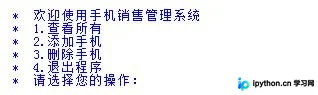
用户可根据界面提示继续执行后续操作。
以上内容为本文的全部介绍,希望能为读者的学习提供有益帮助,欢迎继续支持本站获取更多技术资源。
本站声明
本文内容仅供参考,不代表本站观点。转载或引用请注明出处。如发现内容问题,请通过联系我们页面反馈。















