


Python自制微信机器人:定时发送天气预报详解

本文详细介绍如何使用Python编写微信机器人,通过调用免费天气API获取数据,并利用wxpy库实现每日自动向指定好友发送格式化天气预报。教程涵盖环境配置、API解析、消息发送及定时任务设置,帮助开发者快速搭建个性化天气提醒工具。
引言
0 引言
近期发现了一个免费的天气预报API,经过一段时间的数据解析与格式重组,旨在实现每日自动发送天气信息的功能。偶然间了解到wxpy库,其功能与需求高度契合。以下是该库的相关介绍:
wxpy基于itchat构建,遵循Web微信通讯协议,通过大量接口优化提升了模块的易用性,并扩展了丰富功能。它支持微信登录、消息收发、好友搜索、数据统计、公众号及群聊基本信息获取等操作。
直接展示代码实现部分。
运行环境
1 环境
操作系统:Windows / Linux
Python版本:3.7.2
代码实现
2 代码实现
我们的目标是用Python发送微信,内容包含每日最新的天气信息。这需要完成两部分准备工作,首先关注获取天气信息的环节。
准备工作
2.0 准备工作
本文涉及第三方库requests和wxpy,若尚未安装,可按以下步骤进行:
pip install wxpy pip install requests
获取天气信息
2.1 获取天气信息
使用的API请求链接如下:
http://t.weather.sojson.com/api/weather/city/city_code
请求方式为GET,使用时需将city_code替换为对应城市的编号,无需其他参数。
该接口采用restfull风格,city_code为9位数字,示例如下:
{
 "_id": 58,
 "id": 59,
 "pid": 3,
 "city_code": "101230201",
 "city_name": "厦门"
}
可从_city.json文件中查询各城市对应的编号。该文件已上传至Github本文对应目录,供自行查询使用。
# weather API的URL,此处的城市编号,参看_city.json
url = 'http://t.weather.sojson.com/api/weather/city/101010200'
header = {
 'User-Agent': 'Mozilla/5.0 (Windows NT 10.0; Win64; x64) AppleWebKit/537.36 (KHTML, like Gecko) Chrome/73.0.3683.75 Safari/537.36'
}

# 请求Weather API并拿到服务器返回的数据
rep = requests.get(url, headers = header)
rep.encoding = "utf-8"
result = ''
weather = rep.tex
此API返回数据较多,以下仅展示部分信息。实际使用中主要关注三部分内容,首先是城市基本信息。
"cityInfo": {
 "city": "海淀区", //请求城市
 "cityId": "101010200", //城市ID
 "parent": "北京市", //上级,一般是省份
 "updateTime": "09:02" //天气更新时间
}
其次是该城市当前天气的空气相关指数。
"data": {
 "shidu": "32%", //湿度
 "pm25": 35.0, //pm2.5
 "pm10": 97.0, //pm10
 "quality": "良", //空气质量
 "wendu": "7", //温度
 "ganmao": "极少数敏感人群应减少户外活动", //感冒提醒(指数)
}
第三部分包括温度、风力等其他气象指数。
"forecast": [ //今天+未来14天
 {
  "date": "16", //日期
  "sunrise": "06: 28",
  "high": "高温 20.0℃",
  "low": "低温 2.0℃",
  "sunset": "18: 21",
  "aqi": 48.0,
  "ymd": "2019-03-16", //年月日
  "week": "星期六",
  "fx": "西北风", //风向
  "fl": "3-4级", //风力
  "type": "晴",
  "notice": "愿你拥有比阳光明媚的心情"
 }
]
注:API返回值的完整示例,请参阅Github中本文目录下的weather.json文件。
获取返回值后,需进行解析并转换组装为所需格式。
# 解析服务器返回的数据,具体可参考weather.json文件
index_cityInfo = weather.find("cityInfo")
index_cityId = weather.find("cityId")
index_shidu = weather.find("shidu")
index_pm25 = weather.find("pm25")
index_pm10 = weather.find("pm10")
index_quality = weather.find("quality")
index_wendu = weather.find("wendu")
index_ganmao = weather.find("ganmao")
index_forecast = weather.find("forecast")
index_ymd = weather.find("ymd", index_forecast)
index_week = weather.find("week", index_forecast)
index_sunset = weather.find("sunset", index_forecast)
index_high = weather.find("high", index_forecast)
index_low = weather.find("low", index_forecast)
index_fx = weather.find("fx", index_forecast)
index_fl = weather.find("fl", index_forecast)
index_aqi = weather.find("aqi", index_forecast)
index_type = weather.find("type", index_forecast)
index_notice = weather.find("notice", index_forecast)
最终期望的输出效果如下:
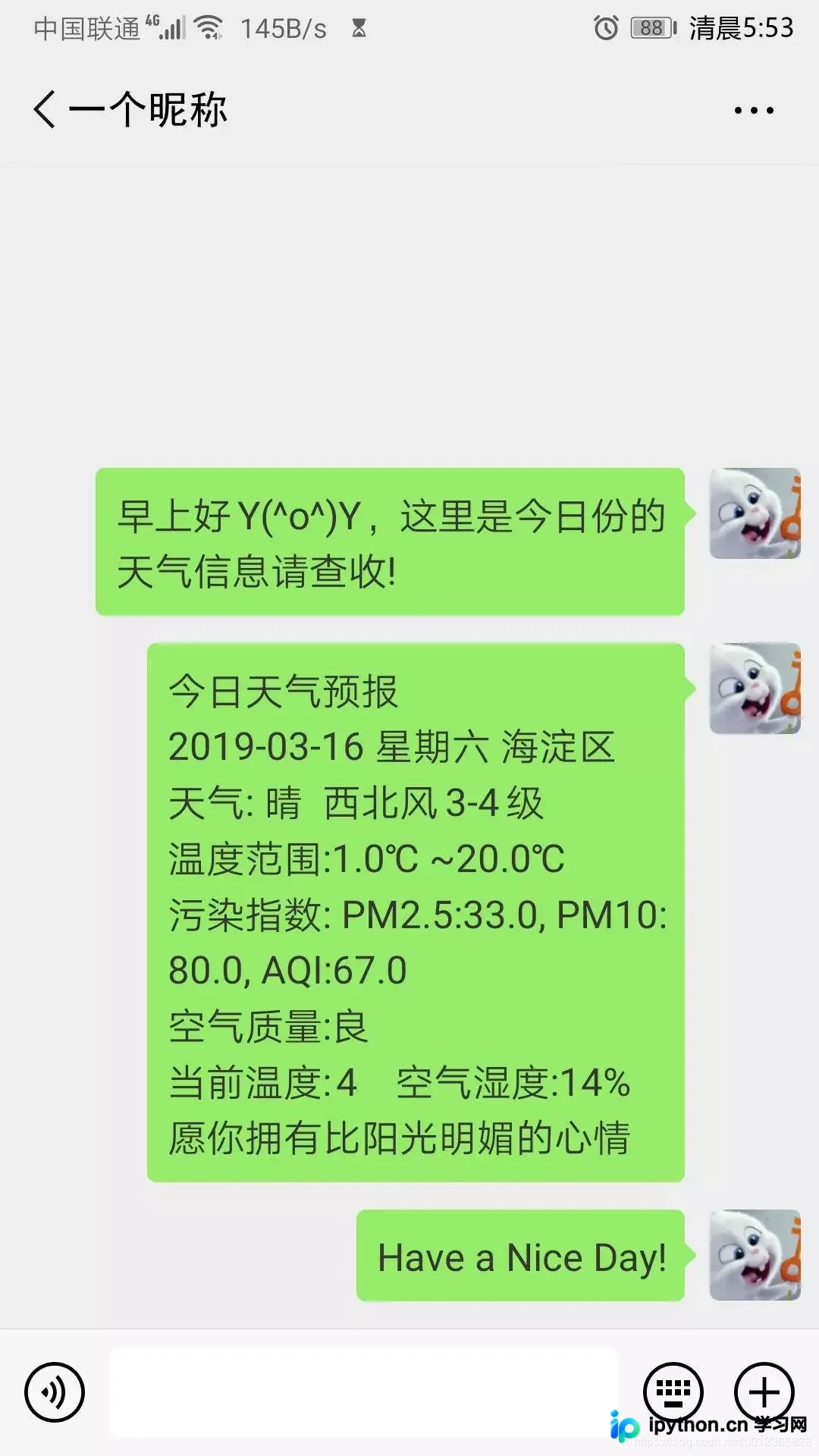
# 今日天气预报 # 年月日 + 星期 + 所在地城市 # 天气类型 + 风向 + 风力 # 温度范围(最低温度~最高温度) # 污染指数:PM2.5/PM10/AQI # 空气质量 # 当前温度 + 空气湿度 # Notice信息
具体的转换代码如下:
result = '今日天气预报' + '\n' \
 + weather[index_ymd + 6:index_week - 3] + " " \
 + weather[index_week + 7:index_fx - 3] + " " \
 + weather[index_cityInfo + 19:index_cityId - 3] + '\n' \
 + "天气: " + weather[index_type + 7:index_notice - 3] + " " \
 + weather[index_fx + 5:index_fl - 3] \
 + weather[index_fl + 5:index_type - 3] + '\n' \
 + "温度范围:" + weather[index_low + 9:index_sunset - 3] + " ~" \
 + weather[index_high + 10:index_low - 3] + '\n' \
 + "污染指数: PM2.5:" + weather[index_pm25 + 6:index_pm10 - 1] + "" \
 + "PM10:" + weather[index_pm10 + 6:index_quality - 1] + " " \
 + "AQI:" + weather[index_aqi + 5:index_ymd - 2] + '\n' \
 + "空气质量:" + weather[index_quality + 10:index_wendu - 3] + '\n' \
 + "当前温度:" + weather[index_wendu + 8:index_ganmao - 3] + " " \
 + "空气湿度:" + weather[index_shidu + 8:index_pm25 - 3] + '\n' \
 + weather[index_notice + 9:weather.find('}', index_notice) - 1]
至此,第一步获取天气信息的工作已完成。接下来是登录微信并定时发送消息的部分。
登录微信与定时发送
2.2 登录微信定时发送消息
首先需登录微信,仅需一行代码即可实现。这实际上是扫描二维码登录Web版微信。
# 初始化机器人,扫码登陆微信,适用于Windows系统
bot = Bot()

# Linux系统,执行登陆请调用下面的这句
bot = Bot(console_qr=2, cache_path="botoo.pkl")
随后定义一个发送消息的函数,将获取并解析好的天气信息发送给指定的微信好友。
# 调用get_weather函数
GW = get_weather()
# 填入你朋友的微信昵称,注意这里不是备注,也不是微信帐号
my_friend = bot.friends().search(u'一个昵称')[0]
# 发送微信消息
my_friend.send(u"早上好Y(^o^)Y,这里是今日份的天气信息请查收!")
my_friend.send(GW)
my_friend.send(u"Have a Nice Day!")

# 每隔86400秒(1天),发送1次
t = Timer(86400, auto_send)
t.start()
接下来,可以使用try...except...语句在消息发送失败时发出告警:
try:
 '''此处为发送消息的代码,即上一段内容'''
except:
 # 你的微信昵称,注意这里不是备注,也不是微信帐号
 my_friend = bot.friends().search('&娴敲棋子&')[0]
 my_friend.send(u"报告老板,今日份的信息发送失败了!")
最后运行主函数,调用发送消息的函数即可。
# 调用函数进行消息发送
auto_send()
效果展示
3 效果展示
这是清晨收到的微信消息截图,效果不错,没有白费功夫😉
后记
4 后记
我将此脚本部署在树莓派上,后台持续运行,效果完美。
目前仅实现了最简单的定时发送,后续计划实现多个时间点的定时发送,并计划加入早间新闻资讯及火车放票信息等内容。
以上所述是小编给大家介绍的用python自制微信机器人,定时发送天气预报详解整合,希望对大家有所帮助,如果大家有任何疑问请给我留言,小编会及时回复大家的。在此也非常感谢大家对本站网站的支持!
本站声明
本文内容仅供参考,不代表本站观点。转载或引用请注明出处。如发现内容问题,请通过联系我们页面反馈。















