


Python爬虫实战:抓取微博动态加载评论数据详解

本文详细解析使用Python爬取微博特定用户评论的技术流程。针对微博主页及详情页的Ajax动态加载特性,通过逆向分析接口规律获取数据。重点介绍如何处理源码中的转义字符与HTML实体编码,利用正则表达式提取关键ID,并拼接评论接口URL。文中包含完整的代码实现及Cookie配置注意事项,旨在帮助开发者掌握动态网页数据抓取的核心技巧。
项目背景与数据需求
近期,杨超越编程大赛引发热议,众多参与者踊跃报名,笔者也加入了这场技术挑战。
在该项目中,我的职责聚焦于数据采集模块,具体目标是从杨超越的相关微博中抓取每一条评论的详细数据。
我们需要提取的数据结构包含四个关键字段:评论人姓名(name)、评论时间(comment_time)、评论内容(comment_info)以及评论人的主页链接(comment_url)。
上述字段构成了我们最终需要获取的核心信息集合。
网页结构分析与Ajax机制
在编写爬虫代码之前,必须对目标网页的结构和数据加载机制进行深入分析。

首先访问杨超越的微博主页,这是获取后续所有数据的入口点。
我们需要从主页中提取出各条微博详情页的链接。然而,通过向下滚动页面可以发现,微博主页的内容并非一次性加载,而是通过Ajax技术动态加载生成的。
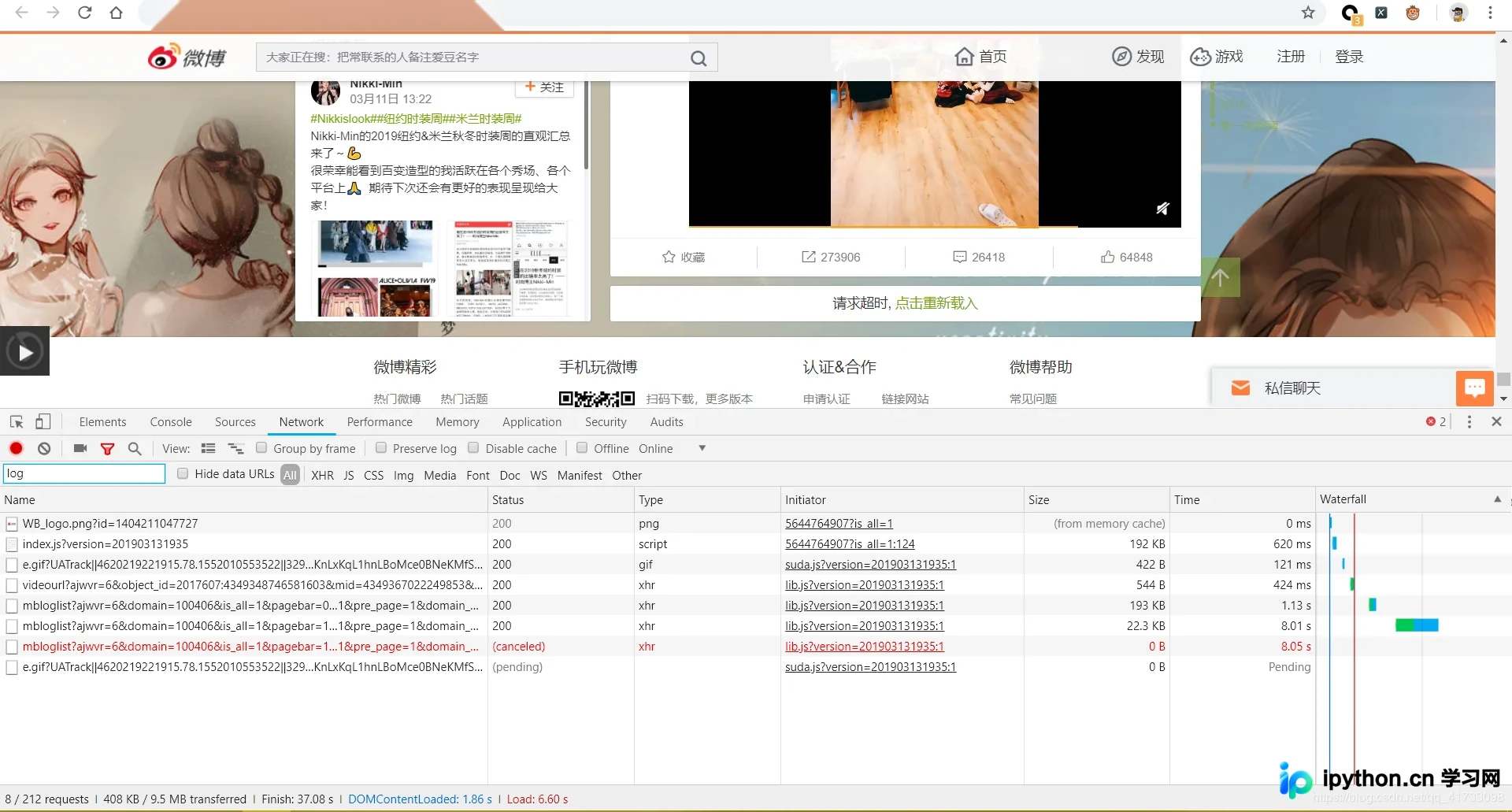
向下滚动后加载出的新链接截图展示了我们需要抓取的目标页面信息,这些动态生成的链接是后续操作的基础。
接下来需要获取详情页中的评论信息。同样地,通过向下滚动详情页,可以发现评论内容也是通过Ajax动态加载出来的,这要求我们模拟相应的请求。
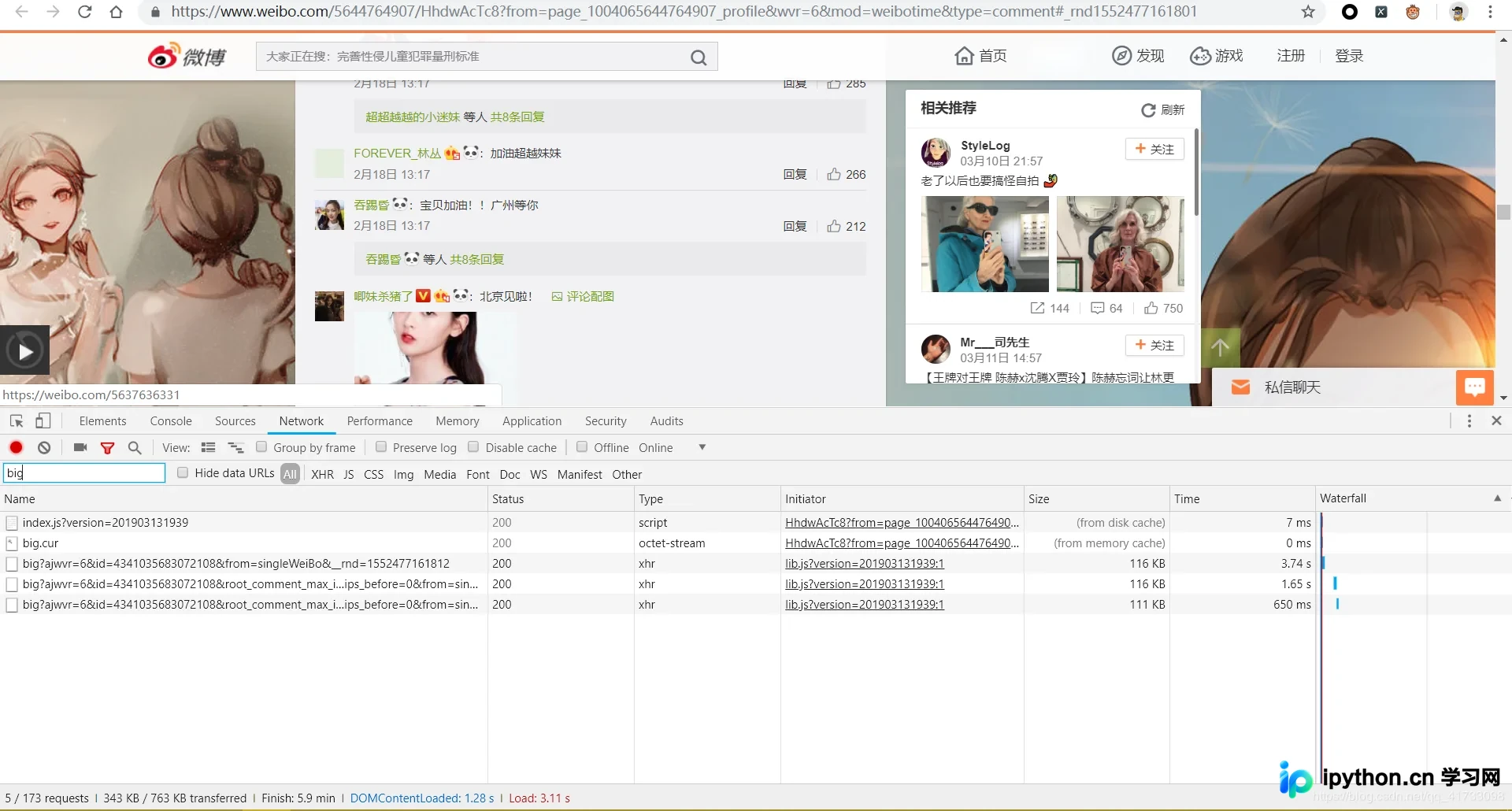
综上所述,我们对整个数据抓取流程进行了初步的技术分析,明确了动态加载和接口调用的关键点。
数据清洗与接口逆向
以下是具体的操作流程和技术实现细节。
在成功获取主页源码后,我们会发现页面包含反爬措施,源代码中充斥着大量转义符“\”,且部分HTML标签如“<”和“>”被直接以文本形式编码,这会导致常规页面解析失败。为了解决这一问题,可以使用replace方法批量去除这些转义符,随后应用正则表达式进行数据提取。虽然尝试过其他解析库,但均遇到兼容性问题,因此本文主要介绍正则处理方案。
获取每篇微博链接后,还需提取一个关键参数id。该id主要用于拼接评论页面的Ajax请求地址。通过观察两个Ajax URL的规律,可以发现其结构具有明显的可预测性,这为构造请求提供了依据。
一旦掌握了Ajax接口的构造规律,爬虫的核心逻辑便基本完成,后续只需按规律发起请求即可。
代码实现与注意事项
下面展示完整的Python实现代码。
重要提示:在发送请求的headers中,务必替换为你自己浏览器获取的有效cookie,否则请求可能被拒绝。
# -*- coding: utf-8 -*-
# Created : 2018/8/26 18:33
# author :GuoLi

import requests
import json
import time
from lxml import etree
import html
import re
from bs4 import BeautifulSoup


class Weibospider:
  def __init__(self):
    # 获取首页的相关信息:
    self.start_url = 'https://weibo.com/u/5644764907?page=1&is_all=1'

    self.headers = {
      "accept": "text/html,application/xhtml+xml,application/xml;q=0.9,image/webp,image/apng,*/*;q=0.8",
      "accept-encoding": "gzip, deflate, br",
      "accept-language": "zh-CN,zh;q=0.9,en;q=0.8",
      "cache-control": "max-age=0",
      "cookie": 使用自己本机的cookie,
      "referer": "https://www.weibo.com/u/5644764907?topnav=1&wvr=6&topsug=1",
      "upgrade-insecure-requests": "1",
      "user-agent": "Mozilla/5.0 (Windows NT 10.0; WOW64) AppleWebKit/537.36 (KHTML, like Gecko) Chrome/72.0.3626.96 Safari/537.36",
    }
    self.proxy = {
      'HTTP': 'HTTP://180.125.70.78:9999',
      'HTTP': 'HTTP://117.90.4.230:9999',
      'HTTP': 'HTTP://111.77.196.229:9999',
      'HTTP': 'HTTP://111.177.183.57:9999',
      'HTTP': 'HTTP://123.55.98.146:9999',
    }

  def parse_home_url(self, url): # 处理解析首页面的详细信息(不包括两个通过ajax获取到的页面)
    res = requests.get(url, headers=self.headers)
    response = res.content.decode().replace("\\", "")
    # every_url = re.compile('target="_blank" href="(/\d+/\w+\?from=\w+&wvr=6&mod=weibotime)" rel="external nofollow" ', re.S).findall(response)
    every_id = re.compile('name=(\d+)', re.S).findall(response) # 获取次级页面需要的id
    home_url = []
    for id in every_id:
      base_url = 'https://weibo.com/aj/v6/comment/big?ajwvr=6&id={}&from=singleWeiBo'
      url = base_url.format(id)
      home_url.append(url)
    return home_url

  def parse_comment_info(self, url): # 爬取直接发表评论的人的相关信息(name,info,time,info_url)
    res = requests.get(url, headers=self.headers)
    response = res.json()
    count = response['data']['count']
    html = etree.HTML(response['data']['html'])
    name = html.xpath("//div[@class='list_li S_line1 clearfix']/div[@class='WB_face W_fl']/a/img/@alt") # 评论人的姓名
    info = html.xpath("//div[@node-type='replywrap']/div[@class='WB_text']/text()") # 评论信息
    info = "".join(info).replace(" ", "").split("\n")
    info.pop(0)
    comment_time = html.xpath("//div[@class='WB_from S_txt2']/text()") # 评论时间
    name_url = html.xpath("//div[@class='WB_face W_fl']/a/@href") # 评论人的url
    name_url = ["https:" + i for i in name_url]
    comment_info_list = []
    for i in range(len(name)):
      item = {}
      item["name"] = name[i] # 存储评论人的网名
      item["comment_info"] = info[i] # 存储评论的信息
      item["comment_time"] = comment_time[i] # 存储评论时间
      item["comment_url"] = name_url[i] # 存储评论人的相关主页
      comment_info_list.append(item)
    return count, comment_info_list

  def write_file(self, path_name, content_list):
    for content in content_list:
      with open(path_name, "a", encoding="UTF-8") as f:
        f.write(json.dumps(content, ensure_ascii=False))
        f.write("\n")

  def run(self):
    start_url = 'https://weibo.com/u/5644764907?page={}&is_all=1'
    start_ajax_url1 = 'https://weibo.com/p/aj/v6/mblog/mbloglist?ajwvr=6&domain=100406&is_all=1&page={0}&pagebar=0&pl_name=Pl_Official_MyProfileFeed__20&id=1004065644764907&script_uri=/u/5644764907&pre_page={0}'
    start_ajax_url2 = 'https://weibo.com/p/aj/v6/mblog/mbloglist?ajwvr=6&domain=100406&is_all=1&page={0}&pagebar=1&pl_name=Pl_Official_MyProfileFeed__20&id=1004065644764907&script_uri=/u/5644764907&pre_page={0}'
    for i in range(12): # 微博共有12页
      home_url = self.parse_home_url(start_url.format(i + 1)) # 获取每一页的微博
      ajax_url1 = self.parse_home_url(start_ajax_url1.format(i + 1)) # ajax加载页面的微博
      ajax_url2 = self.parse_home_url(start_ajax_url2.format(i + 1)) # ajax第二页加载页面的微博
      all_url = home_url + ajax_url1 + ajax_url2
      for j in range(len(all_url)):
        print(all_url[j])
        path_name = "第{}条微博相关评论.txt".format(i * 45 + j + 1)
        all_count, comment_info_list = self.parse_comment_info(all_url[j])
        self.write_file(path_name, comment_info_list)
        for num in range(1, 10000):
          if num * 15 < int(all_count) + 15:
            comment_url = all_url[j] + "&page={}".format(num + 1)
            print(comment_url)
            try:
              count, comment_info_list = self.parse_comment_info(comment_url)
              self.write_file(path_name, comment_info_list)
            except Exception as e:
              print("Error:", e)
              time.sleep(60)
              count, comment_info_list = self.parse_comment_info(comment_url)
              self.write_file(path_name, comment_info_list)
            del count
            time.sleep(0.2)

        print("第{}微博信息获取完成!".format(i * 45 + j + 1))


if __name__ == '__main__':
  weibo = Weibospider()
  weibo.run()
以上介绍了利用Python爬取微博评论的完整流程与代码整合,希望能为读者提供有价值的参考。如有疑问欢迎留言,我们将及时回复。感谢大家对本站的支持。
本站声明
本文内容仅供参考,不代表本站观点。转载或引用请注明出处。如发现内容问题,请通过联系我们页面反馈。















