


Python使用Turtle库绘制七夕浪漫爱心表白代码

发布时间:2026-10-13 |
2人浏览过
本文提供了一段基于Python Turtle库的七夕浪漫表白源码。通过调用turtle模块,代码实现了绘制爱心、箭头及文字的功能,并控制动画速度展示效果。该示例适合Python初学者学习图形绘制与函数封装,可直接运行查看动态爱心表白效果。
Python七夕爱心表白代码实现
本文分享了一段使用Python实现的七夕浪漫表白代码示例,供读者参考学习。
from turtle import *
from time import sleep

def go_to(x, y):
  up()
  goto(x, y)
  down()


def big_Circle(size): #函数用于绘制心的大圆
  speed(1)
  for i in range(150):
    forward(size)
    right(0.3)

def small_Circle(size): #函数用于绘制心的小圆
  speed(1)
  for i in range(210):
    forward(size)
    right(0.786)

def line(size):
  speed(1)
  forward(51*size)

def heart( x, y, size):
  go_to(x, y)
  left(150)
  begin_fill()
  line(size)
  big_Circle(size)
  small_Circle(size)
  left(120)
  small_Circle(size)
  big_Circle(size)
  line(size)
  end_fill()

def arrow():
  pensize(10)
  setheading(0)
  go_to(-400, 0)
  left(15)
  forward(150)
  go_to(339, 178)
  forward(150)

def arrowHead():
  pensize(1)
  speed(1)
  color('red', 'red')
  begin_fill()
  left(120)
  forward(20)
  right(150)
  forward(35)
  right(120)
  forward(35)
  right(150)
  forward(20)
  end_fill()


def main():
  pensize(2)
  color('red', 'pink')
  #getscreen().tracer(30, 0) #取消注释后,快速显示图案
  heart(200, 0, 1)     #画出第一颗心,前面两个参数控制心的位置,函数最后一个参数可控制心的大小
  setheading(0)       #使画笔的方向朝向x轴正方向
  heart(-80, -100, 1.5)   #画出第二颗心
  arrow()          #画出穿过两颗心的直线
  arrowHead()        #画出箭的箭头
  go_to(400, -300)
  write("author:520Python", move=True, align="left", font=("宋体", 30, "normal"))
  done()

main()
运行上述代码后的视觉效果如下所示:
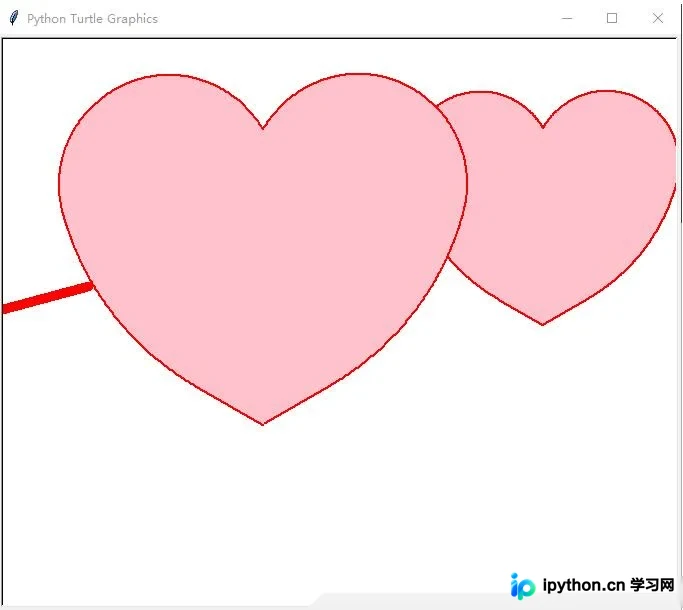
以上内容即为完整的Python表白代码示例,希望能为读者的学习带来帮助,同时也欢迎读者继续支持本站获取更多资源。
本站声明
本文内容仅供参考,不代表本站观点。转载或引用请注明出处。如发现内容问题,请通过联系我们页面反馈。















