


Python OpenCV图像几何变换实战:平移、镜像、缩放、旋转与仿射详解

发布时间:2026-10-13 |
1人浏览过
本文详细讲解基于Python和OpenCV的图像几何变换技术,涵盖平移、镜像翻转、缩放、旋转及仿射变换五大核心操作。通过具体代码示例,演示如何使用cv2模块实现像素级操作、矩阵定义及变换矩阵计算,帮助开发者掌握图像位置与形态调整的关键算法。
图像几何变换概述
前言
本文对近期学习的OpenCV图像几何变换相关笔记进行整理与总结。
处理的基础源图像如下所示:

图像平移操作
1. 平移操作
import cv2
import numpy as np

img = cv2.imread("image0.jpg", 1)
imgInfo = img.shape
height = imgInfo[0]
width = imgInfo[1]
mode = imgInfo[2]

dst = np.zeros(imgInfo, np.uint8)

for i in range( height ):
  for j in range( width - 100 ):
    dst[i, j + 100] = img[i, j]

cv2.imshow('image', dst)
cv2.waitKey(0)
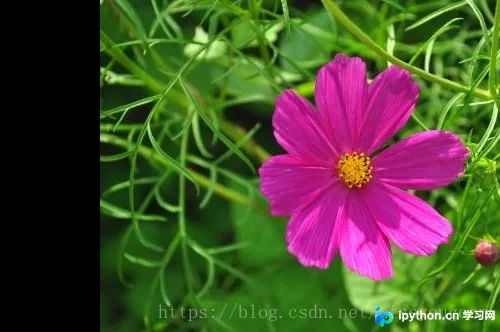
演示代码实现了将图像向右平移100像素的效果,具体结果如图:
图像镜像翻转
2. 镜像翻转
import cv2
import numpy as np


img = cv2.imread('image0.jpg', 1)
cv2.imshow('src', img)
imgInfo = img.shape
height= imgInfo[0]
width = imgInfo[1]
deep = imgInfo[2]

dst = np.zeros([height*2, width, deep], np.uint8)

for i in range( height ):
  for j in range( width ):
    dst[i,j] = img[i,j]
    dst[height*2-i-1,j] = img[i,j]

for i in range(width):
  dst[height, i] = (0, 0, 255)
cv2.imshow('image', dst)
cv2.waitKey(0)
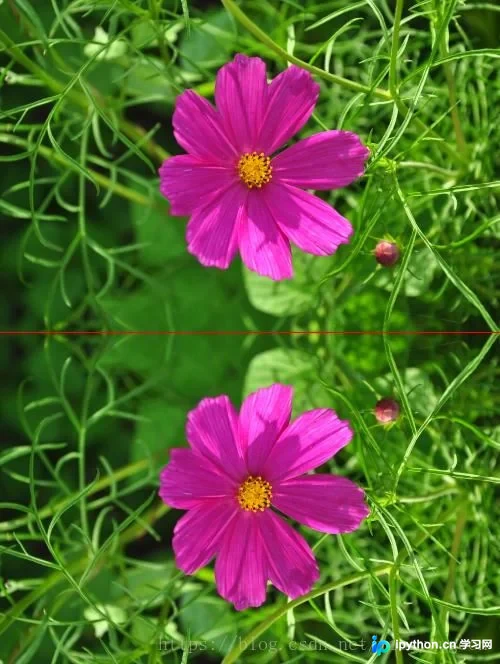
演示代码生成了如下镜像效果:
图像缩放处理
3. 图像缩放
import cv2
img = cv2.imread("image0.jpg", 1)
imgInfo = img.shape
print( imgInfo )
height = imgInfo[0]
width = imgInfo[1]
mode = imgInfo[2]

# 1 放大 缩小 2 等比例 非等比例
dstHeight = int(height * 0.5)
dstWeight = int(width * 0.5)

# 最近邻域插值 双线性插值 像素关系重采样 立方插值
dst = cv2.resize(img, (dstWeight,dstHeight))
print(dst.shape)
cv2.imshow('image', dst)
cv2.waitKey(0)
可以直接调用resize函数进行缩放,同时支持使用邻近插值法等算法优化缩放质量,相关代码如下:
# 1 info 2 空白模板 3 重新计算x, y
import cv2
import numpy as np
img = cv2.imread('image0.jpg', 1)
imgInfo = img.shape # 先高度,后宽度
height = imgInfo[0]
width = imgInfo[1]
dstHeight = int(height/2)
dstWidth = int(width/2)

dstImage = np.zeros([dstHeight, dstWidth, 3], np.uint8)
for i in range( dstHeight ):
  for j in range(dstWidth):
    iNew = i * ( height * 1.0 / dstHeight )
    jNew = j * ( width * 1.0 / dstWidth )

    dstImage[i,j] = img[int(iNew),int(jNew)]

cv2.imshow('image', dstImage)
cv2.waitKey(0)
图像旋转算法
4. 图像旋转
import cv2

img = cv2.imread('image0.jpg', 1)
cv2.imshow('src', img)
imgInfo = img.shape
height= imgInfo[0]
width = imgInfo[1]
deep = imgInfo[2]

# 定义一个旋转矩阵
matRotate = cv2.getRotationMatrix2D((height*0.5, width*0.5), 45, 0.7) # mat rotate 1 center 2 angle 3 缩放系数

dst = cv2.warpAffine(img, matRotate, (height, width))

cv2.imshow('image',dst)
cv2.waitKey(0)
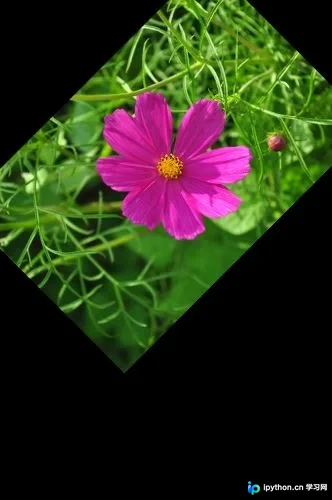
旋转操作需先构建旋转矩阵,通过cv2.getRotationMatrix2D()函数实现。该函数包含三个参数:第一个指定旋转中心点,第二个指定旋转角度,第三个指定缩放比例。变换效果如下图所示:
仿射变换实现
5. 仿射变换
import cv2
import numpy as np

img = cv2.imread('image0.jpg', 1)
cv2.imshow('src', img)
imgInfo = img.shape
height= imgInfo[0]
width = imgInfo[1]
deep = imgInfo[2]
# src 3 -> dst 3 (左上角, 左下角,右上角)
matSrc = np.float32([[0,0],[0,height-1],[width-1, 0]]) # 需要注意的是 行列 和 坐标 是不一致的
matDst = np.float32([[50,50],[100, height-50],[width-200,100]])

matAffine = cv2.getAffineTransform(matSrc,matDst) #mat 1 src 2 dst 形成组合矩阵
dst = cv2.warpAffine(img, matAffine,(height, width))
cv2.imshow('image',dst)
cv2.waitKey(0)
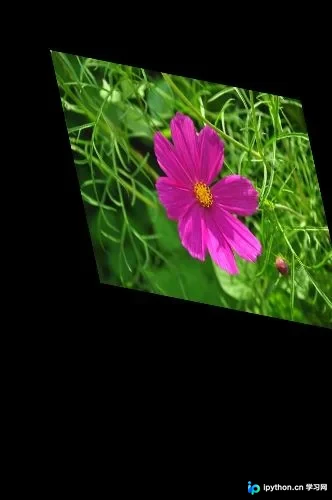
仿射变换需确定原图像矩阵中的三个关键点坐标,分别为左上角、左下角和右上角。接着定义两个矩阵:matSrc存储原图三个点的坐标,matDst存储变换后对应的三个点坐标。利用cv2.getAffineTransform()函数生成组合变换矩阵。最终效果如下:
以上内容为本文全部介绍,希望能为读者的学习提供有益参考,同时也欢迎大家继续支持本站。
本站声明
本文内容仅供参考,不代表本站观点。转载或引用请注明出处。如发现内容问题,请通过联系我们页面反馈。















