


Python3 Pygame实现接小球游戏源码解析

发布时间:2026-10-13 |
2人浏览过
本文提供基于Python3和Pygame库的接小球游戏完整实现代码。游戏通过鼠标控制挡板拦截下落的小球,包含生命值、分数统计及碰撞检测逻辑。代码涵盖窗口初始化、图形绘制、事件处理及游戏循环,适合Python初学者学习游戏开发基础。
Python3 Pygame接小球游戏实现
本文分享了一个使用Python3和Pygame库开发的接小球游戏的完整代码示例,供读者参考学习。
游戏操作说明
游戏操作方式:通过鼠标移动来控制挡板。
游戏界面展示
游戏运行界面截图如下:
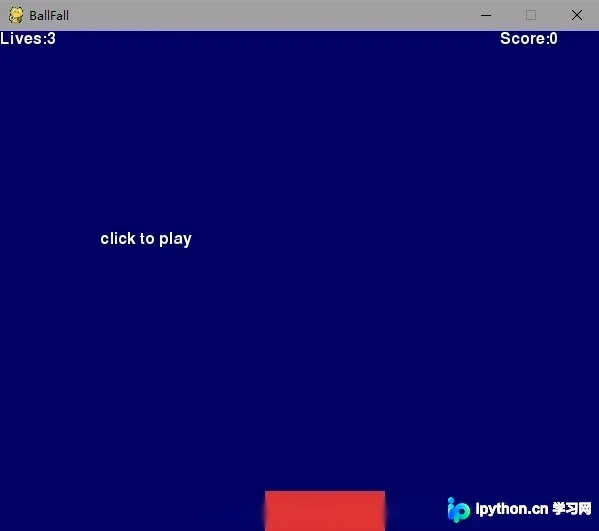
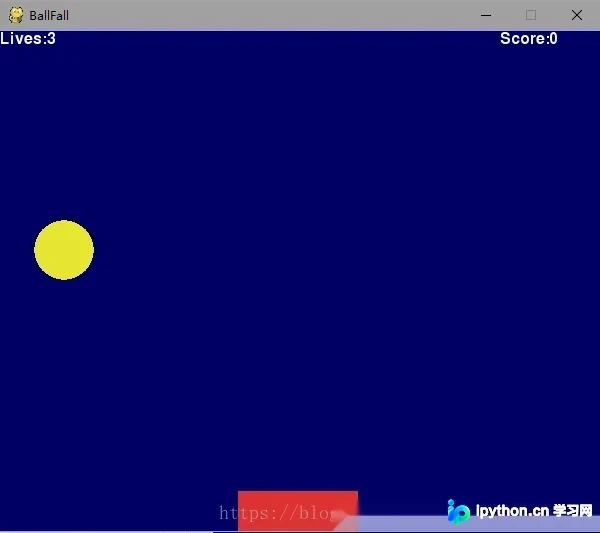
完整代码实现
以下是游戏的完整源代码:
# -*- coding:utf-8 -*-
import sys,pygame,random #导入库
from pygame.locals import *

def print_text(font,x,y,text,color=(255,255,255)):
 imgText = font.render(text,True,color) # 创建字体,三个参数是文本.抗锯齿.颜色
 screen.blit(imgText,(x,y)) #built screen 创建文本窗口

pygame.init() #init 初始化

#窗口设置
screen = pygame.display.set_mode((600,500))#screen-size 窗口大小设置
pygame.display.set_caption('BallFall') #title 窗口标题
font1 = pygame.font.Font(None,24) #font,size 字体类型(None为pygame默认字体).字体大小
pygame.mouse.set_visible(False) #mouse-visible 光标可视

#颜色设置
white = 255,255,255 #rgb
red = 220,50,50
yellow = 230,230,50
blue = 0,0,100

#计数设置
lives = 3 #初始生命
score = 0 #初始分数

#初始化设置
game_over = True #游戏结束判断
mouse_x = mouse_y = 0 #光标初始化
pos_x = 300 #挡板位置初始化
pos_y = 460
bomb_x = random.randint(0,500) #小球位置随机初始化
bomb_y = -50 #小球下落高度初始化
vel_y = 0.3 #小球下落速度

while True:
 for event in pygame.event.get(): #事件判断
 if event.type == QUIT:
 pygame.quit()
 sys.exit()
 elif event.type == MOUSEMOTION: #鼠标运动
 mouse_x,mouse_y = event.pos
 elif event.type == MOUSEBUTTONUP: #鼠标抬起
 if game_over:
 game_over = False
 lives = 3
 score = 0

 keys = pygame.key.get_pressed() #获取键盘
 if keys[K_ESCAPE]: #键盘右上角esc键
 pygame.quit()
 sys.exit()

 screen.fill(blue) #背景颜色

 if game_over:
 print_text(font1,100,200,'click to play')
 else: #判断小球运行轨迹
 bomb_y += vel_y
 if bomb_y > 500: #fallen
 bomb_x = random.randint(0,500) #小球随机出现
 bomb_y = -50
 lives -= 1
 if lives == 0:
 game_over = True
 elif bomb_y > pos_y:
 if bomb_x > pos_x and bomb_x < pos_x + 120:
 score += 1
 bomb_x = random.randint(0,500)
 bomb_y = -50

 pygame.draw.circle(screen,yellow,(bomb_x,int(bomb_y)),30,0) #绘制圆形 五个参数为屏幕.颜色.位置.实心半径.空心半径

 pos_x = mouse_x #挡板位置变化设置
 if pos_x < 0:
 pos_x = 0
 elif pos_x > 500:
 pos_x = 500

 pygame.draw.rect(screen,red,(pos_x,pos_y,120,40),0) #绘制矩形 参数跟圆形一样

 print_text(font1,0,0,'Lives:' + str(lives)) #文字显示
 print_text(font1,500,0,'Score:' + str(score))

 pygame.display.update() #更新
总结
以上就是本文介绍的Python3 Pygame接小球游戏的全部内容,希望这段代码能为您的学习提供帮助,也欢迎大家继续支持本站获取更多技术资源。
本站声明
本文内容仅供参考,不代表本站观点。转载或引用请注明出处。如发现内容问题,请通过联系我们页面反馈。















