


numpy.linspace函数具体使用详解

本文详细解析Python中numpy库的linspace函数,涵盖start、stop、num、endpoint等核心参数的具体用法。通过对比arange与logspace,结合代码示例演示如何生成均匀分布的数值序列,并深入讲解endpoint=False及retstep=True时的特殊行为,帮助开发者高效进行数据预处理与科学计算。
numpy.linspace函数基本语法与参数说明
numpy.linspace函数的标准调用格式为:numpy.linspace(start, stop, num=50, endpoint=True, retstep=False, dtype=None)。
该函数的主要作用是在指定的起始值和结束值之间,生成一组均匀间隔的数字序列。
函数返回num个在区间[start, stop]内均匀分布的样本点。
需要注意的是,该区间是否包含端点stop,取决于endpoint参数的设置,默认情况下端点是可以被包含或排除的。
| Parameters(参数): |
start : scalar(标量)
stop : scalar
num : int, optional(可选)
endpoint : bool, optional
retstep : bool, optional
dtype : dtype, optional
|
|---|---|
| Returns: |
samples : ndarray
step : float(只有当retstep设置为真的时候才会存在)
|
与arange及logspace的对比
相关函数参考如下。
arange
arange与linspace功能相似,但区别在于arange使用步长(step size)来定义序列,而linspace使用样本数量(num)。
具体而言,.arange方法侧重于指定步长,而非直接指定样本的数量。
logspace
logspace用于生成在对数空间内均匀分布的样本,适用于需要指数级增长或衰减的场景。
endpoint=False与retstep=True的高级用法
当将endpoint参数设置为False时,生成的序列将不包含stop值,此时步长的计算方式会发生变化。
>>> import numpy as np
>>> np.linspace(1, 10, 10)
array([ 1.,  2.,  3.,  4.,  5.,  6.,  7.,  8.,  9., 10.])
>>> np.linspace(1, 10, 10, endpoint = False)
array([ 1. , 1.9, 2.8, 3.7, 4.6, 5.5, 6.4, 7.3, 8.2, 9.1])

In [4]: np.linspace(1, 10, 10, endpoint = False, retstep= True)
Out[4]: (array([ 1. , 1.9, 2.8, 3.7, 4.6, 5.5, 6.4, 7.3, 8.2, 9.1]), 0.9)
官方代码示例与图形化演示
以下是官网提供的具体使用示例。
代码示例如下。
>>> >>> np.linspace(2.0, 3.0, num=5)
  array([ 2. , 2.25, 2.5 , 2.75, 3. ])
>>> np.linspace(2.0, 3.0, num=5, endpoint=False)
  array([ 2. , 2.2, 2.4, 2.6, 2.8])
>>> np.linspace(2.0, 3.0, num=5, retstep=True)
  (array([ 2. , 2.25, 2.5 , 2.75, 3. ]), 0.25)
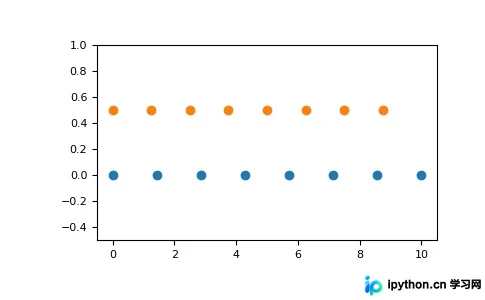
图形化展示对比了包含端点与不包含端点的区别。
>>> >>> import matplotlib.pyplot as plt
>>> N = 8
>>> y = np.zeros(N)
>>> x1 = np.linspace(0, 10, N, endpoint=True)
>>> x2 = np.linspace(0, 10, N, endpoint=False)
>>> plt.plot(x1, y, 'o')
[<matplotlib.lines.Line2D object at 0x...>]
>>> plt.plot(x2, y + 0.5, 'o')
[<matplotlib.lines.Line2D object at 0x...>]
>>> plt.ylim([-0.5, 1])
(-0.5, 1)
>>> plt.show()
以上就是本文的全部内容,希望对大家的学习有所帮助,也希望大家多多支持本站。
本站声明
本文内容仅供参考,不代表本站观点。转载或引用请注明出处。如发现内容问题,请通过联系我们页面反馈。















