


Python二级登录菜单代码实现与Windows安装指南

本文详细解析了Python实现的二级登录菜单代码,涵盖注册、登录及注销功能逻辑。同时提供完整的Windows系统Python安装指南,包括官方下载渠道、百度云备用链接、自动与手动配置环境变量的具体步骤,以及验证安装成功的命令行方法,帮助开发者快速搭建Python开发环境并理解基础交互逻辑。
Python二级登录菜单代码实现
以下是使用Python实现二级登录菜单的具体代码示例:
"""
 1.三级菜单 注册 登陆 注销
 2.进入每一个一级菜单,都会有下一级的菜单
"""
user_item = dict()
try:
  while True:
    print('-------Welcome sir-------')
    input_choice = int(input('Please enter your choice:1:Registration 2:login 3:logout:'))
    # 用户输入自己的选择,会进入到相关的二级菜单
    if input_choice == 1:
      # if input_choice==1 进入注册
      user = input('Please enter your account number:')
      pwd = input('please enter your password:')
      # 保存用户注册的账号
      user_item['user'] = user
      user_item['pwd'] = pwd
      # 提示用户注册成功
      print('您的账号已生效,下次请用该账号:{}登陆本系统'.format(user))
    # if input_choice==2 进入登陆
    elif input_choice == 2:
      login_user = input('Please enter your login account number:')
      login_pwd = input('please enter your login password:')
      # 对用户输入的账号和密码进行确认
      if login_user == user_item['user'] and login_pwd == user_item['pwd']:
        print('Welcome sir:{}'.format(login_user))
      else:
        print('Sorry, your account or password is incorrect. Please confirm and come back')
    # if input_choice == 3 进入注销
    elif input_choice == 3:
      logout_input = input('Do you really want to quit this system?,y or n')
      if logout_input == 'y':
        break
      elif logout_input == 'n':
        input_choice = int(input('Please enter your choice:1:Registration 2:login 3:logout:'))
      else:
        print('Your input is incorrect')
except Exception as re:
  print(re)
finally:
  print('')
Windows系统Python安装与配置
接下来介绍Python在Windows系统下的安装流程。
Python环境安装
Windows平台操作步骤如下:
1. 官方下载地址:https://www.python.org/downloads/
2. 备用下载渠道(百度云盘):
链接地址:https://pan.baidu.com/s/1FJ0fXs6mIBm342AJ4ZXNhw 提取码:768z
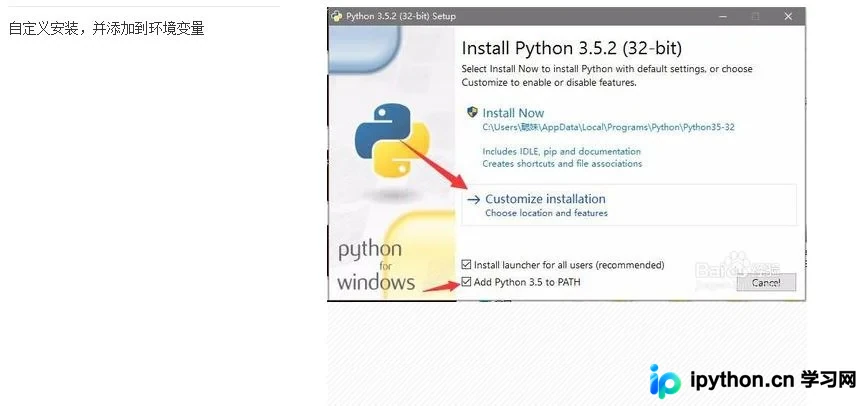
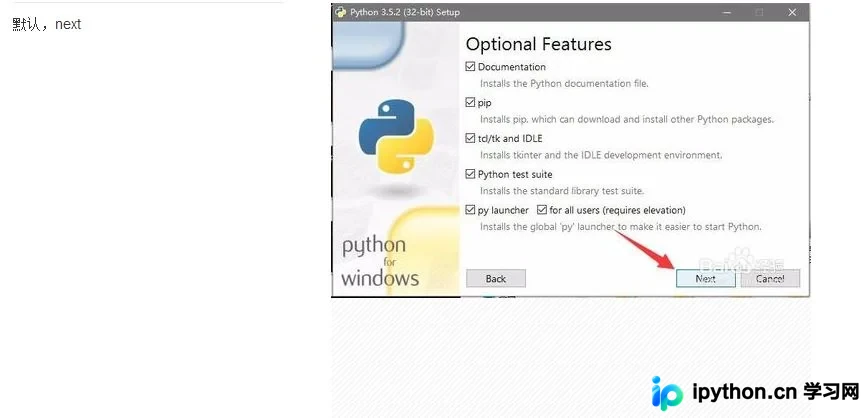
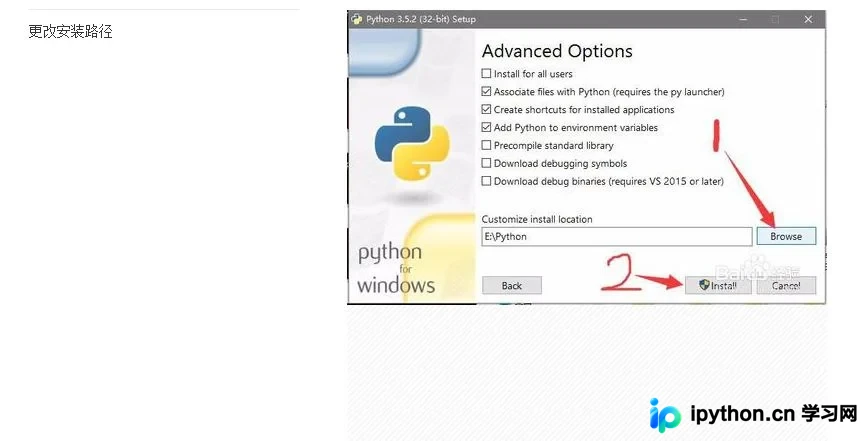
3. 标准安装方式(自动配置路径):
4. 手动配置环境变量方法:
a. 右键点击“计算机”图标,依次选择【属性】→【高级系统设置】→【高级】选项卡→【环境变量】; b. 在“系统变量”区域找到名为 Path 的变量,双击编辑。将Python的安装目录追加到该变量值中,注意不同路径间需用英文分号(;)分隔,且确保追加内容前已有分号作为分隔符。
5. 验证安装是否成功:
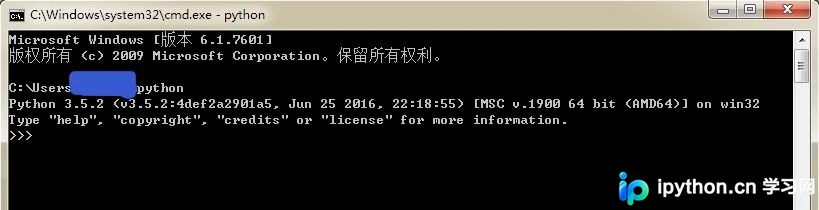
在Windows系统中,按下快捷键 Windows+R 打开运行窗口,输入 cmd 并回车进入命令提示符。在命令行中输入 python 命令,若显示版本信息则说明安装成功。
总结
以上内容介绍了Python二级登录菜单的代码实现及Windows系统的安装配置过程,希望能对读者有所帮助。如有任何疑问,欢迎留言咨询,小编会及时回复。感谢大家对本站的支持! 如果您觉得本文对您有参考价值,欢迎转载,请注明出处,谢谢!
本站声明
本文内容仅供参考,不代表本站观点。转载或引用请注明出处。如发现内容问题,请通过联系我们页面反馈。















