


利用Python和Fiddler模拟GitHub登录实战

本文详细讲解如何使用Python结合Fiddler抓包工具模拟GitHub登录。通过抓取HTTP请求分析登录流程,提取关键参数authenticity_token,并利用requests库构建Session会话完成POST表单提交。文中包含处理SSL证书警告、正则提取Token及通过页面标题判断登录状态的具体代码实现,适合希望学习网络爬虫基础与接口模拟的开发者参考。
前言与工具介绍
前言
近期学习了Fiddler抓包工具的基础用法,借助该工具可以捕获HTTP请求并进行深入分析。基于此,本文旨在演示如何结合Python语言来模拟GitHub的登录过程。
Fiddler抓包分析流程
Fiddler抓包分析
要模拟网站登录,首先需理清其基本交互流程。本文使用Fiddler抓取GitHub登录时的网络请求,目标网页URL为:https://github.com/login,具体抓包结果如下:
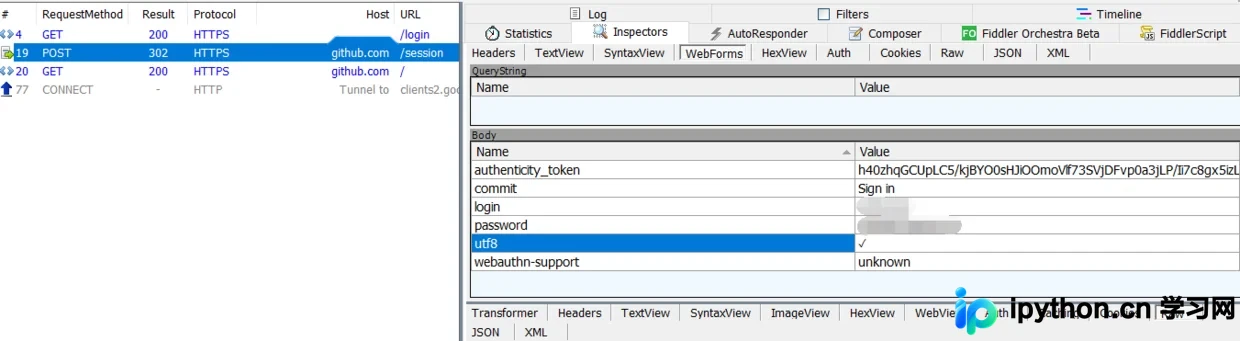
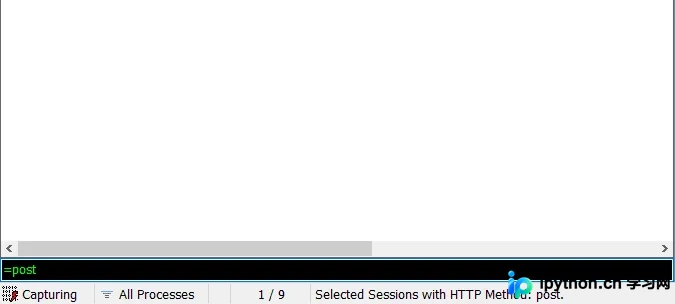
界面左侧显示会话列表,右侧展示详细的请求与响应数据。通常登录操作采用POST请求,若会话列表未默认显示RequestMethod列,可通过设置该列方便查找;若未设置,也可使用命令“=post”快速过滤出POST请求。
通过抓包分析发现,尽管GitHub登录入口URL为https://github.com/login,但实际发生了302重定向。真正提交POST表单数据的URL是https://github.com/session,登录成功后页面将跳转至https://github/首页。
查看WebForm选项卡可见POST表单提交的数据字段。分析表明,authenticity_token、login和password三个字段是动态变化的,其余字段每次登录均固定。其中login和password分别对应用户名和密码,因此核心在于解析authenticity_token的来源,即可实现模拟登录。
确定authenticity_token来源的方法很简单:直接在响应数据中搜索,或将数据复制后搜索。结果显示,authenticity_token包含在https://github.com/login请求的响应中,并以hidden隐藏域的形式存在。
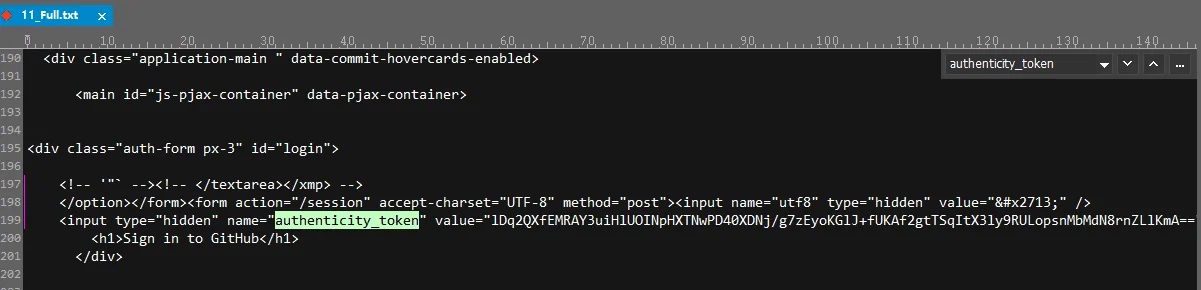
至此,登录的大致流程已梳理完毕,接下来将使用Python代码实现GitHub的模拟登录。
Python代码实现步骤
代码实现
运行环境说明:PyCharm 2018.2.4、Python3.7.0。
第一步:配置请求头与Session对象。
    # 设置Session
    self.s = requests.session()
    # 设置请求头
    self.headers = {
      "User-Agent": "Mozilla/5.0 (Windows NT 10.0; Win64; x64; rv:44.0) Gecko/20100101 Firefox/44.0"
    }
    # 在使用Fiddler时进行请求,通过该代码忽略SSLError错误
    self.s.verify = False
代码中创建了Session会话对象,它类似于一个微型浏览器,能自动维持请求中的部分参数(如cookies),从而简化对cookies和header的手动处理。若在使用Fiddler进行抓包时发起代码请求,可能会遇到SSLError错误;添加self.s.verify = False后,可忽略该证书验证错误。
requests.exceptions.SSLError: HTTPSConnectionPool(host='github.com', port=443): Max retries exceeded with url: /login (Caused by SSLError(SSLCertVerificationError(1, '[SSL: CERTIFICATE_VERIFY_FAILED] certificate verify failed: unable to get local issuer certificate (_ssl.c:1045)')))注意事项:
忽略SSLError后再次运行,控制台仍会输出两行警告信息。这些警告不影响登录功能,可暂时忽略。
D:\Python\installation\lib\site-packages\urllib3\connectionpool.py:847: InsecureRequestWarning: Unverified HTTPS request is being made. Adding certificate verification is strongly advised. See: https://urllib3.readthedocs.io/en/latest/advanced-usage.html#ssl-warnings
 InsecureRequestWarning)
D:\Python\installation\lib\site-packages\urllib3\connectionpool.py:847: InsecureRequestWarning: Unverified HTTPS request is being made. Adding certificate verification is strongly advised. See: https://urllib3.readthedocs.io/en/latest/advanced-usage.html#ssl-warnings
 InsecureRequestWarning)
若希望消除这两行警告,可在Python3环境下使用以下代码进行屏蔽:
import urllib3
urllib3.disable_warnings()
第二步:获取authenticity_token。
    login_url = "https://github.com/login"
    r = self.s.get(login_url, headers = self.headers)
    authenticity_token = re.findall('<input type="hidden" name="authenticity_token" value="(.+?)" />', r.text)
    print("authenticity_token:{}".format(authenticity_token))
    return authenticity_token[1]
访问https://github.com/login时,登录页面会生成隐藏参数authenticity_token,这是提交登录表单所必需的。可通过正则表达式re.findall提取该Token。注意HTML中存在两个authenticity_token,正则匹配结果为一个长度为2的列表,经分析,GitHub登录实际使用的是列表中的第二个元素,即authenticity_token[1]。
第三步:执行模拟登录。
  def github_login(self, authenticity_token, username, password):
    session_url = "https://github.com/session"
    body = {
      "authenticity_token":authenticity_token,
      "commit":"Sign in",
      "login":username,
      "password":password,
      "utf8":"✓",
      "webauthn-support":"unknown"
    }
    r = self.s.post(session_url, headers = self.headers, data = body)
    title = re.findall('<title>(.+?)</title>',r.text)
    print("title:%s" %title[0])
    return title[0]
获取authenticity_token后,即可发起登录请求。通过POST提交表单后,需验证登录是否成功。本文通过检查页面标题来判断登录状态,当然也可采用其他判断方式。
第四步:利用title判断登录状态。
  def is_login_success(self, title):
    if "GitHub" == title:
      return True
    else:
      return False
GitHub登录成功后,页面标题显示为“GitHub”;若登录失败,标题通常显示为“Sign in to GitHub · GitHub”。
以上即为使用Python模拟GitHub登录的完整流程,难度适中,读者阅读后应能进行实践操作。
附完整源码:
import requests
import re
import urllib3
urllib3.disable_warnings()

class Github_Login():

  def __init__(self):
    # 设置Session
    self.s = requests.session()
    # 设置请求头
    self.headers = {
      "User-Agent": "Mozilla/5.0 (Windows NT 10.0; Win64; x64; rv:44.0) Gecko/20100101 Firefox/44.0"
    }
    # 在使用Fiddler时进行请求,通过该代码忽略SSLError错误
    self.s.verify = False

  # 获取 authenticity_token
  def get_authenticity_token(self):
    login_url = "https://github.com/login"
    r = self.s.get(login_url, headers = self.headers)
    authenticity_token = re.findall('<input type="hidden" name="authenticity_token" value="(.+?)" />', r.text)
    print("authenticity_token:{}".format(authenticity_token))
    return authenticity_token[1]

  # 模拟登录,并返回 title
  def github_login(self, authenticity_token, username, password):
    session_url = "https://github.com/session"
    body = {
      "authenticity_token":authenticity_token,
      "commit":"Sign in",
      "login":username,
      "password":password,
      "utf8":"✓",
      "webauthn-support":"unknown"
    }
    r = self.s.post(session_url, headers = self.headers, data = body)
    title = re.findall('<title>(.+?)</title>',r.text)
    print("title:%s" %title[0])
    return title[0]

  # 通过 title 判断是否登录成功
  def is_login_success(self, title):
    if "GitHub" == title:
      return True
    else:
      return False

if __name__ == '__main__':
  github = Github_Login()
  authenticity_token = github.get_authenticity_token()
  title = github.github_login(authenticity_token, username = "用户名", password = "密码")
  login_result = github.is_login_success(title)
  print(login_result)
总结
总结
本文介绍了上述全部内容,希望能为读者在学习或工作中提供一定的参考价值,感谢支持。
本站声明
本文内容仅供参考,不代表本站观点。转载或引用请注明出处。如发现内容问题,请通过联系我们页面反馈。















