


Django组合搜索实现过程详解(附代码)

发布时间:2026-10-13 |
4人浏览过
本文详细解析如何在Django中实现基于多张表的多条件组合搜索功能。通过定义Direction、Classification、Level与Video四张模型表,利用ManyToMany与ForeignKey建立关联。结合URL有名分组捕获参数,在视图中动态构建查询条件,并在模板中生成带有高亮状态的筛选链接,最终实现灵活的视频分类筛选展示。
一、简介
- 实现组合搜索功能
- 涉及技术方向:自动化、测试、运维、前端
- 涵盖分类:Python、Linux、JavaScript、OpenStack、Node.js、GO
- 难度级别涵盖:初级、中级、高级、骨灰级
系统涉及4张数据表:
Direction(技术方向表)、Classification(技术分类表)、Level(难度级别表)、Video(视频信息表)
各表之间的关联关系如下:
Direction与Classification之间为多对多(ManyToMany)关系
Video与Classification、Level之间分别为一对多(ForeignKey)关系
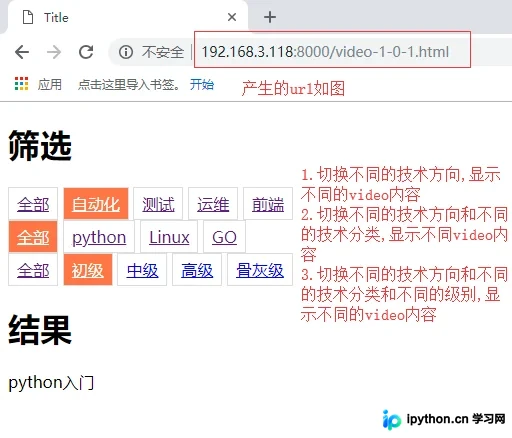
最终实现的筛选界面效果如下图所示:
二、models.py模型代码
class Direction(models.Model):
  """
  技术方向:自动化,测试,运维,前端
  """
  name = models.CharField(verbose_name='名称', max_length=32)
  classification = models.ManyToManyField('Classification')

  class Meta:
    # 重命名表名,不要自动添加的app名
    db_table = 'Direction'
    verbose_name_plural = '方向(视频方向)'
  def __str__(self):
    return self.name
class Classification(models.Model):
  """
  分类:Python Linux JavaScript OpenStack Node.js GO
  """
  name = models.CharField(verbose_name='名称', max_length=32)
  class Meta:
    db_table = 'Classification'
    verbose_name_plural = '分类(视频分类)'

  def __str__(self):
    return self.name
class Level(models.Model):
  title = models.CharField(max_length=32)

  class Meta:
    db_table = 'Level'
    verbose_name_plural = '难度级别'

  def __str__(self):
    return self.title
class Video(models.Model):
  status_choice = (
    (1, '下线'),
    (2, '上线'),
  )
  status = models.IntegerField(verbose_name='状态', choices=status_choice, default=1)
  level = models.ForeignKey(Level)
  classification = models.ForeignKey('Classification', null=True, blank=True)
  weight = models.IntegerField(verbose_name='权重(按从大到小排列)', default=0)
  title = models.CharField(verbose_name='标题', max_length=32)
  summary = models.CharField(verbose_name='简介', max_length=32)
  # img = models.ImageField(verbose_name='图片', upload_to='./static/images/Video/')
  img = models.CharField(verbose_name='图片', max_length=32)
  href = models.CharField(verbose_name='视频地址', max_length=256)
  create_date = models.DateTimeField(auto_now_add=True)
  class Meta:
    db_table = 'Video'
    verbose_name_plural = '视频'
  def __str__(self):
    return self.title
三、urls.py路由配置代码
urlpatterns=[
  url(r'^admin',admin.site.urls),
  #利用的是有名分组的方法,分别获取不同的id
  url(r'^video-(?P<direction_id>(\d+))-(?P<classification_id>(\d+))-(?P<level_id>(\d+)).html$', views.video,
    name='video')
]
四、views.py视图处理代码
def video(request,*args,**kwargs):
  condition = {}
  for k, v in kwargs.items():
    temp = int(v)
    kwargs[k] = temp
  print(kwargs) # (?P<direction_id>(\d+))-(?P<classification_id>(\d+))-(?P<level_id>(\d+))
  # 构造查询字典
  direction_id = kwargs.get('direction_id')
  classification_id = kwargs.get('classification_id')
  level_id = kwargs.get('level_id')
  # 获取所有的技术方向
  direction_list = models.Direction.objects.all()
  # 当没有选择技术方向时,就获取所有分类
  if direction_id == 0:
    class_list = models.Classification.objects.all()
    # 当没有选择分类时,不做什么
    if classification_id == 0:
      pass
    else:
      # 否则就将分类id放入字典
      condition['classification_id'] = classification_id
  else:
    # 当选择了技术方向id时,查询出该技术方向下的所有分类
    direction_obj = models.Direction.objects.filter(id=direction_id).first()
    class_list = direction_obj.classification.all()
    # 只获取该方向下的分类id
    vlist = direction_obj.classification.all().values_list('id')
    # 下面的代码为了生成condition是传入的一对多查询id,如:{'classification_id__in': (1, 2, 3), 'level_id': 1}
    if not vlist:
      classification_id_list = []
    else:
      # 将vlist转换成列表
      classification_id_list = list(zip(*vlist))[0]
    if classification_id == 0:
      condition['classification_id__in'] = classification_id_list
    else:
      if classification_id in classification_id_list:
        condition['classification_id'] = classification_id
      else:
        #指定技术方向:[1,2,3]  分类:5
        kwargs['classification_id'] = 0
        condition['classification_id__in'] = classification_id_list

  if level_id == 0:
    pass
  else:
    condition['level_id'] = level_id
  level_list = models.Level.objects.all()
  video_list = models.Video.objects.filter(**condition)
  # 技术方向的queryset对象列表
  print(direction_list)
  # 分类的queryset对象列表
  print(class_list)
  # 等级的queryset对象列表
  print(level_list)
  # video的queryset对象列表
  print(video_list)
  # 技术方向的id,分类的id,等级的id组成的字典
  print(kwargs)
  return render(
    request,
    'video.html',
    {
      'direction_list':direction_list,
      'class_list':class_list,
      'level_list':level_list,
      'video_list':video_list,
      'kwargs':kwargs,
    }
  )
五、video.html模板代码
<!DOCTYPE html>
<html lang="en">
<head>
  <meta charset="UTF-8">
  <title>Title</title>
  <style>
    .condition a {
      display: inline-block;
      padding: 5px 8px;
      border: 1px solid #dddddd;
    }
    .condition a.active {
      background-color: coral;
      color: white;
    }
  </style>
</head>
<body>
<div class="condition">
  <h1>筛选</h1>
  <div>
    {% if kwargs.direction_id == 0 %}
      {#反向解析#}
      <a href="{% url " rel="external nofollow" rel="external nofollow" rel="external nofollow" rel="external nofollow" video" direction_id=0 classification_id=kwargs.classification_id level_id=kwargs.level_id %}"
        class="active">全部</a>
    {% else %}
      <a href="{% url " rel="external nofollow" rel="external nofollow" rel="external nofollow" rel="external nofollow" video" direction_id=0 classification_id=kwargs.classification_id level_id=kwargs.level_id %}">全部</a>
    {% endif %}
    {% for item in direction_list %}
      {% if item.id == kwargs.direction_id %}
        <a href="{% url " rel="external nofollow" rel="external nofollow" rel="external nofollow" rel="external nofollow" video" direction_id=item.id classification_id=kwargs.classification_id level_id=kwargs.level_id %}"
          class="active">{{ item.name }}</a>
      {% else %}
        <a href="{% url " rel="external nofollow" rel="external nofollow" rel="external nofollow" rel="external nofollow" video" direction_id=item.id classification_id=kwargs.classification_id level_id=kwargs.level_id %}">{{ item.name }}</a>
      {% endif %}
    {% endfor %}
  </div>
  <div>
    {% if kwargs.classification_id == 0 %}
      <a href="/video-{{ kwargs.direction_id }}-0-{{ kwargs.level_id }}.html" rel="external nofollow" rel="external nofollow" class="active">全部</a>
    {% else %}
      <a href="/video-{{ kwargs.direction_id }}-0-{{ kwargs.level_id }}.html" rel="external nofollow" rel="external nofollow" >全部</a>
    {% endif %}
    {% for item in class_list %}
      {% if item.id == kwargs.classification_id %}
        <a href="/video-{{ kwargs.direction_id }}-{{ item.id }}-{{ kwargs.level_id }}.html" rel="external nofollow" rel="external nofollow"
          class="active">{{ item.name }}</a>
      {% else %}
        <a href="/video-{{ kwargs.direction_id }}-{{ item.id }}-{{ kwargs.level_id }}.html" rel="external nofollow" rel="external nofollow" >{{ item.name }}</a>
      {% endif %}
    {% endfor %}
  </div>
  <div>
    {% if kwargs.level_id == 0 %}
      <a href="/video-{{ kwargs.direction_id }}-{{ kwargs.classification_id }}-0.html" rel="external nofollow" rel="external nofollow" class="active">全部</a>
    {% else %}
      <a href="/video-{{ kwargs.direction_id }}-{{ kwargs.classification_id }}-0.html" rel="external nofollow" rel="external nofollow" >全部</a>
    {% endif %}
    {% for item in level_list %}
      {% if item.id == kwargs.level_id %}
        <a href="/video-{{ kwargs.direction_id }}-{{ kwargs.classification_id }}-{{ item.id }}.html" rel="external nofollow" rel="external nofollow"
          class="active">{{ item.title }}</a>
      {% else %}
        <a href="/video-{{ kwargs.direction_id }}-{{ kwargs.classification_id }}-{{ item.id }}.html" rel="external nofollow" rel="external nofollow" >{{ item.title }}</a>
      {% endif %}
    {% endfor %}
  </div>
</div>
<div>
  <h1>结果</h1>
  {% for row in video_list %}
    <div>{{ row.title }}</div>
  {% endfor %}
</div>
</body>
</html>
以上即为Django组合搜索的完整实现过程,希望本文内容能对读者在Django开发中的学习有所帮助,同时也欢迎大家继续支持本站获取更多技术分享。
本站声明
本文内容仅供参考,不代表本站观点。转载或引用请注明出处。如发现内容问题,请通过联系我们页面反馈。















