


Python Django 实现分页功能:首页尾页与上下页代码详解

发布时间:2026-10-13 |
1人浏览过
本文详细介绍如何在 Python Django 框架中实现高效的分页功能。通过修改 views.py 与 book_list.html,演示如何添加首页、尾页、上一页及下一页按钮。重点讲解如何处理 URL 中 page 参数的异常值(如非数字或负数),确保系统稳定运行。
Django 实现首页与尾页功能
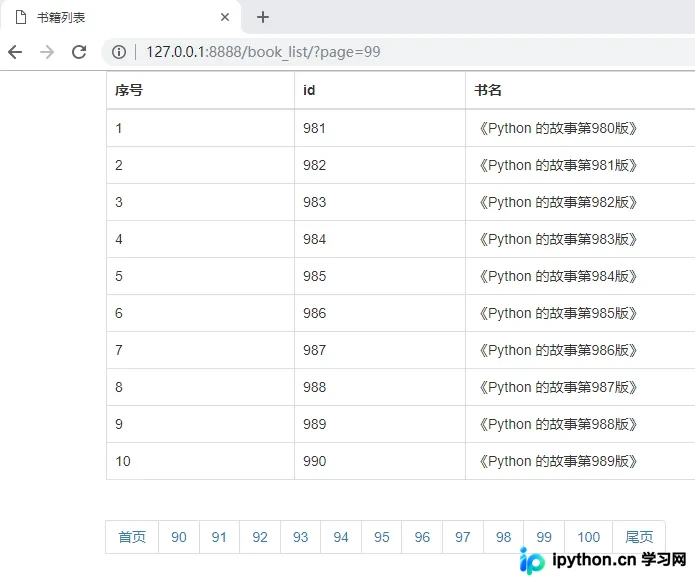
首先实现添加首页和尾页的功能。
在 views.py 文件中编写相关逻辑。
from django.shortcuts import render
from app01 import models
def book_list(request):
  # 从 URL 中取参数
  page_num = request.GET.get("page")
  print(page_num, type(page_num))
  page_num = int(page_num)
  # 定义两个变量保存数据从哪儿取到哪儿
  data_start = (page_num - 1) * 10
  data_end = page_num * 10
  # 书籍总数
  total_count = models.Book.objects.all().count()
  # 每一页显示多少条数据
  per_page = 10
  # 总共需要多少页码来显示
  total_page, m = divmod(total_count, per_page)
  # 页面上最多展示的页码
  max_page = 11
  half_max_page = max_page // 2

  # 页面上展示的页码的开始页
  page_start = page_num - half_max_page
  # 页面上展示的页码的结束页
  page_end = page_num + half_max_page
  # 如果当前页减一半比 1 小
  if page_start <= 1:
    page_start = 1
    page_end = max_page
  # 如果当前页加一半比总页码还大
  if page_end > total_page:
    page_end = total_page
    page_start = total_page - max_page + 1
  # 如果还有数据
  if m:
    total_page += 1
  all_book = models.Book.objects.all()[data_start:data_end]
  # 拼接 html 的分页代码
  html_list = []
  # 添加首页按钮
  html_list.append('<li><a href="/books/?page=1" rel="external nofollow" >首页</a></li>')
  # 展示的页码
  for i in range(page_start, page_end + 1):
    tmp = '<li><a href="/book_list/?page={0}" rel="external nofollow" rel="external nofollow" rel="external nofollow" rel="external nofollow" rel="external nofollow" rel="external nofollow" rel="external nofollow" >{0}</a></li>'.format(i)
    html_list.append(tmp)
  # 添加尾页按钮
  html_list.append('<li><a href="/books/?page={}" rel="external nofollow" >尾页</a></li>'.format(total_page))
  page_html = "".join(html_list) # 拼接 html 的分页代码
  return render(request, "book_list.html", {"books": all_book, "page_html": page_html})
在 book_list.html 模板中展示数据。
<!DOCTYPE html>
<html lang="en">
<head>
  <meta charset="UTF-8">
  <title>书籍列表</title>
  <link rel="stylesheet" href="/static/bootstrap/css/bootstrap.min.css" rel="external nofollow" rel="external nofollow" >
</head>
<body>
<div class="container">
  <table class="table table-bordered">
    <thead>
    <tr>
      <th>序号</th>
      <th>id</th>
      <th>书名</th>
    </tr>
    </thead>
    <tbody>
    {% for book in books %}
      <tr>
        <td>{{ forloop.counter }}</td>
        <td>{{ book.id }}</td>
        <td>{{ book.title }}</td>
      </tr>
    {% endfor %}
    </tbody>
  </table>
  <nav aria-label="Page navigation">
    <ul class="pagination">
      <li>
        {{ page_html|safe }}
      </li>
    </ul>
  </nav>
</div>
</body>
</html>
查看运行效果。
添加上一页与下一页导航
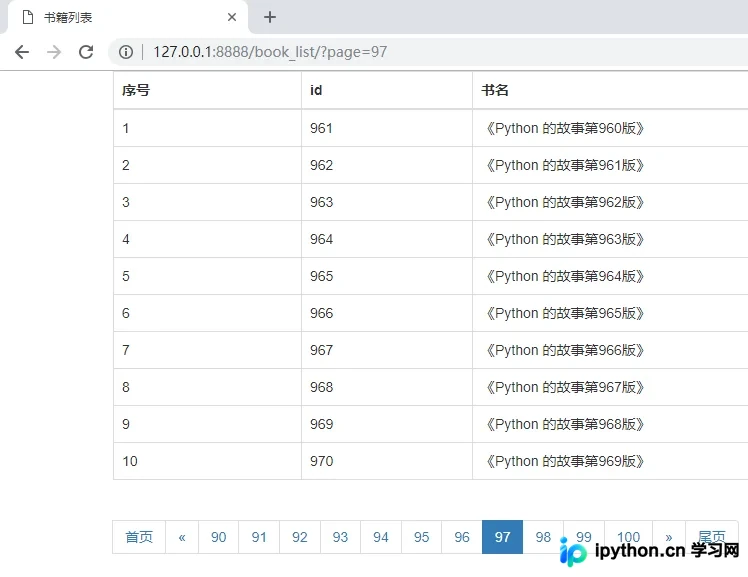
接下来,进一步添加上一页和下一页的导航功能。
继续完善 views.py 中的代码逻辑。
from django.shortcuts import render
from app01 import models
def book_list(request):
  # 从 URL 中取参数
  page_num = request.GET.get("page")
  print(page_num, type(page_num))
  page_num = int(page_num)
  # 定义两个变量保存数据从哪儿取到哪儿
  data_start = (page_num - 1) * 10
  data_end = page_num * 10
  # 书籍总数
  total_count = models.Book.objects.all().count()
  # 每一页显示多少条数据
  per_page = 10
  # 总共需要多少页码来显示
  total_page, m = divmod(total_count, per_page)
  # 页面上最多展示的页码
  max_page = 11
  half_max_page = max_page // 2
  # 页面上展示的页码的开始页
  page_start = page_num - half_max_page
  # 页面上展示的页码的结束页
  page_end = page_num + half_max_page
  # 如果当前页减一半比 1 小
  if page_start <= 1:
    page_start = 1
    page_end = max_page
  # 如果当前页加一半比总页码还大
  if page_end > total_page:
    page_end = total_page
    page_start = total_page - max_page + 1
  # 如果还有数据
  if m:
    total_page += 1
  all_book = models.Book.objects.all()[data_start:data_end]
  # 拼接 html 的分页代码
  html_list = []
  # 添加首页按钮
  html_list.append('<li><a href="/book_list/?page=1" rel="external nofollow" rel="external nofollow" rel="external nofollow" >首页</a></li>')
  # 如果是第一页,就没有上一页
  if page_num <= 1:
    html_list.append('<li class="disabled"><a href="#" rel="external nofollow" rel="external nofollow" rel="external nofollow" rel="external nofollow" rel="external nofollow" rel="external nofollow" ><span aria-hidden="true">«</span></a></li>'.format(page_num-1))
  else:
    # 加一个上一页的标签
    html_list.append('<li><a href="/book_list/?page={}" rel="external nofollow" rel="external nofollow" rel="external nofollow" rel="external nofollow" rel="external nofollow" rel="external nofollow" rel="external nofollow" rel="external nofollow" rel="external nofollow" ><span aria-hidden="true">«</span></a></li>'.format(page_num-1))
  # 展示的页码
  for i in range(page_start, page_end + 1):
    # 给当前页添加 active
    if i == page_num:
      tmp = '<li class="active"><a href="/book_list/?page={0}" rel="external nofollow" rel="external nofollow" rel="external nofollow" rel="external nofollow" rel="external nofollow" rel="external nofollow" rel="external nofollow" >{0}</a></li>'.format(i)
    else:
      tmp = '<li><a href="/book_list/?page={0}" rel="external nofollow" rel="external nofollow" rel="external nofollow" rel="external nofollow" rel="external nofollow" rel="external nofollow" rel="external nofollow" >{0}</a></li>'.format(i)
    html_list.append(tmp)
  # 如果是最后一页,就没有下一页
  if page_num >= total_page:
    html_list.append('<li class="disabled"><a href="#" rel="external nofollow" rel="external nofollow" rel="external nofollow" rel="external nofollow" rel="external nofollow" rel="external nofollow" ><span aria-hidden="true">»</span></a></li>')
  else:
    html_list.append('<li><a href="/book_list/?page={}" rel="external nofollow" rel="external nofollow" rel="external nofollow" rel="external nofollow" rel="external nofollow" rel="external nofollow" rel="external nofollow" rel="external nofollow" rel="external nofollow" ><span aria-hidden="true">»</span></a></li>'.format(page_num+1))
  # 添加尾页按钮
  html_list.append('<li><a href="/book_list/?page={}" rel="external nofollow" rel="external nofollow" rel="external nofollow" rel="external nofollow" rel="external nofollow" rel="external nofollow" rel="external nofollow" rel="external nofollow" rel="external nofollow" >尾页</a></li>'.format(total_page))

  page_html = "".join(html_list) # 拼接 html 的分页代码
  return render(request, "book_list.html", {"books": all_book, "page_html": page_html})
同步更新 book_list.html 以支持新的导航按钮。
<!DOCTYPE html>
<html lang="en">
<head>
  <meta charset="UTF-8">
  <title>书籍列表</title>
  <link rel="stylesheet" href="/static/bootstrap/css/bootstrap.min.css" rel="external nofollow" rel="external nofollow" >
</head>
<body>
<div class="container">
  <table class="table table-bordered">
    <thead>
    <tr>
      <th>序号</th>
      <th>id</th>
      <th>书名</th>
    </tr>
    </thead>
    <tbody>
    {% for book in books %}
      <tr>
        <td>{{ forloop.counter }}</td>
        <td>{{ book.id }}</td>
        <td>{{ book.title }}</td>
      </tr>
    {% endfor %}
    </tbody>
  </table>
  <nav aria-label="Page navigation">
    <ul class="pagination">
      <li>
        {{ page_html|safe }}
      </li>
    </ul>
  </nav>
</div>
</body>
</html>
再次验证运行结果。
处理 URL 参数异常与代码优化
针对后续可能出现的改进需求进行说明。
需要处理用户通过 URL 传递的 page 参数出现异常值的情况。
具体示例如下:
当访问 http://127.0.0.1:8888/book_list/?page=a 时
或者访问 http://127.0.0.1:8888/book_list/?page=-1 时
系统均会报错。
对此进行代码改进。
from django.shortcuts import render
from app01 import models
def book_list(request):
  # 从 URL 中取参数
  page_num = request.GET.get("page")
  print(page_num, type(page_num)) # page_num 为 str 类型
  # 书籍总数
  total_count = models.Book.objects.all().count()
  # 每一页显示多少条数据
  per_page = 10
  # 总共需要多少页码来显示
  total_page, m = divmod(total_count, per_page)
  # 如果还有数据
  if m:
    total_page += 1
  try:
    page_num = int(page_num)
    # 如果输入的页码数超过了最大的页码数,默认返回最后一页
    if page_num > total_page:
      page_num = total_page
    # 如果输入的页码数小于 1,则返回第一页
    if page_num < 1:
      page_num = 1
  except Exception as e:
    # 当输入的页码不是正经数字的时候 默认返回第一页的数据
    page_num = 1
  # 定义两个变量保存数据从哪儿取到哪儿
  data_start = (page_num - 1) * 10
  data_end = page_num * 10
  # 页面上最多展示的页码
  max_page = 11
  half_max_page = max_page // 2
  # 页面上展示的页码的开始页
  page_start = page_num - half_max_page
  # 页面上展示的页码的结束页
  page_end = page_num + half_max_page
  # 如果当前页减一半比 1 小
  if page_start <= 1:
    page_start = 1
    page_end = max_page
  # 如果当前页加一半比总页码还大
  if page_end > total_page:
    page_end = total_page
    page_start = total_page - max_page + 1
  all_book = models.Book.objects.all()[data_start:data_end]
  # 拼接 html 的分页代码
  html_list = []
  # 添加首页按钮
  html_list.append('<li><a href="/book_list/?page=1" rel="external nofollow" rel="external nofollow" rel="external nofollow" >首页</a></li>')
  # 如果是第一页,就没有上一页
  if page_num <= 1:
    html_list.append('<li class="disabled"><a href="#" rel="external nofollow" rel="external nofollow" rel="external nofollow" rel="external nofollow" rel="external nofollow" rel="external nofollow" ><span aria-hidden="true">«</span></a></li>'.format(page_num-1))
  else:
    # 加一个上一页的标签
    html_list.append('<li><a href="/book_list/?page={}" rel="external nofollow" rel="external nofollow" rel="external nofollow" rel="external nofollow" rel="external nofollow" rel="external nofollow" rel="external nofollow" rel="external nofollow" rel="external nofollow" ><span aria-hidden="true">«</span></a></li>'.format(page_num-1))
   # 展示的页码
  for i in range(page_start, page_end + 1):
    # 给当前页添加 active
    if i == page_num:
      tmp = '<li class="active"><a href="/book_list/?page={0}" rel="external nofollow" rel="external nofollow" rel="external nofollow" rel="external nofollow" rel="external nofollow" rel="external nofollow" rel="external nofollow" >{0}</a></li>'.format(i)
    else:
      tmp = '<li><a href="/book_list/?page={0}" rel="external nofollow" rel="external nofollow" rel="external nofollow" rel="external nofollow" rel="external nofollow" rel="external nofollow" rel="external nofollow" >{0}</a></li>'.format(i)
    html_list.append(tmp)
  # 如果是最后一页,就没有下一页
  if page_num >= total_page:
    html_list.append('<li class="disabled"><a href="#" rel="external nofollow" rel="external nofollow" rel="external nofollow" rel="external nofollow" rel="external nofollow" rel="external nofollow" ><span aria-hidden="true">»</span></a></li>')
  else:
    html_list.append('<li><a href="/book_list/?page={}" rel="external nofollow" rel="external nofollow" rel="external nofollow" rel="external nofollow" rel="external nofollow" rel="external nofollow" rel="external nofollow" rel="external nofollow" rel="external nofollow" ><span aria-hidden="true">»</span></a></li>'.format(page_num+1))
  # 添加尾页按钮
  html_list.append('<li><a href="/book_list/?page={}" rel="external nofollow" rel="external nofollow" rel="external nofollow" rel="external nofollow" rel="external nofollow" rel="external nofollow" rel="external nofollow" rel="external nofollow" rel="external nofollow" >尾页</a></li>'.format(total_page))

  page_html = "".join(html_list) # 拼接 html 的分页代码
  return render(request, "book_list.html", {"books": all_book, "page_html": page_html})
若数据库中的数据总数少于 max_page 设定的值,可能会导致显示负数页码的问题。
假设数据库中仅包含 21 条数据:

再次进行代码优化。
from django.shortcuts import render
from app01 import models
def book_list(request):
  # 从 URL 中取参数
  page_num = request.GET.get("page")
  print(page_num, type(page_num)) # page_num 为 str 类型
  # 书籍总数
  total_count = models.Book.objects.all().count()
  # 每一页显示多少条数据
  per_page = 10
  # 总共需要多少页码来显示
  total_page, m = divmod(total_count, per_page)
  # 如果还有数据
  if m:
    total_page += 1
  try:
    page_num = int(page_num)
    # 如果输入的页码数超过了最大的页码数,默认返回最后一页
    if page_num > total_page:
      page_num = total_page
    # 如果输入的页码数小于 1,则返回第一页
    if page_num < 1:
      page_num = 1
  except Exception as e:
    # 当输入的页码不是正经数字的时候 默认返回第一页的数据
    page_num = 1
  # 定义两个变量保存数据从哪儿取到哪儿
  data_start = (page_num - 1) * 10
  data_end = page_num * 10
  # 页面上最多展示的页码
  max_page = 11
  # 如果总页码数小于页面上最多展示的页码
  if total_page < max_page:
    max_page = total_page
  half_max_page = max_page // 2
  # 页面上展示的页码的开始页
  page_start = page_num - half_max_page
  # 页面上展示的页码的结束页
  page_end = page_num + half_max_page
  # 如果当前页减一半比 1 小
  if page_start <= 1:
    page_start = 1
    page_end = max_page
  # 如果当前页加一半比总页码还大
  if page_end > total_page:
    page_end = total_page
    page_start = total_page - max_page + 1
  all_book = models.Book.objects.all()[data_start:data_end]
  # 拼接 html 的分页代码
  html_list = []
  # 添加首页按钮
  html_list.append('<li><a href="/book_list/?page=1" rel="external nofollow" rel="external nofollow" rel="external nofollow" >首页</a></li>')
  # 如果是第一页,就没有上一页
  if page_num <= 1:
    html_list.append('<li class="disabled"><a href="#" rel="external nofollow" rel="external nofollow" rel="external nofollow" rel="external nofollow" rel="external nofollow" rel="external nofollow" ><span aria-hidden="true">«</span></a></li>'.format(page_num-1))
  else:
    # 加一个上一页的标签
    html_list.append('<li><a href="/book_list/?page={}" rel="external nofollow" rel="external nofollow" rel="external nofollow" rel="external nofollow" rel="external nofollow" rel="external nofollow" rel="external nofollow" rel="external nofollow" rel="external nofollow" ><span aria-hidden="true">«</span></a></li>'.format(page_num-1))
  # 展示的页码
  for i in range(page_start, page_end + 1):
    # 给当前页添加 active
    if i == page_num:
      tmp = '<li class="active"><a href="/book_list/?page={0}" rel="external nofollow" rel="external nofollow" rel="external nofollow" rel="external nofollow" rel="external nofollow" rel="external nofollow" rel="external nofollow" >{0}</a></li>'.format(i)
    else:
      tmp = '<li><a href="/book_list/?page={0}" rel="external nofollow" rel="external nofollow" rel="external nofollow" rel="external nofollow" rel="external nofollow" rel="external nofollow" rel="external nofollow" >{0}</a></li>'.format(i)
    html_list.append(tmp)
  # 如果是最后一页,就没有下一页
  if page_num >= total_page:
    html_list.append('<li class="disabled"><a href="#" rel="external nofollow" rel="external nofollow" rel="external nofollow" rel="external nofollow" rel="external nofollow" rel="external nofollow" ><span aria-hidden="true">»</span></a></li>')
  else:
    html_list.append('<li><a href="/book_list/?page={}" rel="external nofollow" rel="external nofollow" rel="external nofollow" rel="external nofollow" rel="external nofollow" rel="external nofollow" rel="external nofollow" rel="external nofollow" rel="external nofollow" ><span aria-hidden="true">»</span></a></li>'.format(page_num+1))
  # 添加尾页按钮
  html_list.append('<li><a href="/book_list/?page={}" rel="external nofollow" rel="external nofollow" rel="external nofollow" rel="external nofollow" rel="external nofollow" rel="external nofollow" rel="external nofollow" rel="external nofollow" rel="external nofollow" >尾页</a></li>'.format(total_page))
  page_html = "".join(html_list) # 拼接 html 的分页代码
  return render(request, "book_list.html", {"books": all_book, "page_html": page_html})
观察改进后的运行结果。

以上就是本文的全部内容,希望对大家的学习有所帮助,也希望大家多多支持本站。
本站声明
本文内容仅供参考,不代表本站观点。转载或引用请注明出处。如发现内容问题,请通过联系我们页面反馈。















