


Python多线程常用属性及Thread类继承详解

发布时间:2026-10-13 |
5人浏览过
本文详解Python中threading模块的常用属性,包括currentThread、enumerate、activeCount及线程命名方法。同时介绍如何通过直接继承threading.Thread类并重写run函数来创建自定义线程,结合代码示例说明子线程的创建、启动与参数传递机制,帮助开发者掌握多线程编程核心技巧。
Python线程常用属性详解
一、线程常用属性
1. threading.currentThread:用于返回当前线程的变量对象。
2. threading.enumerate:返回一个包含当前正在运行的线程列表。这里“正在运行”指的是线程已启动但尚未结束的状态。
3. threading.activeCount:返回当前正在运行的线程数量,其效果等同于对 threading.enumerate() 返回的列表调用 len()。
4. thr.setName:用于为指定的线程对象设置名称。
5. thr.getName:用于获取指定线程对象的名称。
举例:
mport _thread as thread
import time
def loop1(in1):
print("Start loop 1 at:", time.ctime())
print("我是参数", in1)
time.sleep(4)
print("End loop 1 at:", time.ctime())
def loop2(in1, in2):
print("Start loop 2 at:", time.ctime())
print("我是参数", in1, "和参数 ", in2)
time.sleep(4)
print("End loop 2 at:", time.ctime())
import threading
def main1():
print("Starting at:", time.ctime())
t1 = threading.Thread(target = loop1, args = ('', ))
t1.setName("THR_1")# 给线程重命名
t1.start()
t2 = threading.Thread(target = loop2, args = ('', ''))
t2.setName("THR_2")
t2.setDaemon(True)# 主线程运行完了就完了, 不用等线程2
t2.start()
time.sleep(3)# 三秒后两个子线程仍然在运行着, 因为他们里面有一个四秒在停着
for thr in threading.enumerate(): #返回的是正在运行的子线程的列表
print("正在运行的子线程名为:{0}".format(thr.getName()))# 读取了该线程的名字
print("正在运行的子线程数量为:{0}".format(threading.activeCount()))# 打印出了线程的数量, 包括主线程和两个子线程一共3个线程
t1.join()# 等线程1运行完了再接着向下运行
print("ALL done at :", time.ctime())
if __name__ == "__main__":
main1()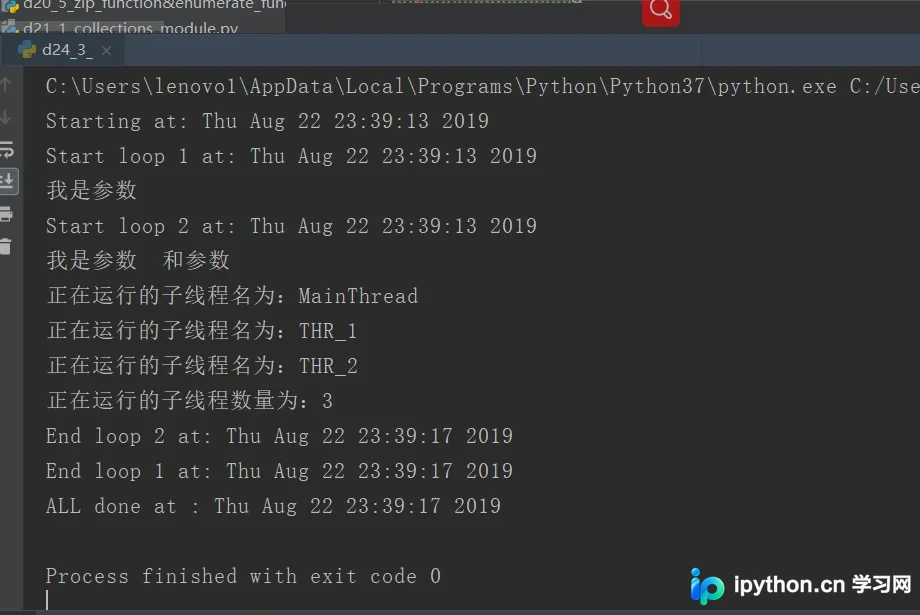
继承Thread类创建自定义线程
二、直接继承子类threading.Thread
1. 直接继承 Thread 类,并重写 run 函数。
2. 具体实现示例如下:
class MyThread(threading.Thread): #定义一个Thread的子类
def __init__(self, args): #重写__init__函数, 其中参数为self和新引入的参数
super(MyThread, self).__init__()# 固定格式, 继承父类的__init__函数
self.args = args
def run(self):
time.sleep(1)
print("The args for this class is {0}".format(self.args))
for i in range(5):
t = MyThread(i)
t.start()
t.join()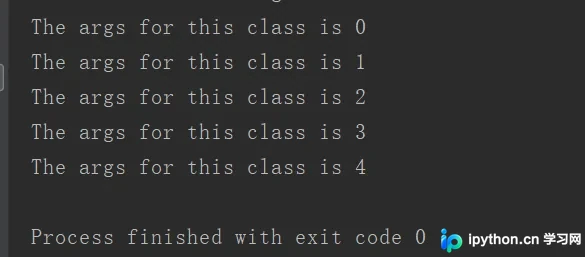
三、源码
d24_3_other_multi_thread_attribute.py
https://github.com/ruigege66/Python_learning/blob/master/d24_3_other_multi_thread_attribute.py
以上就是本文的全部内容,希望对大家的学习有所帮助,也希望大家多多支持本站。
本站声明
本文内容仅供参考,不代表本站观点。转载或引用请注明出处。如发现内容问题,请通过联系我们页面反馈。















