


Python Pygame 双人弹球游戏源码与实现解析

发布时间:2026-10-13 |
6人浏览过
本文介绍使用 Python 和 Pygame 库开发双人弹球小游戏的完整过程。游戏模拟简化版乒乓球规则,双方控制挡板拦截小球,先拦截失败者判负。文章提供了基于 Python 3.7 的运行环境配置说明、核心代码逻辑解析及运行效果展示,适合初学者参考学习。
双人弹球游戏概述
本文旨在展示如何利用 Python 的 Pygame 库构建一个双人弹球游戏。游戏机制类似于简化版的乒乓球:两名玩家各自控制一块可左右移动的挡板,共同拦截在两者之间来回弹跳的小球。当某一方未能成功拦截小球时,该方即判定为输家。
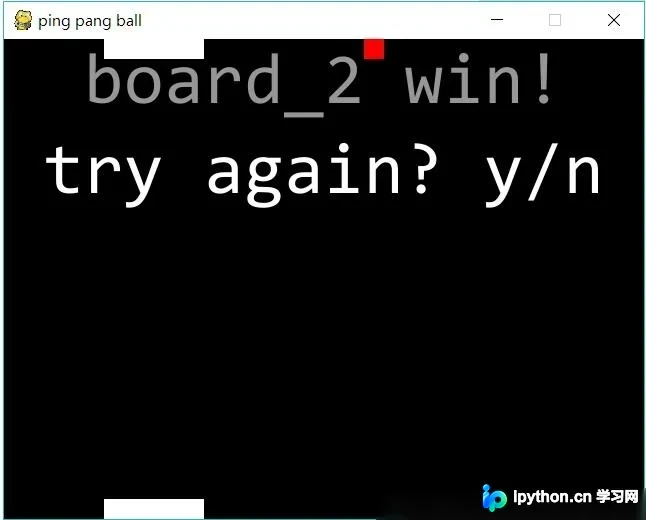
由于这是首次使用 Pygame 编写 Python 小游戏,且开发时间仅耗时两三个小时,代码整体略显粗糙,部分功能存在瑕疵。例如,挡板可能会移出屏幕边界,且游戏结束后的提示信息显示不完整。
尽管存在上述细节问题,但游戏的核心功能,包括小球的运动逻辑及基本交互机制,已实现得较为完善。
代码实现与环境配置
具体实现代码如下:
该项目的运行环境要求为 Python 3.7,并需预先安装 Pygame 库。
import pygame,sys,time,random
from pygame.locals import *
# 定义颜色变量
redColour = pygame.Color(255,0,0)
blackColour = pygame.Color(0,0,0)
whiteColour = pygame.Color(255,255,255)
greyColour = pygame.Color(150,150,150)

# 定义gameOver函数
def gameOver(playSurface,board):
 gameOverFont = pygame.font.Font('C:\Windows\Fonts\consola.ttf',72)
 if board[0][1]==0:
  gameOverSurf = gameOverFont.render('board_2 win!', True, greyColour)
 if board[0][1]==460:
  gameOverSurf = gameOverFont.render('board_1 win!', True, greyColour)
 gameOverRect = gameOverSurf.get_rect()
 gameOverRect.midtop = (320, 10)
 playSurface.blit(gameOverSurf, gameOverRect)

 againFont = pygame.font.Font('C:\Windows\Fonts\consola.ttf',24)
 againSurf = gameOverFont.render('Do you want to try again? y/n', True, whiteColour)
 againRect=againSurf.get_rect()
 againRect.midtop=(20,100)
 playSurface.blit(againSurf, againRect)
 pygame.display.flip()
 time.sleep(3)
 for event in pygame.event.get():
  if event.key == ord("y"):
   main()
  if event.key==ord("n"):
   pygame.quit()
   sys.exit()
 pygame.quit()
 sys.exit()

# 定义main函数
def main():
 # 初始化pygame
 pygame.init()
 fpsClock = pygame.time.Clock()
 # 创建pygame显示层
 playSurface = pygame.display.set_mode((640,480))
 pygame.display.set_caption('ping pang ball')

 # 初始化变量
 #两块板子为5块正方形组成的矩形,小球为1块正方形,正方形大小为20x20
 board_1 = [[100,0],[120,0],[140,0],[160,0],[180,0]]
 board_2 = [[100,460],[120,460],[140,460],[160,460],[180,460]]
 ball = [100,100]
 direction=3 #控制小球X轴的移动方向及速度
 direction_x=0 #判断小球沿X轴正向还是反向移动 0反向 1正向,2没有速度
 direction_y=1 #控制小球Y轴的移动方向及速度 0反向,1正向
 # 检测例如按键等pygame事件
 while True:
  for event in pygame.event.get():
   if event.type == QUIT:
    pygame.quit()
    sys.exit()
   elif event.type == KEYDOWN:
    # 判断键盘事件控制板子移动
    if event.key == K_RIGHT:
     for i in board_1:
      i[0]+=20
    if event.key == K_LEFT:
     for i in board_1:
      i[0]-=20
    if event.key == ord("a"):
     for i in board_2:
      i[0]-=20
    if event.key == ord("d"):
     for i in board_2:
      i[0]+=20
    if event.key == K_ESCAPE:
     pygame.event.post(pygame.event.Event(QUIT))

  # 判断小球击中board_1的位置,范围为板子的左角到右角
  if ball[1] == board_1[0][1]+20 and board_1[0][0]-20<=ball[0]<=board_1[4][0]+20:
   direction_y=1 #若击中板子,则Y轴方向正向移动
   #判断小球击中板子左角的状态,如果小球击中板子左角并且移动方向为正向,则:
   if ball[0]==board_1[0][0]-20 and direction_x==1:
    direction=0 #设此刻方向改为0
   #如果小球击中板子左数第一块,则:
   if ball[0]==board_1[0][0]:
    direction=1 #设此刻方向改为1
   #如果小球击中板子左数第二块,则:
   if ball[0]==board_1[1][0]:
    direction=2 #设此刻方向改为2
   #如果小球击中板子正中间,则:
   if ball[0]==board_1[2][0]:
    direction=3 #设此刻方向改为3
   #如果小球击中板子左数第四块,则:
   if ball[0]==board_1[3][0]:
    direction=4 #设此刻方向改为4
   #如果小球击中板子左数第五块,则:
   if ball[0]==board_1[4][0]:
    direction=5 #设此刻方向改为5
   #如果小球击中板子右角并且移动方向为反向:
   if ball[0]==board_1[4][0]+20 and direction_x==0:
    direction=6 #设此刻方向改为6
   #如果小球击中板子两角但是没有速度,即竖直移动
   if direction_x==2 and (ball[0]==board_1[0][0]-20 or ball[0]==board_1[4][0]+20):
    direction_y=0 #设此刻Y轴方向改为0
  #判断小球击中board_2的位置,与击中board_1时相比只改变Y轴的方向,X轴不变
  if ball[1]==board_2[0][1]-20 and board_2[0][0]-20<=ball[0]<=board_2[4][0]+20:
   direction_y=0
   if ball[0]==board_2[0][0]-20 and direction_x==1:
    direction=0
   if ball[0]==board_2[0][0]:
    direction=1
   if ball[0]==board_2[1][0]:
    direction=2
   if ball[0]==board_2[2][0]:
    direction=3
   if ball[0]==board_2[3][0]:
    direction=4
   if ball[0]==board_2[4][0]:
    direction=5
   if ball[0]==board_2[4][0]+20 and direction_x==0:
    direction=6
   if direction_x==2 and (ball[0]==board_2[0][0]-20 or ball[0]==board_2[4][0]+20):
    direction_y=1
  if ball[0]<=0:
   direction=4
  if ball[0]>=620:
   direction=2
  #设置小球Y轴的移动速度
  if direction_y==0:
   ball[1]-=20
  if direction_y==1:
   ball[1]+=20
  #设置小球X轴的移动速度,X,Y轴速度的改变形成角度
  if direction==0:
   ball[0]-=40
   direction_x=0
  if direction==1:
   ball[0]-=40
   direction_x=0
  if direction==2:
   ball[0]-=20
   direction_x=0
  if direction==3:
   direction_x=2
  if direction==4:
   ball[0]+=20
   direction_x=1
  if direction==5:
   ball[0]+=40
   direction_x=1
  if direction==6:
   ball[0]+=40
   direction_x=1


  # 绘制pygame显示层
  playSurface.fill(blackColour)
  pygame.draw.rect(playSurface,whiteColour,Rect(board_1[0],(100,20)))
  pygame.draw.rect(playSurface,whiteColour,Rect(board_2[0],(100,20)))
  pygame.draw.rect(playSurface,redColour,Rect(ball,(20,20)))
  # 刷新pygame显示层
  pygame.display.flip()
  # 判断胜利
  if ball[1]==board_1[0][1] and (ball[0]<board_1[0][0] or ball[0]>board_1[4][0]):
   gameOver(playSurface,board_1)
  if ball[1]==board_2[0][1] and (ball[0]<board_2[0][0] or ball[0]>board_2[4][0]):
   gameOver(playSurface,board_2)

  # 控制游戏速度
  fpsClock.tick(5)

if __name__ == "__main__":
 main()
运行效果展示
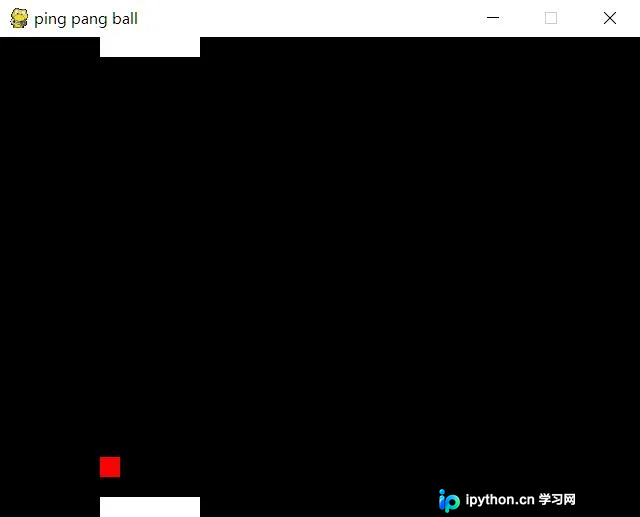
游戏的实际运行效果如下所示:
以上内容即为本文的全部分享,希望能为读者的学习提供有益帮助,同时也感谢大家对本平台的支持。
本站声明
本文内容仅供参考,不代表本站观点。转载或引用请注明出处。如发现内容问题,请通过联系我们页面反馈。















