


Python使用PIL实现图片文字自动换行插入

发布时间:2026-10-13 |
2人浏览过
本文介绍如何使用Python的PIL库在图片中插入大量文字并实现自动换行。通过自定义ImgText类,设定预设宽度与字体,程序自动计算字符宽度并分段,支持中文需指定字体。代码展示了从加载图片、绘制文本到保存结果的完整流程,适用于需要动态生成带文字图片的场景。
Python图片文字插入实现
本文分享一个使用Python在图片中插入文字的具体代码示例,供读者参考学习。
问题描述
问题
主要探讨如何在图片中插入大量文字,并实现文字的自动换行处理。
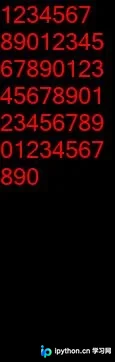
效果展示
效果
原始图
效果图
注意事项
注明
若需要写入中文请使用中文字体
代码实现
实现方式
from PIL import Image, ImageDraw, ImageFont


class ImgText:
  font = ImageFont.truetype("micross.ttf", 24)

  def __init__(self, text):
    # 预设宽度 可以修改成你需要的图片宽度
    self.width = 100
    # 文本
    self.text = text
    # 段落 , 行数, 行高
    self.duanluo, self.note_height, self.line_height = self.split_text()

  def get_duanluo(self, text):
    txt = Image.new('RGBA', (100, 100), (255, 255, 255, 0))
    draw = ImageDraw.Draw(txt)
    # 所有文字的段落
    duanluo = ""
    # 宽度总和
    sum_width = 0
    # 几行
    line_count = 1
    # 行高
    line_height = 0
    for char in text:
      width, height = draw.textsize(char, ImgText.font)
      sum_width += width
      if sum_width > self.width: # 超过预设宽度就修改段落 以及当前行数
        line_count += 1
        sum_width = 0
        duanluo += '\n'
      duanluo += char
      line_height = max(height, line_height)
    if not duanluo.endswith('\n'):
      duanluo += '\n'
    return duanluo, line_height, line_count

  def split_text(self):
    # 按规定宽度分组
    max_line_height, total_lines = 0, 0
    allText = []
    for text in self.text.split('\n'):
      duanluo, line_height, line_count = self.get_duanluo(text)
      max_line_height = max(line_height, max_line_height)
      total_lines += line_count
      allText.append((duanluo, line_count))
    line_height = max_line_height
    total_height = total_lines * line_height
    return allText, total_height, line_height

  def draw_text(self):
    """
    绘图以及文字
    :return:
    """
    note_img = Image.open("001.png").convert("RGBA")
    draw = ImageDraw.Draw(note_img)
    # 左上角开始
    x, y = 0, 0
    for duanluo, line_count in self.duanluo:
      draw.text((x, y), duanluo, fill=(255, 0, 0), font=ImgText.font)
      y += self.line_height * line_count
    note_img.save("result.png")


if __name__ == '__main__':
  n = ImgText(
    "1234567890" * 5)
  n.draw_text()
以上就是本文的全部内容,希望对大家的学习有所帮助,也希望大家多多支持本站。
本站声明
本文内容仅供参考,不代表本站观点。转载或引用请注明出处。如发现内容问题,请通过联系我们页面反馈。















