


Django后端实现微信小程序微信模板消息推送完整指南
本文详细讲解如何在Django后端实现微信小程序的微信模板消息推送功能。内容涵盖通过Django-crontab定时获取access_token、配置缓存存储、编写发送消息的视图函数以及URL路由配置,帮助开发者快速完成服务通知功能的集成。
模板消息
官方文档:https://developers.weixin.qq.com/miniprogram/dev/api-backend/open-api/template-message/templateMessage.send.html
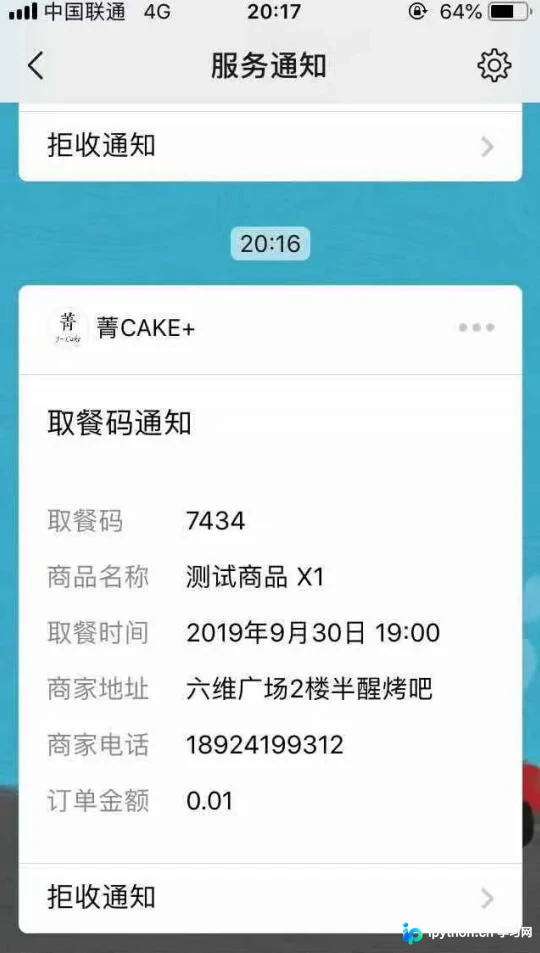
模板消息如下图所示
Django项目中获取access_token
在Django项目中获取access_token
根据官方文档说明,后端必须获取一个有效的access_token才能发送模板消息。该token的有效期为两小时,因此需要后端设置定时任务定期获取。本文采用Django-crontab第三方包来实现这一定时任务。
pip install django-crontab依据文档要求,需向https://api.weixin.qq.com/cgi-bin/token?grant_type=client_credential&appid=APPID&secret=APPSECRET发送GET请求,接口返回结果中包含access_token。
将获取到的access_token存入缓存系统。
Python实现代码如下:
response = requests.get(f'https://api.weixin.qq.com/cgi-bin/token?grant_type=client_credential&appid={settings.APPID}&secret={settings.APPSECRET}')
response = response.json()
if response.get('access_token', ''):
 cache.set('access_token', response['access_token'])
 cache.expire('access_token', response['expires_in'])
在settings.py中进行相关配置:
CRONJOBS = (
 #每隔7200秒都生成一次access——token
 ('0 */2 * * *', 'django.core.management.call_command', ['runstat', '--token']),
)
完成上述配置后,即可实现每隔两小时自动获取token的功能。
Django发送模板消息
Django发送模板消息
首先,需要在微信公众平台中创建所需的模板消息。
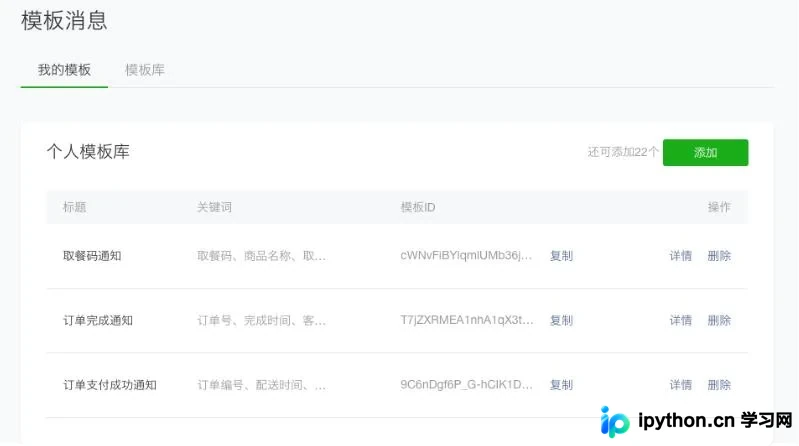
随后,将模板ID复制到项目中,并编写相应的视图函数。
@require_http_methods(["POST"])
@csrf_exempt
def notifications(request):
 if request.method == 'POST':
  access_token = cache.get('access_token')

  template_id = '你的模板id'
  push_data = {
   "keyword1": {
    "value": obj.order_sn
   },
   "keyword2": {
    "value": obj.time
   },
   "keyword3": {
    "value": "{:.2f}".format(float(obj.total_price))
   },
  }

  if access_token:
   # 如果存在accesstoken
   payload = {
    'touser': req_data.get('openid', ''), #这里为用户的openid
    'template_id': template_id, #模板id
    'form_id': req_data.get('form_id', ''), #表单id或者prepay_id
    'data': push_data #模板填充的数据
   }

   response = requests.post(f'https://api.weixin.qq.com/cgi-bin/message/wxopen/template/send?access_token={access_token}',
       json=payload)

   #直接返回res结果
   return JsonResponse(response.json())
  else:
   return JsonResponse({
    'err': 'access_token missing'
   })
配置urls.py文件。
#模板消息通知
path('api/v1/notifications/', notifications),
当用户向notifications接口发送POST请求后,即可将模板消息推送到微信中。
以上这篇Django后端发送小程序微信模板消息示例(服务通知)就是小编分享给大家的全部内容了,希望能给大家一个参考,也希望大家多多支持本站。
本站声明
本文内容仅供参考,不代表本站观点。转载或引用请注明出处。如发现内容问题,请通过联系我们页面反馈。















