


Python结合HTMLTestRunner与Echarts生成饼图测试报告

发布时间:2026-10-13 |
5人浏览过
本文介绍如何在Python单元测试中使用HTMLTestRunner结合echarts.common.min.js生成包含饼图的可视化测试报告。通过示例代码展示如何配置测试用例、运行测试并生成HTML报告文件,帮助开发者实现更直观的测试结果展示。
Python结合HTMLTestRunner与Echarts生成饼图测试报告
本文主要内容如下:
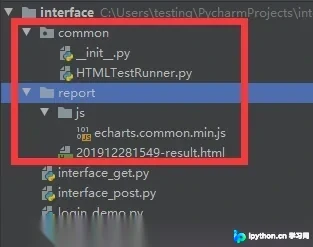
本文将演示如何结合使用
HTMLTestRunner库以及echarts.common.min.js文件(相关文件可参考百度网盘链接,此处仅作记录备查)
具体的单元测试脚本unit_test.py代码如下:
import unittest
import requests
import time
import os.path
from common import HTMLTestRunner


class TestLogin(unittest.TestCase):

 def setUp(self):
  # 获取session对象
  self.session = requests.session()
  # 登录url
  self.url = 'http://XXXXXX/oauth/oauth/token'

 def test_login_success(self):
  data = {
   'grant_type': 'password',
   'username': 'iu',
   'password': '111',
   'client_id': 'web',
   'client_secret': 'web-secret'
  }
  r = self.session.post(url=self.url, data=data)
  try:
   self.assertEqual(r.json()['token_type'])
  except AssertionError as e:
   print(e)


 def test_username_not_exit(self):
  data = {
   'grant_type': 'password',
   'username': '322u',
   'password': '8',
   'client_id': 'web',
   'client_secret': 'web-secret'
  }
  r = self.session.post(url=self.url, data=data)
  try:
   self.assertEqual("用户名或密码错误", r.json()["error_description"])
  except AssertionError as e:
   print(e)

 def test_password_error(self):
  data = {
   'grant_type': 'password',
   'username': '2u',
   'password': '888ssss888',
   'client_id': 'web',
   'client_secret': 'web-secret'
  }
  r = self.session.post(url=self.url, data=data)
  try:
   self.assertEqual("用户名或密码错误", r.json()["error_description"])
  except AssertionError as e:
   print(e)

 def tearDown(self):
  self.session.close()


if __name__ == '__main__':
 # unittest.main()
 test = unittest.TestSuite()
 test.addTest(TestLogin('test_login_success'))
 test.addTest(TestLogin('test_username_not_exit'))
 test.addTest(TestLogin('test_password_error'))

 rq = time.strftime('%Y%m%d%H%M', time.localtime(time.time()))
 file_path = os.path.abspath('.') + '\\report\\' + rq + '-result.html'

 file_result = open(file_path, 'wb')

 runner = HTMLTestRunner.HTMLTestRunner(stream=file_result, title=u'测试报告', description=u'用例执行情况')
 runner.run(test)
 file_result.close()
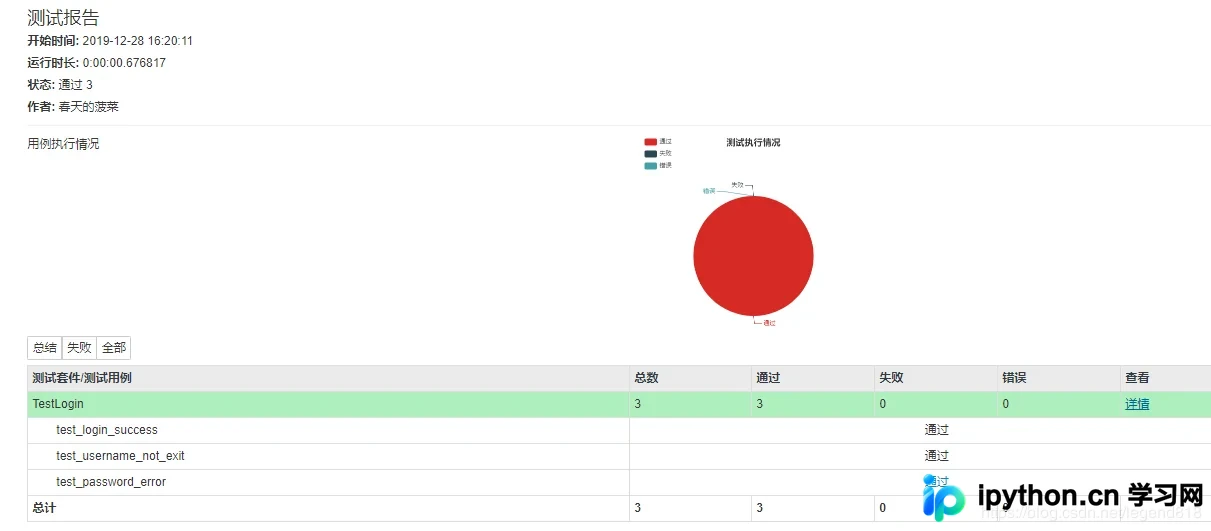
执行测试后生成报告文件 ,查看生成的报告效果:
以上内容为本文的全部介绍,希望能为读者的学习提供有益参考,同时也欢迎读者继续支持本站。
本站声明
本文内容仅供参考,不代表本站观点。转载或引用请注明出处。如发现内容问题,请通过联系我们页面反馈。















