


Python Matplotlib Subplot绘图流程与核心函数详解

本文详细介绍Python中Matplotlib库的subplot子图绘制流程。涵盖从数据准备、画布创建、多种绘图方式(如plot、bar、scatter等)到图表定制(标题、标签、注释、图例)及保存显示的完整步骤。重点解析fig.add_subplot与plt.subplots()函数的参数用法,包括行列数、共享坐标轴及布局调整,并提供代码示例供参考。
Matplotlib绘图概述与流程
在Python生态中,matplotlib.pyplot是进行数据可视化时最常用的库之一,其功能丰富且实用。虽然其基础框架简洁易懂,但要绘制出功能完善、美观整洁的图表,往往需要查阅大量函数文档。为了提升效率,本文对常用绘图函数进行了系统总结,并附带一个综合示例,旨在帮助用户建立一套可复用的绘图模板,减少重复查找的时间。
一、标准作图流程
完整的绘图过程通常包含六个步骤:1. 准备数据;2. 创建画布;3. 执行绘图;4. 定制图表细节;5. 保存图像;6. 显示图像。
关于数据准备,输入数据可以是NumPy数组,也可以是Python列表(list),Matplotlib均能良好支持。
画布创建与数据准备
第二步是创建画布。
import matplotlib.pyplot as plt
#figure(num=None, figsize=None, dpi=None, facecolor=None, edgecolor=None, frameon=True)

#num:图像编号或名称,数字为编号 ,字符串为名称
#figsize:指定figure的宽和高,单位为英寸;
#dpi参数指定绘图对象的分辨率,即每英寸多少个像素,缺省值为80 ,1英寸等于2.5cm,A4纸是 21*30cm的纸张
#facecolor:背景颜色
#edgecolor:边框颜色
#frameon:是否显示边

fig = plt.figure()
fig = plt.figure(figsize=(8,6), dpi=80)

fig.add_axes()
fig, axes = plt.subplos(nrows = 2, ncols = 2) #axes是长度为4的列表
绘图类型与定制细节
第三步涉及具体的绘图路线选择。
对于一维数据,通常使用折线图等基础图形进行展示。
axes[0, 0].plot(x, y)
axes[0,1].bar([1,2,3], [2,4,8])
axes[0,2].barh([1,2,3], [2,4,8])
axes[1,0].axhline(0.45)
axes[1, 1].scatter(x, y)
axes[1,2].axvline(0.65)
axes[2,0].fill(x,y, color = 'blue')
axes[2,1].fill_between(x,y, color = 'blue')
axes[2,2].violinplot(y)
axes[0,3].arrow(0,0,0.5,0.5)
axes[1,3].quiver(x,y)
第四步为图表定制,包括调整坐标轴、添加标题、标签及注释等。
plt.plot(x,y, alpha=0.4, c = 'blue', maker = 'o')
#颜色,标记,透明度

# 显示数学文本

t = np.arange(0.0, 2.0, 0.01)
s = np.sin(2*np.pi*t)

plt.plot(t,s)
plt.title(r'$\alpha_i > \beta_i$', fontsize=20)
plt.text(1, -0.6, r'$\sum_{i=0}^\infty x_i$', fontsize=20)
plt.text(0.6, 0.6, r'$\mathcal{A}\mathrm{sin}(2 \omega t)$',
     fontsize=20)
plt.xlabel('time (s)')
plt.ylabel('volts (mV)')

fig = plt.figure()
fig.suptitle('bold figure suptitle', fontsize=14, fontweight='bold')

ax = fig.add_subplot(111)
fig.subplots_adjust(top=0.85)
ax.set_title('axes title')

ax.set_xlabel('xlabel')
ax.set_ylabel('ylabel')

ax.text(3, 8, 'boxed italics text in data coords', style='italic',
    bbox={'facecolor':'red', 'alpha':0.5, 'pad':10})

ax.text(2, 6, r'an equation: $E=mc^2$', fontsize=15)

ax.text(3, 2, u'unicode: Institut f\374r Festk\366rperphysik')

ax.text(0.95, 0.01, 'colored text in axes coords',
    verticalalignment='bottom', horizontalalignment='right',
    transform=ax.transAxes,
    color='green', fontsize=15)


ax.plot([2], [1], 'o')


# 注释
ax.annotate('我是注释啦', xy=(2, 1), xytext=(3, 4),color='r',size=15,
      arrowprops=dict(facecolor='g', shrink=0.05))

ax.axis([0, 10, 0, 10])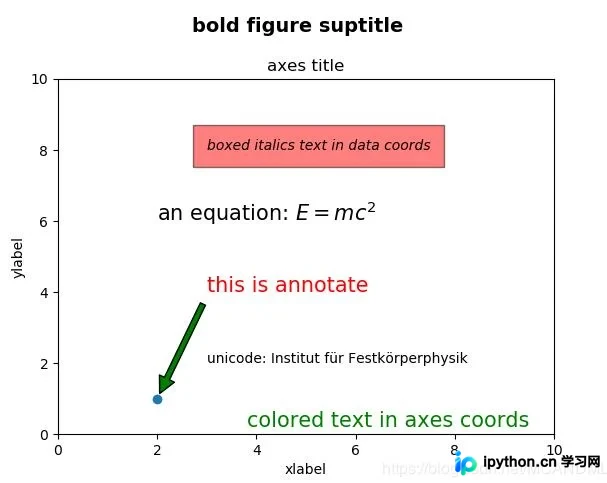
第五步涉及图像的保存与显示操作。
plt.savefig("1.png")
plt.savefig("1.png", trainsparent =True)
plt.show()
Subplot核心函数解析
二、核心函数使用详解
1. fig.add_subplot(numrows, numcols, fignum):该函数接受三个参数,分别代表子图的行数、列数以及当前子图的索引号。例如:ax = fig.add_subplot(2, 3, 1) 或简写为 ax = fig.add_subplot(231)。
2. plt.subplots()函数的使用方式。
x = np.linspace(0, 2*np.pi,400)
y = np.sin(x**2)
fig, ax = plt.subplots()
ax.plot(x, y)
ax.set_title('Simple plot')

# Creates two subplots and unpacks the output array immediately
#fig = plt.figure(figsize=(6,6))
f, (ax1, ax2) = plt.subplots(1, 2, sharey=True)
ax1.plot(x, y)
ax1.set_title('Sharing Y axis')
ax2.scatter(x, y)

# Creates four polar axes, and accesses them through the returned array
fig, axes = plt.subplots(2, 2, subplot_kw=dict(polar=True))
axes[0, 0].plot(x, y)
axes[1, 1].scatter(x, y)

# Share a X axis with each column of subplots
plt.subplots(2, 2, sharex='col')

# Share a Y axis with each row of subplots
plt.subplots(2, 2, sharey='row')

# Share both X and Y axes with all subplots
plt.subplots(2, 2, sharex='all', sharey='all')

# Note that this is the same as
plt.subplots(2, 2, sharex=True, sharey=True)

# Creates figure number 10 with a single subplot
# and clears it if it already exists.
fig, ax=plt.subplots(num=10, clear=True)
3. plt.legend()用于添加图例。
plt.legend(loc='String or Number', bbox_to_anchor=(num1, num2))
plt.legend(loc='upper center', bbox_to_anchor (0.6,0.95),ncol=3,fancybox=True,shadow=True)
#bbox_to_anchor被赋予的二元组中,第一个数值用于控制legend的左右移动,值越大越向右边移动,第二个数值用于控制legend的上下移动,值越大,越向上移动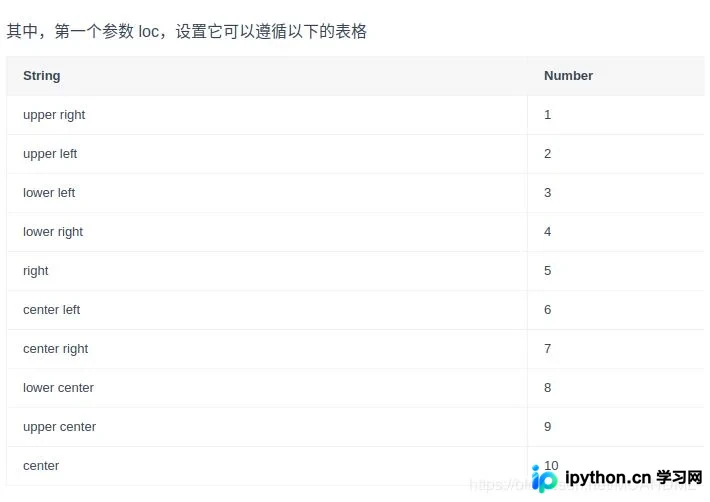
以上关于Python Matplotlib中subplot函数的使用详解即为全部内容,希望对读者有所帮助。如有需要,欢迎参考本文提供的示例代码,并期待大家的支持。
本站声明
本文内容仅供参考,不代表本站观点。转载或引用请注明出处。如发现内容问题,请通过联系我们页面反馈。















