


Python 3.6 使用 PyMySQL 连接 MySQL 数据库及增删改查详解

发布时间:2026-10-13 |
3人浏览过
本文详细介绍如何在 Python 3.6 环境中通过 pip 安装 PyMySQL 库,并演示如何使用该库连接 MySQL 数据库。内容涵盖建立连接、执行查询、插入、更新及删除数据的具体代码示例,包括参数传递、事务提交与回滚处理,帮助开发者快速掌握 Python 操作 MySQL 的基础技能。
经过一番折腾完成了数据库连接配置。由于此前未安装 pip 工具,且当前使用的 Python 版本为 3.6,因此选择使用 pymysql 库来建立数据库连接。下文将简要介绍连接过程以及基础的增删改查操作流程。
1. 通过 pip 安装 pymysql
打开命令行窗口(cmd),输入以下命令:pip install pymysql
按下回车键等待安装进程完成;

安装完成后,若终端显示如图相关信息,则表明安装成功。
2. 测试连接
import pymysql #导入 pymysql若代码编译未出现错误,即表示 pymysql 库已成功安装并可正常使用。
简单的增删改查操作
示例表结构
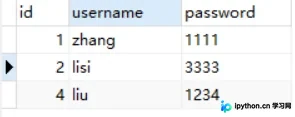
2.1 查询操作
import pymysql #导入 pymysql

#打开数据库连接
db= pymysql.connect(host="localhost",user="root",
 	password="123456",db="test",port=3307)

# 使用cursor()方法获取操作游标
cur = db.cursor()

#1.查询操作
# 编写sql 查询语句 user 对应我的表名
sql = "select * from user"
try:
	cur.execute(sql) 	#执行sql语句

	results = cur.fetchall()	#获取查询的所有记录
	print("id","name","password")
	#遍历结果
	for row in results :
		id = row[0]
		name = row[1]
		password = row[2]
		print(id,name,password)
except Exception as e:
	raise e
finally:
2.2 插入操作
import pymysql
#2.插入操作
db= pymysql.connect(host="localhost",user="root",
 	password="123456",db="test",port=3307)

# 使用cursor()方法获取操作游标
cur = db.cursor()

sql_insert ="""insert into user(id,username,password) values(4,'liu','1234')"""

try:
	cur.execute(sql_insert)
	#提交
	db.commit()
except Exception as e:
	#错误回滚
	db.rollback()
finally:
	db.close()
2.3 更新操作
import pymysql
#3.更新操作
db= pymysql.connect(host="localhost",user="root",
 	password="123456",db="test",port=3307)

# 使用cursor()方法获取操作游标
cur = db.cursor()

sql_update ="update user set username = '%s' where id = %d"

try:
	cur.execute(sql_update % ("xiongda",3)) #像sql语句传递参数
	#提交
	db.commit()
except Exception as e:
	#错误回滚
	db.rollback()
finally:
	db.close()
2.4 删除操作
import pymysql
#4.删除操作
db= pymysql.connect(host="localhost",user="root",
 	password="123456",db="test",port=3307)

# 使用cursor()方法获取操作游标
cur = db.cursor()

sql_delete ="delete from user where id = %d"

try:
	cur.execute(sql_delete % (3)) #像sql语句传递参数
	#提交
	db.commit()
except Exception as e:
	#错误回滚
	db.rollback()
finally:
	db.close()
如需了解更多关于 Python 3.6 连接 MySQL 数据库及增删改查操作的内容,大家可以点击下方的相关链接进行查看。
本站声明
本文内容仅供参考,不代表本站观点。转载或引用请注明出处。如发现内容问题,请通过联系我们页面反馈。















