


Python与OpenCV实现图像拼接的简易方法

发布时间:2026-10-13 |
4人浏览过
本文介绍如何利用Python和OpenCV库实现图像拼接功能。针对官方文档中Python版本Stitcher类说明缺失的情况,通过GitHub源码示例提供简洁实用的代码实现。涵盖从读取图像、创建拼接器到生成全景图的完整流程,适用于创建照片全景图或处理扫描材料。
Python OpenCV图像拼接简介
本示例展示了如何使用Python结合OpenCV库完成图像拼接任务,供读者参考学习。
基于Python和OpenCV的图像拼接实现方案
查阅最新的OpenCV官方文档可知,C++版本的Stitcher类已有详细说明,但Python版本的文档尚未同步更新。本文旨在简要介绍Python环境下该功能的实现方式。
源码参考与代码实现
鉴于官方文档中缺乏Python版Stitcher类的具体说明,我们需要从GitHub源码中寻找参考。以下是stitching模块的一个样例代码片段:
from __future__ import print_function
import cv2 as cv
import numpy as np
import argparse
import sys

modes = (cv.Stitcher_PANORAMA, cv.Stitcher_SCANS)

parser = argparse.ArgumentParser(description='Stitching sample.')
parser.add_argument('--mode',
 type = int, choices = modes, default = cv.Stitcher_PANORAMA,
 help = 'Determines configuration of stitcher. The default is `PANORAMA` (%d), '
   'mode suitable for creating photo panoramas. Option `SCANS` (%d) is suitable '
   'for stitching materials under affine transformation, such as scans.' % modes)
parser.add_argument('--output', default = 'result.jpg',
 help = 'Resulting image. The default is `result.jpg`.')
parser.add_argument('img', nargs='+', help = 'input images')
args = parser.parse_args()

# read input images
imgs = []
for img_name in args.img:
 img = cv.imread(img_name)
 if img is None:
  print("can't read image " + img_name)
  sys.exit(-1)
 imgs.append(img)

stitcher = cv.Stitcher.create(args.mode)
status, pano = stitcher.stitch(imgs)

if status != cv.Stitcher_OK:
 print("Can't stitch images, error code = %d" % status)
 sys.exit(-1)

cv.imwrite(args.output, pano);
print("stitching completed successfully. %s saved!" % args.output)
尽管上述示例代码较长,但实际应用中只需使用以下精简代码即可实现功能,简单直接。
import numpy as np
import cv2
from cv2 import Stitcher

if __name__ == "__main__":
 img1 = cv2.imread('1.jpg')
 img2 = cv2.imread('2.jpg')
 stitcher = cv2.createStitcher(False)
 #stitcher = cv2.Stitcher.create(cv2.Stitcher_PANORAMA), 根据不同的OpenCV版本来调用
 (_result, pano) = stitcher.stitch((img1, img2))
 cv2.imshow('pano',pano)
 cv2.waitKey(0)
拼接效果展示
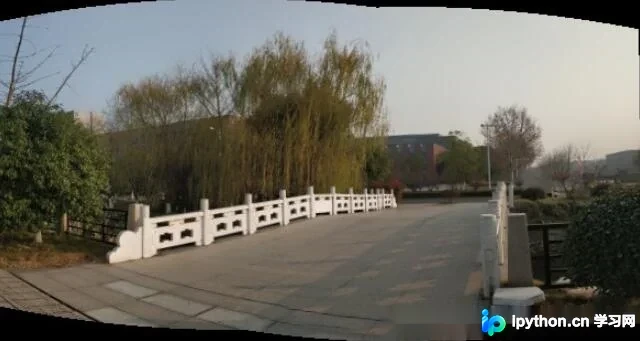
拼接效果如下所示:
原始输入图像:
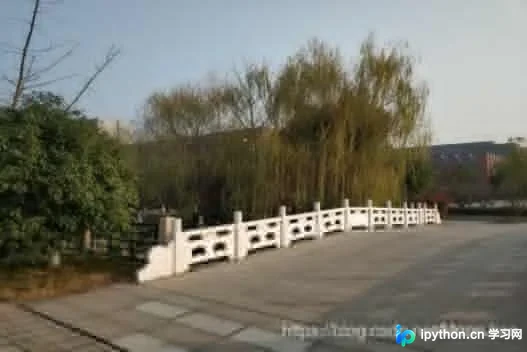
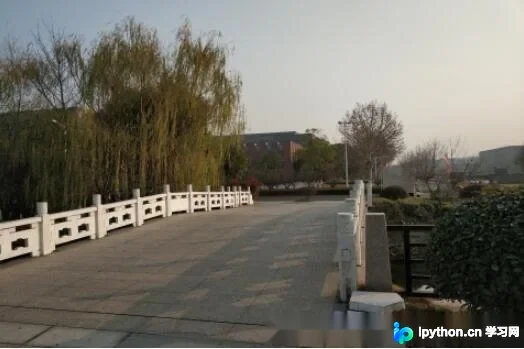
拼接完成后的全景图像:
以上内容为本文的全部分享,希望能为各位的学习带来帮助。欢迎大家继续支持本站获取更多技术资源。
本站声明
本文内容仅供参考,不代表本站观点。转载或引用请注明出处。如发现内容问题,请通过联系我们页面反馈。















