


Python实现带渐变与特定高亮的环形图绘制详解

发布时间:2026-10-13 |
3人浏览过
本文介绍如何使用Python的Matplotlib库绘制环形图。通过自定义颜色生成函数,实现基于随机种子或固定规则的渐变色彩填充,并支持将特定扇区高亮为红色。代码包含完整的颜色列表生成逻辑、数据绑定及图例定位方法,适用于需要展示比例且强调特定数据的可视化场景。
Python绘制环形图的核心实现
以下提供了使用Python绘制环形图的完整代码示例,供读者参考和实际应用。
颜色生成与高亮逻辑
import os

import pandas as pd
import matplotlib.pyplot as plt
import random
import numpy as np


# 获取渐变色的list
def gradual(number):
 colors = []
 h = 0.00001
 gradual2 = random.uniform(0, 1)
 r = gradual2
 if gradual2 >= 0.5:
  g = h
  b = gradual2
 else:
  g = gradual2
  b = h
 colors.append((r, g, b, 1))
 for i in range(number - 1):
  # 大于0.5 则为绿色渐变,小于则为蓝色渐变
  if gradual2 >= 0.5:
   g = 1 if ((1 - h) / number) > 1 else (g + (1 - h) / number)
  else:
   b = 1 if ((1 - h) / number) > 1 else (b + (1 - h) / number)
  colors.append((r, g, b, 1))
 return colors


# 获取绿色的个数,standardRedIndex为要将那个颜色改为红色
def listGreen(number, standardRedIndex):
 colors = []
 for i in range(number):
  if i == standardRedIndex - 1:
   colors.append('r')
  else:
   colors.append('#6CAD4F')
 return colors


# 画环形图
def circularGraph(outerData, innerData, labels, standardRedIndex):
 data = pd.DataFrame([outerData, innerData], columns=labels)
 # 设置字体这样才可以显示中文
 plt.rcParams['font.sans-serif'] = 'Microsoft YaHei'
 plt.rcParams['axes.unicode_minus'] = False
 plt.figure(figsize=(8, 5))
 colors = gradual(len(labels))
 # 数据内环
 plt.pie(data.iloc[1, :], radius=0.65, wedgeprops=dict(width=0.3, edgecolor='w'), colors=colors)
 # 数据外环
 plt.pie(data.iloc[0, :], radius=1, wedgeprops=dict(width=0.3, edgecolor='w'),
   colors=listGreen(len(labels), standardRedIndex))
 # 获取ax label
 ax = plt.subplot(1, 1, 1)
 # loc是位置,bbox_to_anchor是位置坐标,borderaxespad将图例放外面 frameon=False去掉图例边框
 # bbox_to_anchor 的y坐标
 y = -1 / 40 * len(labels) + 0.5
 ax.legend(labels, loc=4, bbox_to_anchor=(1.3, y), borderaxespad=0., frameon=False)
 plt.show()


circularGraph([30, 30, 20, 40, 20, 20, 40, 20, 20, 40, 20], [30, 30, 20, 40, 20, 20, 40, 20, 20, 40, 20],
    ['甲硫杆菌', '霍尔德曼氏菌属', 'Faecali菌属', '瘤胃菌属', 'Faecali菌属', 'Faecali菌属', '瘤胃菌属', 'Faecali菌属', 'Faecali菌属', '瘤胃菌属', 'Faecali菌属'], 3)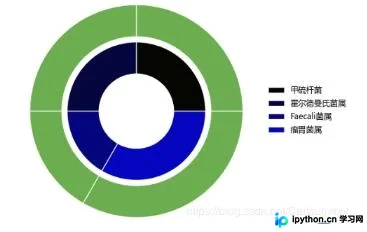
如需了解更多Python图像处理技巧,可访问相关专题页面:《python图片处理操作》。
希望上述内容能对您的学习有所帮助,欢迎继续支持本站获取更多技术资源。
本站声明
本文内容仅供参考,不代表本站观点。转载或引用请注明出处。如发现内容问题,请通过联系我们页面反馈。















