


Python结合百度语音识别实现视频字幕自动生成

本文详细介绍如何使用Python从视频中提取音频,利用MoviePy和Pydub进行静音分段处理,并通过百度智能云API将语音转换为文字。教程涵盖环境配置、音频分割策略、Access Token获取及SRT字幕格式生成,帮助开发者快速实现自动化视频字幕制作。
视频音频提取与预处理
首先,需要从目标视频中分离出音频轨道,这是后续处理的基础步骤。
为了完成视频到音频的转换,需要安装并引入moviepy库。
pip install moviepy具体实现代码如下:
audio_file = work_path + '\\out.wav'
video = VideoFileClip(video_file)
video.audio.write_audiofile(audio_file,ffmpeg_params=['-ar','16000','-ac','1'])
音频静音分段处理
接下来,利用音频库pydub对提取出的音频进行静音检测与分段处理,以便将长音频切割为适合识别的短片段。
安装pydub库的命令如下:
pip install pydub第一种分段策略是通过检测静音区间来拆分音频,具体代码实现如下:
# 这里silence_thresh是认定小于-70dBFS以下的为silence,发现小于 sound.dBFS * 1.3 部分超过 700毫秒,就进行拆分。这样子分割成一段一段的。
sounds = split_on_silence(sound, min_silence_len = 500, silence_thresh= sound.dBFS * 1.3)


sec = 0
for i in range(len(sounds)):
 s = len(sounds[i])
 sec += s
print('split duration is ', sec)
print('dBFS: {0}, max_dBFS: {1}, duration: {2}, split: {3}'.format(round(sound.dBFS,2),round(sound.max_dBFS,2),sound.duration_seconds,len(sounds)))
如果上述方法分割的时间点不够精准,难以准确定位语音起止,可以尝试更换另一种分割算法。
# 通过搜索静音的方法将音频分段
# 参考:https://wqian.net/blog/2018/1128-python-pydub-split-mp3-index.html
timestamp_list = detect_nonsilent(sound,500,sound.dBFS*1.3,1)

for i in range(len(timestamp_list)):
 d = timestamp_list[i][1] - timestamp_list[i][0]
 print("Section is :", timestamp_list[i], "duration is:", d)
print('dBFS: {0}, max_dBFS: {1}, duration: {2}, split: {3}'.format(round(sound.dBFS,2),round(sound.max_dBFS,2),sound.duration_seconds,len(timestamp_list)))
运行第二种方法后的输出结果如下所示:
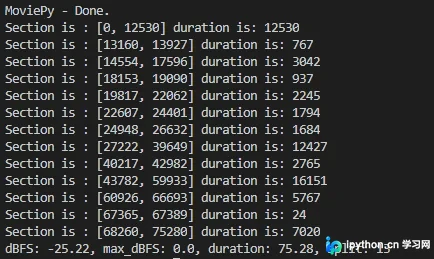
对比来看,第二种方法的分割效果更易于后续处理。
百度语音识别集成
完成音频分段后,即可调用百度语音识别接口进行文字转换。
首先需在百度智能云平台注册并创建一个应用,以获取必要的API Key和Secret Key。

使用获取到的凭证来请求并获取Access Token,这是调用语音识别API的必要授权。
百度AI产品提供一定的免费调用额度,对于生成常规视频字幕而言,免费配额通常已足够使用。
'''
百度智能云获取 Access Token
'''
def fetch_token():
 params = {'grant_type': 'client_credentials',
    'client_id': API_KEY,
    'client_secret': SECRET_KEY}
 post_data = urlencode(params)
 if (IS_PY3):
  post_data = post_data.encode( 'utf-8')
 req = Request(TOKEN_URL, post_data)
 try:
  f = urlopen(req)
  result_str = f.read()
 except URLError as err:
  print('token http response http code : ' + str(err.errno))
  result_str = err.reason
 if (IS_PY3):
  result_str = result_str.decode()


 print(result_str)
 result = json.loads(result_str)
 print(result)
 if ('access_token' in result.keys() and 'scope' in result.keys()):
  print(SCOPE)
  if SCOPE and (not SCOPE in result['scope'].split(' ')): # SCOPE = False 忽略检查
   raise DemoError('scope is not correct')
  print('SUCCESS WITH TOKEN: %s EXPIRES IN SECONDS: %s' % (result['access_token'], result['expires_in']))
  return result['access_token']
 else:
  raise DemoError('MAYBE API_KEY or SECRET_KEY not correct: access_token or scope not found in token response')
在调用接口时,需将分段后的音频原始数据(Raw Data)发送至百度服务器进行合成识别。
此处选用百度语音极速版API,因其依托专有GPU服务集群,相比标准版API响应速度提升2倍,识别准确率提升15%。该接口适用于近场短语音交互场景,如手机语音搜索或聊天输入,支持上传完整录音文件且时长不超过60秒,并能实时返回识别结果。
def asr_raw(speech_data, token):
 length = len(speech_data)
 if length == 0:
  # raise DemoError('file %s length read 0 bytes' % AUDIO_FILE)
  raise DemoError('file length read 0 bytes')


 params = {'cuid': CUID, 'token': token, 'dev_pid': DEV_PID}
 #测试自训练平台需要打开以下信息
 #params = {'cuid': CUID, 'token': token, 'dev_pid': DEV_PID, 'lm_id' : LM_ID}
 params_query = urlencode(params)


 headers = {
  'Content-Type': 'audio/' + FORMAT + '; rate=' + str(RATE),
  'Content-Length': length
 }


 url = ASR_URL + "?" + params_query
 # print post_data
 req = Request(ASR_URL + "?" + params_query, speech_data, headers)
 try:
  begin = timer()
  f = urlopen(req)
  result_str = f.read()
  # print("Request time cost %f" % (timer() - begin))
 except URLError as err:
  # print('asr http response http code : ' + str(err.errno))
  result_str = err.reason


 if (IS_PY3):
  result_str = str(result_str, 'utf-8')
 return result_str
SRT字幕生成与总结
获取识别后的文本内容后,即可开始生成字幕文件。
SRT字幕的标准格式可参考相关技术文章:https://www.cnblogs.com/tocy/p/subtitle-format-srt.html。
生成字幕的核心逻辑是将语音识别结果按SRT格式规范组装,具体代码实现如下:
idx = 0
for i in range(len(timestamp_list)):
 d = timestamp_list[i][1] - timestamp_list[i][0]
 data = sound[timestamp_list[i][0]:timestamp_list[i][1]].raw_data
 str_rst = asr_raw(data, token)
 result = json.loads(str_rst)
 # print("rst is ", result)
 # print("rst is ", rst['err_no'][0])


 if result['err_no'] == 0:
  text.append('{0}\n{1} --> {2}\n'.format(idx, format_time(timestamp_list[i][0]/ 1000), format_time(timestamp_list[i][1]/ 1000)))
  text.append( result['result'][0])
  text.append('\n')
  idx = idx + 1
  print(format_time(timestamp_list[i][0]/ 1000), "txt is ", result['result'][0])
with open(srt_file,"r+") as f:
 f.writelines(text)
最后,对整个过程进行总结。
通过在实际视频网站下载的视频进行测试,极速模式在速度和识别率方面表现最佳,体验甚至优于网易见外平台。
至此,关于使用Python和百度语音识别生成视频字幕的教程介绍完毕。如需了解更多Python与百度语音识别相关内容,可搜索本站往期文章或继续浏览后续教程,感谢支持。
本站声明
本文内容仅供参考,不代表本站观点。转载或引用请注明出处。如发现内容问题,请通过联系我们页面反馈。















