


Python skimage实现二值图像凸壳计算详解

发布时间:2026-10-13 |
3人浏览过
本文介绍如何使用Python的skimage库计算二值图像的凸壳。通过convex_hull_image函数,可获取包围白色区域的最小凸多边形像素集合。文中提供了完整的代码示例,包括图像读取、反转处理及结果可视化,帮助开发者快速掌握凸壳算法在图像处理中的应用。
二值图像凸壳概念
二值图像的凸壳定义为包围输入图像中所有白色像素的最小凸多边形的像素集合。
skimage函数介绍
在skimage库中,提供了专门的函数来处理这一任务。
from skimage.morphology import convex_hull_image chull = convex_hull_image(image)
完整代码示例
以下是完整的实现代码:
"""
===========
Convex Hull
===========

The convex hull of a binary image is the set of pixels included in the
smallest convex polygon that surround all white pixels in the input.

A good overview of the algorithm is given on `Steve Eddin's blog
<http://blogs.mathworks.com/steve/2011/10/04/binary-image-convex-hull-algorithm-notes/>`__.

"""

import matplotlib.pyplot as plt

from skimage.morphology import convex_hull_image
from skimage import data, img_as_float
from skimage.util import invert

# The original image is inverted as the object must be white.
image = invert(data.horse())

chull = convex_hull_image(image)

fig, axes = plt.subplots(1, 2, figsize=(8, 4))
ax = axes.ravel()

ax[0].set_title('Original picture')
ax[0].imshow(image, cmap=plt.cm.gray)
ax[0].set_axis_off()

ax[1].set_title('Transformed picture')
ax[1].imshow(chull, cmap=plt.cm.gray)
ax[1].set_axis_off()

plt.tight_layout()
plt.show()

######################################################################
# We prepare a second plot to show the difference.
#

chull_diff = img_as_float(chull.copy())
chull_diff[image] = 2

fig, ax = plt.subplots()
ax.imshow(chull_diff, cmap=plt.cm.gray)
ax.set_title('Difference')
plt.show()
实验结果展示
运行上述代码后的实验输出结果如下。
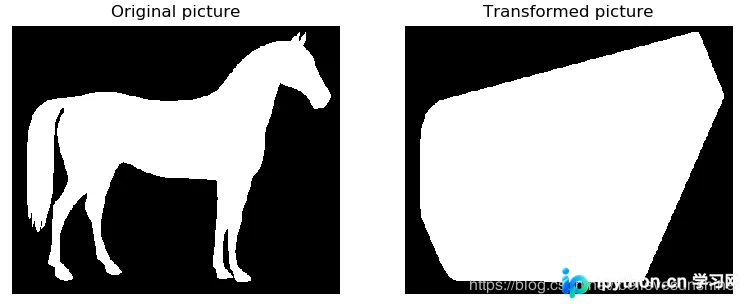
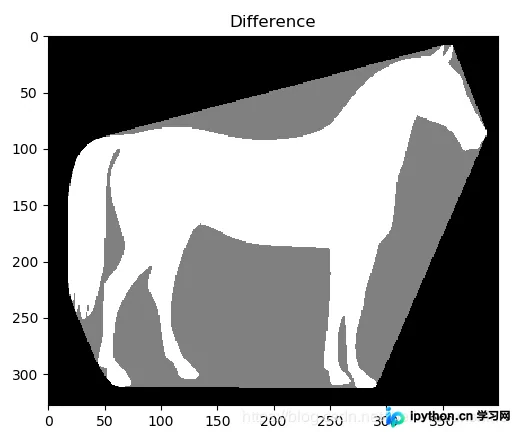
以上就是本文的全部内容,希望对大家的学习有所帮助,也希望大家多多支持本站。
本站声明
本文内容仅供参考,不代表本站观点。转载或引用请注明出处。如发现内容问题,请通过联系我们页面反馈。















