


Python使用WordCloud生成英文词云图完整教程

发布时间:2026-10-13 |
6人浏览过
本文详细介绍如何利用Python的wordcloud模块生成英文词云图。通过读取文本文件,配置字体、背景颜色、图片尺寸及最大词数等关键参数,实现自定义词云效果。代码示例展示了从导入模块、读取数据到生成并显示图片的全过程,适用于基础数据可视化需求。
Python生成英文词云图的方法
利用wordcloud模块可以生成词云图,以下测试文本内容为:
Betty Botter bought some butter but she said the butter's bitter. If I put it in my batter it will make my batter bitter. So, she bought some better butter, better than the bitter butter and she put it in her batter and her batter was not bitter. So 'twas good that Betty Botter bought some better butter.
生成词云图的具体代码如下:
#导入生成云图模块
from wordcloud import WordCloud
with open("F:/python入门/数据2/fenci_test2.txt" ,encoding="utf-8")as file:
  #读取文本
  text=file.read()
  #设置词云的字体、背景颜色、宽、高、字数
  wordcloud=WordCloud(font_path="C:/Windows/Fonts/Tahoma.ttf",
  background_color="black",width=600,
  height=300,max_words=50).generate(text)
  #生成图片
  image=wordcloud.to_image()
  #显示图片
  image.show()
运行结果如下:
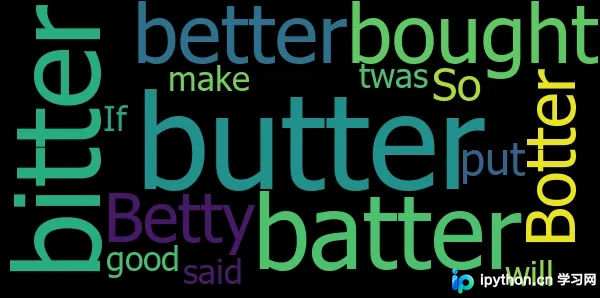
以上是本文的全部内容,希望对各位的学习有所帮助,也欢迎大家继续支持本站。
本站声明
本文内容仅供参考,不代表本站观点。转载或引用请注明出处。如发现内容问题,请通过联系我们页面反馈。















