


matplotlib图例位置loc参数详解与gnuplot图例配置指南

本文详细介绍matplotlib中plt.legend()函数的loc属性,包括'best'、数字0及多种字符串位置选项的具体用法,并附带完整绘图代码示例。此外,补充讲解了gnuplot中set key命令的配置语法,涵盖图例显示位置、排列方式(水平/垂直)、字体及间距调整方法,帮助开发者优化图表可读性。
matplotlib图例位置loc参数详解
在使用matplotlib进行绘图时,通常需要为图形添加说明或补充信息。此时,图例(legend)的设置至关重要。通常情况下,将loc属性设置为'best'即可自动选择最佳位置,满足大多数场景的需求。
plt.legend(handles = [l1, l2,], labels = ['a', 'b'], loc = 'best')
或者直接使用数字0来代表最佳位置。
plt.legend(handles = [l1, l2,], labels = ['a', 'b'], loc = 0)
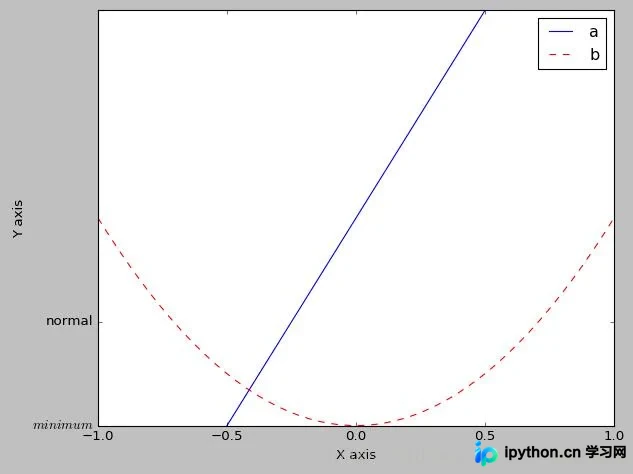
除了'best'之外,loc属性还支持多种具体的位置字符串选项。
'upper right', 'upper left', 'lower left', 'lower right', 'right', 'center left', 'center right', 'lower center', 'upper center', 'center'
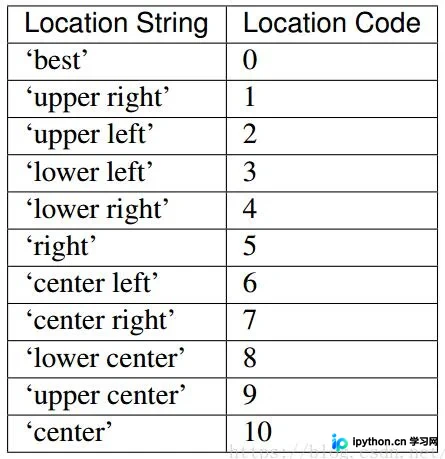
上述内容涵盖了图例位置的主要快捷设置方式,足以应对一般性的绘图需求。
以下是一个完整的演示示例。
import matplotlib.pyplot as plt
import numpy as np

# 绘制普通图像
x = np.linspace(-1, 1, 50)
y1 = 2 * x + 1
y2 = x**2

plt.figure()
# 在绘制时设置lable, 逗号是必须的
l1, = plt.plot(x, y1, label = 'line')
l2, = plt.plot(x, y2, label = 'parabola', color = 'red', linewidth = 1.0, linestyle = '--')

# 设置坐标轴的取值范围
plt.xlim((-1, 1))
plt.ylim((0, 2))

# 设置坐标轴的lable
plt.xlabel('X axis')
plt.ylabel('Y axis')

# 设置x坐标轴刻度, 原来为0.25, 修改后为0.5
plt.xticks(np.linspace(-1, 1, 5))
# 设置y坐标轴刻度及标签, $$是设置字体
plt.yticks([0, 0.5], ['$minimum$', 'normal'])

# 设置legend
plt.legend(handles = [l1, l2,], labels = ['a', 'b'], loc = 'best')
plt.show()
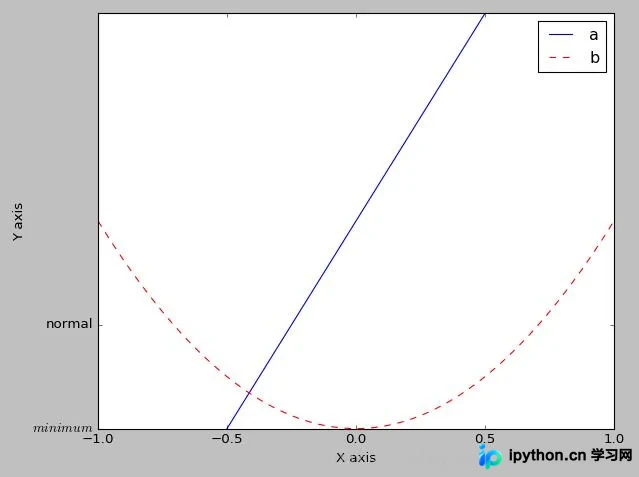
运行上述代码后的输出结果如下图所示。
gnuplot图例配置语法与示例
补充知识:关于gnuplot中图例(key/legend)的位置和大小设置方法。
首先通过几个具体示例来了解基本配置。
//不显示图例。 unset key //设置图例 显示在图形(内)的顶部居中,并且多个图例水平显示。 set key top horizontal center //设置图例 显示在图形(外)的顶部居中,并且多个图例水平显示。 set key top outside horizontal center //设置图例 显示的字体并加粗。 set key font "Times,18,Bold" //调整图例行间隔 set key spacing 3 //调整图例中线段示例长度 set key samplen 2
接下来介绍set key命令的语法规则。
Syntax:
   set key {on|off} {default}
       {{inside | outside} | {lmargin | rmargin | tmargin | bmargin}
        | {at <position>}}
       {left | right | center} {top | bottom | center}
       {vertical | horizontal} {Left | Right}
       {{no}reverse} {{no}invert}
       {samplen <sample_length>} {spacing <vertical_spacing>}
       {width <width_increment>}
       {height <height_increment>}
       {{no}autotitle {columnheader}}
       {title "<text>"} {{no}enhanced}
       {{no}box { {linestyle | ls <line_style>}
            | {linetype | lt <line_type>}
             {linewidth | lw <line_width>}}}
   unset key
   show key
Elements within the key are stacked according to vertical or horizontal. In the case of vertical, the key occupies as few columns as possible. That is, elements are aligned in a column until running out of vertical space at which point a new column is started. In the case of horizontal, the key occupies as few rows as possible.
图例的内容排列方式取决于我们设置的水平或垂直模式,系统会进行堆叠显示。
当设置为垂直显示时,gnuplot会尽可能减少行数来放置图例。如果单行无法容纳所有图例项,系统会自动开启新的一行继续显示。
当设置为水平显示时,gnuplot会尽可能减少列数来放置图例。如果单列无法容纳所有图例项,系统会自动开启新的一列继续放置。
The vertical spacing between lines is controlled by spacing. The spacing is set equal to the product of the pointsize, the vertical tic size, and vertical_spacing. The program will guarantee that the vertical spacing is no smaller than the character height.
The defaults for set key are on, right, top, vertical, Right, noreverse, noinvert, samplen 4, spacing 1.25, title “”, and nobox.
以上内容关于matplotlib图例loc属性说明及gnuplot图例配置方法,旨在为读者提供参考。希望这些信息能对大家有所帮助,欢迎继续支持本站获取更多技术分享。
本站声明
本文内容仅供参考,不代表本站观点。转载或引用请注明出处。如发现内容问题,请通过联系我们页面反馈。















