


利用Python实现《西游记》章节汉字注音与排版自动化

本文介绍如何使用Python的pypinyin和openpyxl库,自动为《西游记》章节标题添加汉语拼音。通过构建三层二维数据结构处理汉字与拼音对应关系,并生成Excel表格进行居中排版,最终导出为PDF。文章详细记录了从数据结构设计到解决Word竖版兼容问题的完整过程,包含核心代码实现与调试经验。
项目背景与技术栈
起因很简单,为了给读一年级的孩子标注《三国演义》和《西游记》章节的汉语拼音,因为孩子每天朗读时遇到不少生僻字,家人建议手动注音。作为程序员,自然想到用程序解决,特别是利用Python这一强大工具。以下列出实现此功能所需的技术栈。
编程语言:Python3.7
依赖插件:pypinyin 0.37.0 以及 openpyxl 3.0.3
开发环境:PyCharm 社区版
关于使用openpyxl操作Excel的教程在网络上非常丰富,此处不再赘述。
核心算法与数据结构设计
利用pypinyin将汉字转换为汉语拼音非常简单,网上相关的API示例众多。其核心实现仅需一行代码即可完成。以下分享部分关键代码片段:
# 带声调的(默认)
def yinjie(word):
  sentens = "".join(word.split())
  print(sentens)
  s = ''
  # heteronym=True开启多音字
  for i in pypinyin.pinyin(word, heteronym=False):
    s = s + ''.join(i) + " "
  return s
上述代码足以实现基础的汉字转拼音功能,但为了满足特定的数据结构要求,并未直接采用该简单方法。下面详细说明所采用的数据结构设计。
核心数据结构为三层二维数组,这是实现功能的关键:
第一层结构由单个汉字及其对应的汉语拼音组成。
示例数据如下:['dì', '第'], ['yī', '一'], ['bǎi', '百'], ['huí', '回']
第二层结构按照标题中的空格进行分词处理。
示例数据如下:[['dì', '第'], ['yī', '一'], ['bǎi', '百'], ['huí', '回']], [['jìng', '径'], ['huí', '回'], ['dōng', '东'], ['tǔ', '土']], [['wǔ', '五'], ['shèng', '圣'], ['chéng', '成'], ['zhēn', '真']]
第三层结构则是所有标题的集合。
即第二层的汇总,由于《西游记》共有100个章节标题,因此第三层包含100个上述结构的集合。
这是最初生成的成果物,存在对应关系混乱且难以阅读的问题。

家人提供了一个参考案例,如下图所示:
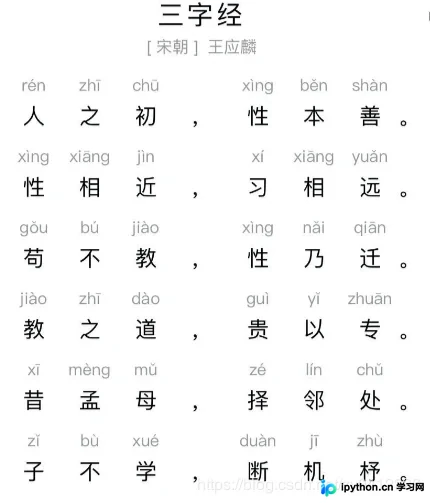
作为程序员,我们不应示弱,当然可以使用Python来解决这个问题。
排版方案演进与实现
最初的目标是将文字写入Word文档,因此使用了Python-docx库。然而,由于汉语拼音长度不一,导致对齐困难。若通过计算拼音长度来推算汉字位置,算法将极其复杂,涉及排版逻辑。我并非排版专家,因此该方案行不通。
这类似于数学应用题,思路打开后其实并不复杂:只需创建表格,让汉语拼音和汉字居中显示即可。在使用Python-docx尝试许久后,发现竖版Word无法同时容纳汉字和拼音,导致排版失败。效果如下图所示:
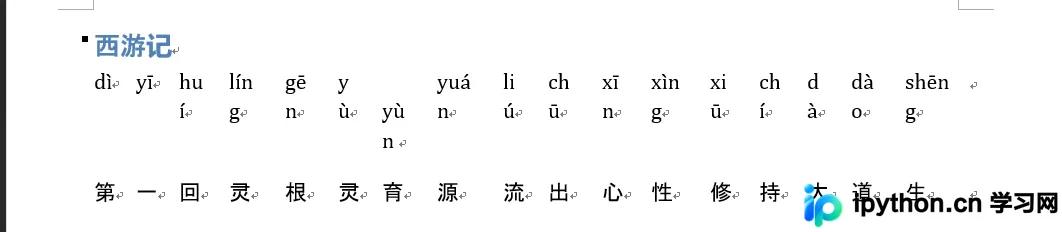
看来思路需要调整。
放弃Python-docx,改用openpyxl操作Excel。这是第一次尝试生成的成果物,看起来效果尚可。
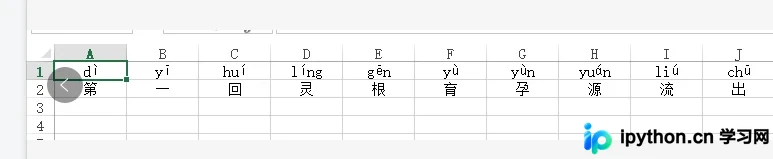
最终确定的成果物格式。
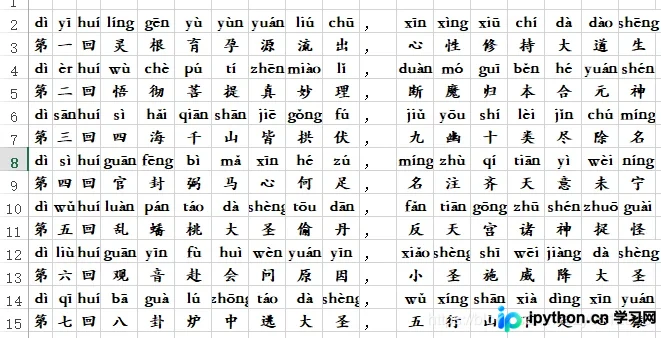
将Excel文件转换为PDF后的效果。
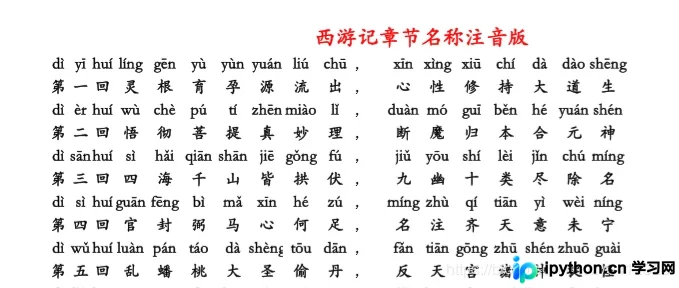
代码实现与调试总结
经过反复调试,最终完成。整个过程耗时近6小时,主要时间消耗在数据结构设计和排版逻辑上。此外,语法细节也带来了挑战:作为从Net转向Java的开发者,对Python中的逻辑运算符感到困惑。在Net和Java中,逻辑“与”通常用&&表示,而在Python中则是and。因这一基础语法差异,修改了大量代码并经过多次调试。基础不牢确实会导致开发效率低下。以下是完整代码:
import pypinyin
from openpyxl import Workbook
from openpyxl.drawing.text import Font
from openpyxl.styles import Font, colors, Alignment
from pulgin.Tools import Tools
class HanZhiAddPinYin:
  def __init__(self):
    pass
  def signWord(self,word):
    pinyicontent = pypinyin.pinyin(word, heteronym=False)
    word_pinyin = [pinyicontent[0][0], word]
    return word_pinyin
  def sentences(self,keyWords):
    listsentense = []
    for duanyu in keyWords.split():
      print(duanyu)
      duanyu_list = []
      for word in duanyu:
        duanyu_list.append(self.signWord(word))
      listsentense.append(duanyu_list)
    print(
      listsentense
    )
    return listsentense
  def articles(self,txt_file_path):
    article = []
    encoding = Tools.get_file_encoding(txt_file_path)
    f = open(txt_file_path, "r", encoding=encoding, errors='ignore') # 返回一个文件对象
    line = f.readline().strip() # 调用文件的 readline()方法
    index = 1
    while line:
      article.append(self.sentences(line))
      line = f.readline()
      index = index + 1
    f.close()
    return article
  def builder_execl(self,word_title, save_path, article):
    """
    构建execl文件
    :param word_title: sheet页面的名词
    :param save_path: execl保存路径
    :param article: 文章内容集合
    :return:
    """
    wb = Workbook()
    ws = wb.active
    ws.title = word_title
    ws.sheet_properties.tabColor = "1072BA" # 设置背景
    xl_sheet = wb.get_sheet_by_name(word_title)
    execl_cell_width = 4.6
    for sentences in article:
      column_index = 1
      # sentences 2行数据
      # 获取行数
      pinyin_row = xl_sheet.max_row + 1 # 拼音所在的行
      hanzi_row = pinyin_row + 1 # 汉字所在的行
      sentences_index = 0
      for duanyu in sentences: # ['dì', '第'], ['yī', '一'], ['huí', '回']
        for sign_word in duanyu: # ['dì', '第']
          # region 设置样式
          # 设置样式
          execl_cell_font = Font(name='华文楷体', size=12, italic=False, color=colors.BLACK, bold=True)
          execl_pinyin_row = xl_sheet.cell(row=pinyin_row, column=column_index)
          execl_hanzi_row = xl_sheet.cell(row=hanzi_row, column=column_index)
          execl_pinyin_row.alignment = Alignment(horizontal='center', vertical='center')
          execl_hanzi_row.alignment = Alignment(horizontal='center', vertical='center')
          execl_pinyin_row.font = execl_cell_font
          execl_hanzi_row.font = execl_cell_font
          xl_sheet.column_dimensions['A'].width = 3
          xl_sheet.column_dimensions['B'].width = 3
          xl_sheet.column_dimensions['C'].width = 3
          xl_sheet.column_dimensions['D'].width = execl_cell_width
          xl_sheet.column_dimensions['E'].width = execl_cell_width
          xl_sheet.column_dimensions['F'].width = execl_cell_width
          xl_sheet.column_dimensions['H'].width = execl_cell_width
          xl_sheet.column_dimensions['I'].width = execl_cell_width
          xl_sheet.column_dimensions['G'].width = execl_cell_width
          xl_sheet.column_dimensions['J'].width = execl_cell_width
          xl_sheet.column_dimensions['K'].width = execl_cell_width
          xl_sheet.column_dimensions['L'].width = execl_cell_width
          xl_sheet.column_dimensions['M'].width = execl_cell_width
          xl_sheet.column_dimensions['N'].width = execl_cell_width
          xl_sheet.column_dimensions['O'].width = execl_cell_width
          xl_sheet.column_dimensions['P'].width = execl_cell_width
          xl_sheet.column_dimensions['Q'].width = execl_cell_width
          xl_sheet.column_dimensions['R'].width = execl_cell_width
          xl_sheet.column_dimensions['S'].width = execl_cell_width
          xl_sheet.column_dimensions['T'].width = execl_cell_width
          xl_sheet.column_dimensions['U'].width = execl_cell_width
          xl_sheet.column_dimensions['V'].width = execl_cell_width
          xl_sheet.column_dimensions['W'].width = execl_cell_width
          # endregion
          xl_sheet.cell(row=pinyin_row, column=column_index, value=sign_word[0])
          xl_sheet.cell(row=hanzi_row, column=column_index, value=sign_word[1]) # 0 第一百回 1 径回东土 2 五圣成真
          # print(sentences_index)
          # print(len(duanyu) + len(sentences[0]))
          # print(column_index)
          if sentences_index == 1 and len(duanyu) + len(sentences[0]) == column_index:#坑人的and
            xl_sheet.cell(row=pinyin_row, column=column_index + 1, value=",")
            xl_sheet.cell(row=hanzi_row, column=column_index + 1, value=",")
            column_index = column_index + 1 # 遇到断句多增加一列向后
          column_index = column_index + 1 # 列向后
        sentences_index = sentences_index + 1 # 三个短语计数器
    wb.save(save_path)
总结
至此,关于基于Python第三方插件实现《西游记》章节标注汉语拼音的方法介绍完毕。如需了解更多Python第三方插件标注拼音的相关内容,请搜索本站历史文章或继续浏览后续文章。希望大家多多支持本站!
本站声明
本文内容仅供参考,不代表本站观点。转载或引用请注明出处。如发现内容问题,请通过联系我们页面反馈。















