


Python多线程结合数据库连接池优化查询性能

本文介绍在Python中利用多线程和数据库连接池优化大量数据查询的方法。通过对比普通循环查询与多线程并发查询的执行结果,展示如何限制最大连接数和线程数,从而减少CPU等待IO的时间,提升程序运行效率。
背景与问题描述
一、背景
当数据量庞大时,程序执行时间往往主要消耗在等待单次数据库查询返回结果上。在此过程中,CPU处于等待I/O的空闲状态,这不仅浪费了CPU资源,也延长了总耗时。虽然批量查询也是一种方案,但并非所有场景都支持批量操作。针对这种非CPU密集型(即不大量占用CPU资源)的计算场景,在Python中采用多线程技术是一个极佳的选择。
核心技术知识点
二、核心知识点
本文涉及的关键技术包括:数据库连接池的应用及其优势、Python多线程的使用,以及队列数据结构的应用。
数据库连接池用于限制数据库的最大连接数,每次建立的连接均可复用,甚至可限制单个连接的复用次数(本例中未启用此限制)。需要注意的是,数据库连接池设定的最大连接数应大于或等于程序开启的最大线程数。通常逻辑是,每个线程独占一个数据库连接可使程序达到最高速度;若连接池最大连接数小于线程数,则可能因同时尝试建立超过允许数量的连接而引发风险。使用数据库连接池的优势在于,它能提供线程间共享的数据库连接,并自动管理连接状态,从而有效解决Python多线程并发操作数据库时常见的链接超时、连接丢失或操作超时等问题。
Python多线程:在程序等待I/O返回的间隙,调用多线程并发执行数据库查询操作。
队列:基于数据结构中的队列概念,通常采用先进先出(FIFO)模式。本例主要利用队列“取一个元素则数量减一”的特性来控制并发线程数。虽然使用列表也能实现类似功能,且本例并未强调严格的顺序关系,但使用队列有助于练习相关数据结构的应用。
代码实现与对比
三、代码对比示例
数据库结构截图如下:
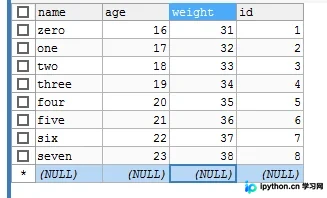
第一段代码演示:正常循环查询并打印执行时间。
#!/usr/bin/python
# -*- coding=utf-8 -*-
import time
import threading
import MySQLdb
import Queue
from MySQLdb.cursors import DictCursor
from DBUtils.PooledDB import PooledDB

def mysql_connection():
  host = 'localhost'
  user = 'root'
  port = 3306
  password = '123456'
  db = 'test'
  charset = 'utf8'
  limit_count = 3 # 最低预启动数据库连接数量
  pool = PooledDB(MySQLdb, limit_count, maxconnections=15, host=host, user=user, port=port, passwd=password, db=db, charset=charset,
      use_unicode=True, cursorclass=DictCursor)
  return pool


start = time.time()
pool = mysql_connection()

for id in range(50):
  con = pool.connection()
  cur = con.cursor()
  sql = '''select id,name,age,weight from test where id = %s '''%id
  cur.execute(sql)
  time.sleep(0.5)
  result = cur.fetchall()
  if result:
    print('this is tread %s (%s,%s,%s,%s)'%(id,result[0]['id'],result[0]['name'],result[0]['age'],result[0]['weight']))
  else:
    print('this tread %s result is none'%id)

end = time.time() - start
print(end)
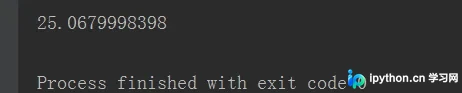
执行结果如下:
第二段代码演示:限制数据库连接池最大连接数为15个,并使用队列将最大线程数限制为10个。
#!/usr/bin/python
# -*- coding=utf-8 -*-
import time
import threading
import MySQLdb
import Queue
from MySQLdb.cursors import DictCursor
from DBUtils.PooledDB import PooledDB

def mysql_connection():
  host = 'localhost'
  user = 'root'
  port = 3306
  password = '123456'
  db = 'test'
  charset = 'utf8'
  limit_count = 3 # 最低预启动数据库连接数量
  pool = PooledDB(MySQLdb, limit_count, maxconnections=15, host=host, user=user, port=port, passwd=password, db=db, charset=charset,
      use_unicode=True, cursorclass=DictCursor)
  return pool

def tread_connection_db(id):
  con = pool.connection()
  cur = con.cursor()
  sql = '''select id,name,age,weight from test where id = %s '''%id
  cur.execute(sql)
  time.sleep(0.5)
  result = cur.fetchall()
  if result:
    print('this is tread %s (%s,%s,%s,%s)'%(id,result[0]['id'],result[0]['name'],result[0]['age'],result[0]['weight']))
  else:
    print('this tread %s result is none'%id)
  con.close()


if __name__=='__main__':
  start = time.time()
  #创建线程连接池,最大限制15个连接
  pool = mysql_connection()
  #创建队列,队列的最大个数及限制线程个数
  q=Queue.Queue(maxsize=10)
  #测试数据,多线程查询数据库
  for id in range(50):
    #创建线程并放入队列中
    t = threading.Thread(target=tread_connection_db, args=(id,))
    q.put(t)
    #队列队满
    if q.qsize()==10:
      #用于记录线程,便于终止线程
      join_thread = []
      #从对列取出线程并开始线程,直到队列为空
      while q.empty()!=True:
        t = q.get()
        join_thread.append(t)
        t.start()
      #终止上一次队满时里面的所有线程
      for t in join_thread:
        t.join()
  end = time.time() - start
  print(end)
程序注释已尽量清晰,执行结果如下:

结论与总结
四、结论
通过对比执行结果,可以直观看出优化效果。
至此,关于Python使用多线程查询数据库的实现示例介绍完毕。如需了解更多Python多线程查询数据库的相关内容,欢迎搜索本站历史文章或继续浏览后续文章。感谢大家的支持!
本站声明
本文内容仅供参考,不代表本站观点。转载或引用请注明出处。如发现内容问题,请通过联系我们页面反馈。















