


Python实现简单聊天机器人的两种方法

发布时间:2026-10-14 |
2人浏览过
本文介绍如何使用Python实现简单的聊天机器人。首先通过AIML库和本地语料库(如Alice)构建离线对话系统,其次利用图灵机器人API接口实现在线智能回复。文章包含完整代码示例,涵盖模块安装、API调用及异常处理,适合Python初学者探索AI交互应用。
基于AIML库的本地聊天机器人实现
在午休期间,笔者偶然阅读了一篇关于“Python实现机器人”的博客,觉得颇具趣味。受此启发,笔者尝试编写了一个基础的Python聊天程序,具体源码如下所示:
# -*- coding: utf-8 -*-
import aiml
import sys
import os


def get_module_dir(name):
 print("module", sys.modules[name])
 path = getattr(sys.modules[name], '__file__', None)
 print(path)
 if not path:
 raise AttributeError('module %s has not attribute __file__' % name)
 return os.path.dirname(os.path.abspath(path))


alice_path = get_module_dir('aiml') + '\\botdata\\alice'

os.chdir(alice_path) # 切换到语料库所在工作目录

alice = aiml.Kernel() # 创建机器人alice对象
alice.learn("startup.xml") # 加载...\\botdata\\alice\\startup.xml
alice.respond('LOAD ALICE') # 加载...\\botdata\\alice目录下的语料库

while True:
 message = input("Enter your message >> ")
 if("exit" == message):
 exit()
 response = alice.respond(message) # 机器人应答
 print(response)
温馨提示:若在运行过程中提示缺少特定模块,请通过pip命令安装对应的依赖库。
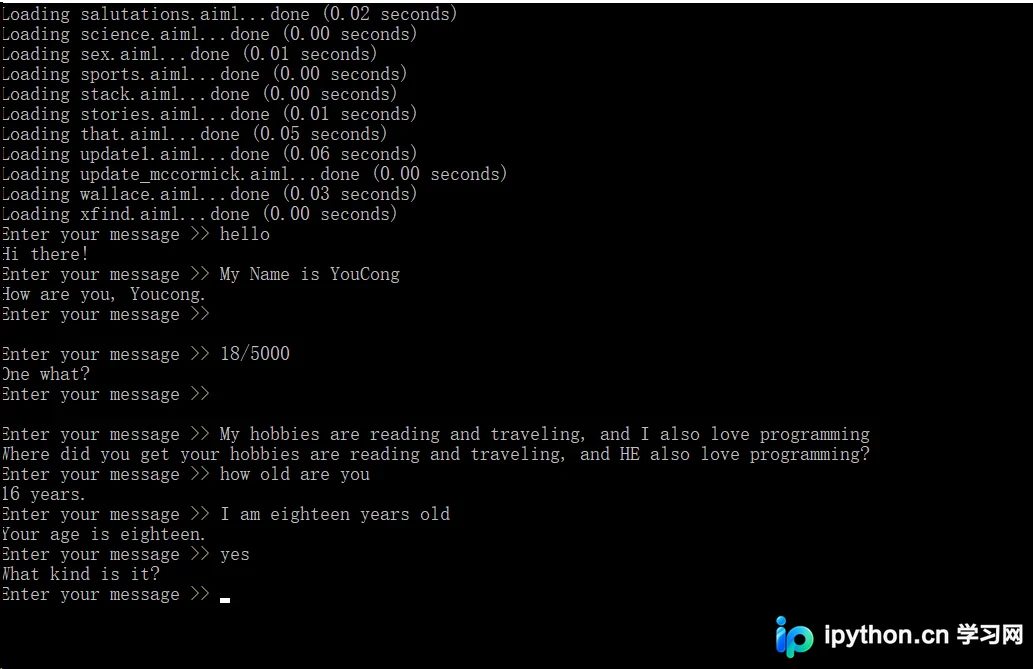
程序运行效果如下图所示:
基于图灵机器人API的在线对话实现
上述示例的不足之处在于仅支持英文对话,不过国内有图灵机器人平台可供替代使用。
基于图灵机器人的实现代码如下:
from urllib.request import urlopen,Request
from urllib.error import URLError
from urllib.parse import urlencode
import json

class TuringChatMode(object):
  """this mode base on turing robot"""

  def __init__(self):
    # API接口地址
    self.turing_url = 'http://www.tuling123.com/openapi/api?'

  def get_turing_text(self,text):
    ''' 请求方式:  HTTP POST
      请求参数:  参数   是否必须    长度     说明
            key    必须     32      APIkey
            info    必须     1-32     请求内容,编码方式为"utf-8"
            userid   必须     32      MAC地址或ID
    '''
    turing_url_data = dict(
      key = 'fcbf9efe277e493993e889eabca5b331',
      info = text,
      userid = '60-14-B3-BA-E1-4D',

    )
    # print("The things to Request is:",self.turing_url + urlencode(turing_url_data))
    self.request = Request(self.turing_url + urlencode(turing_url_data))
    # print("The result of Request is:",self.request)

    try:
      w_data = urlopen(self.request)
      # print("Type of the data from urlopen:",type(w_data))
      # print("The data from urlopen is:",w_data)
    except URLError:
      raise IndexError("No internet connection available to transfer txt data")
      # 如果发生网络错误,断言提示没有可用的网络连接来传输文本信息
    except:
      raise KeyError("Server wouldn't respond (invalid key or quota has been maxed out)")
      # 其他情况断言提示服务相应次数已经达到上限

    response_text = w_data.read().decode('utf-8')
    # print("Type of the response_text :",type(response_text))
    # print("response_text :",response_text)

    json_result = json.loads(response_text)
    # print("Type of the json_result :",type(json_result))
    return json_result['text']

if __name__ == '__main__':
  print("Now u can type in something & input q to quit")

  turing = TuringChatMode()

  while True:
    msg = input("\nMaster:")
    if msg == 'q':
      exit("u r quit the chat !")     # 设定输入q,退出聊天。
    else:
      turing_data = turing.get_turing_text(msg)
      print("Robot:",turing_data)
运行效果图如下所示:
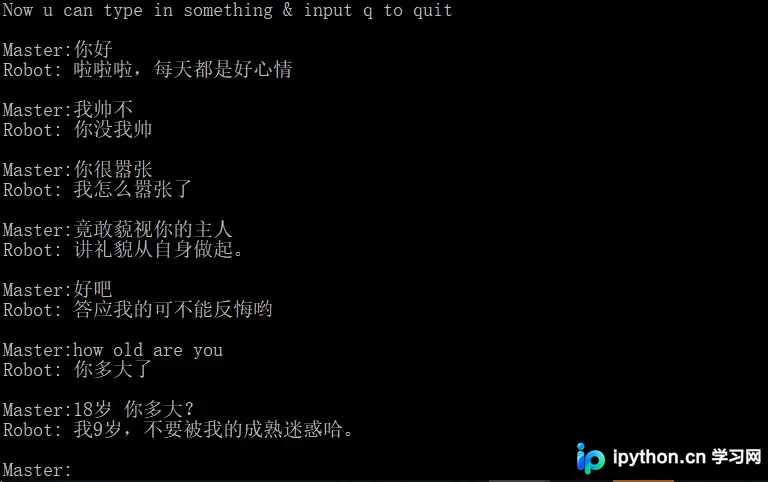
由于该机器人智能化程度有限,偶尔会出现答非所问的情况。
如需了解更多功能,可访问图灵机器人官网:http://www.tuling123.com
编程世界充满乐趣,只要勇于探索,总能发现许多有趣的事物。
以上是关于Python实现机器人聊天的详细内容,更多相关技术文章请关注本站其他文章。
本站声明
本文内容仅供参考,不代表本站观点。转载或引用请注明出处。如发现内容问题,请通过联系我们页面反馈。















