


Python使用matplotlib绘制煤炭周价格波动图:数据读取与处理详解

本文介绍如何使用Python读取包含日期和价格的CSV文件,通过字符串处理将多列数据分离为最高价、最低价和均价列表。利用matplotlib库绘制折线图,并使用reversed()函数调整时间轴顺序,最终生成清晰的周价格波动图表。
Python读取多列数据与matplotlib绘图教程
多列数据的读取与处理
本例使用的数据为煤炭5500大卡周价格的最高价与最低价。左侧展示价格数据表格,右侧为对应的日期信息。
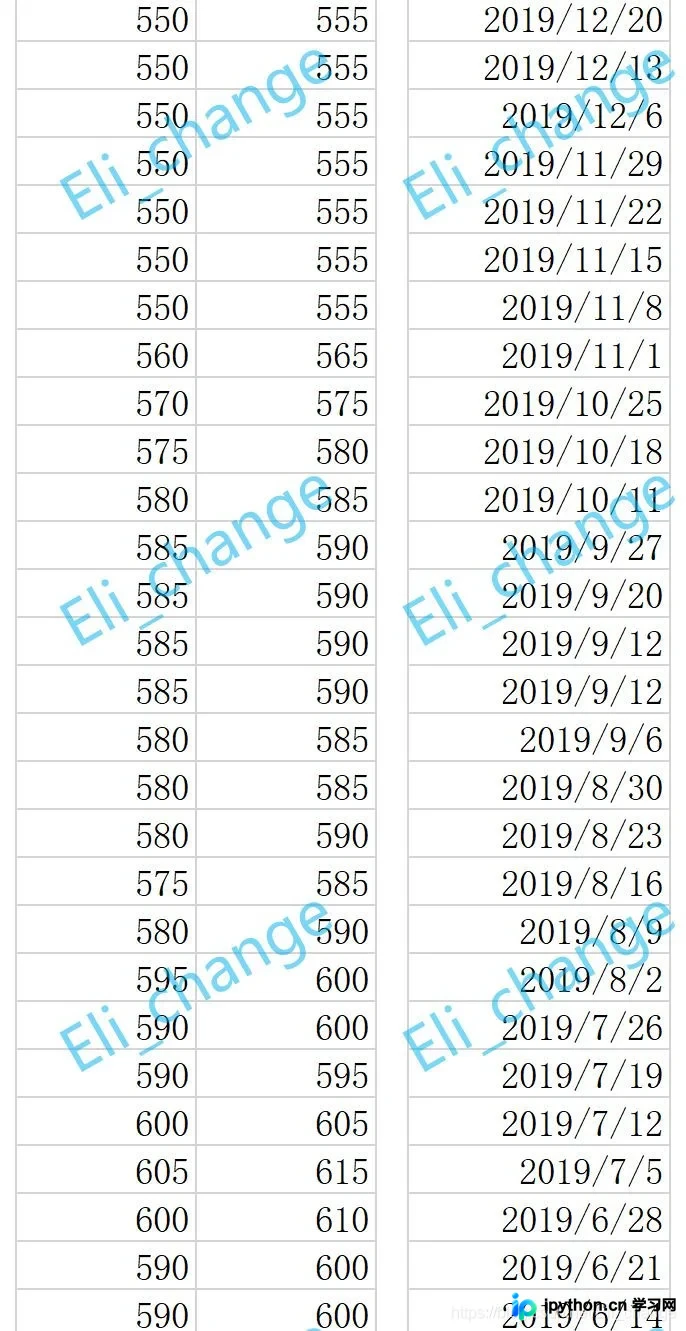
数据导入与预处理
一、导入数据
此处省略基础讲解,如有不清楚之处,请参考上一篇博客。具体实现见代码。
import matplotlib.pyplot as plt
import re
plt.rcParams['font.sans-serif'] = ['SimHei'] # 设置字体
plt.rcParams['axes.unicode_minus'] = False # 设置正负号
# 导入数据,日期
with open('日期.csv', encoding='gbk') as oo:
  day = oo.read()
day_str = day.replace('\n', ',') # 换行替换成逗号
day_list = re.split('[,]', day_str)
list_days = []
for s in range(len(day_list)-1): # 获得时间
  list_days.append(day_list[s])
# 将x转换成时间类型
# 导入数据,金额
with open('煤炭5500周价格波动数据.csv', encoding='gbk') as pp:
  sk = pp.read()
ll = sk.replace('\n', ',') # 换行替换成逗号
list_1 = re.split('[,]', ll) # 分割数据
list_2 = []
for s in range(len(list_1)-1):
  list_2.append(int(float(list_1[s])))
数据已成功读取至相关列表中,现进行输出验证。
输出结果如下: ['2019/12/27', '2019/12/20', '2019/12/13', '2019/12/6', '2019/11/29', '2019/11/22', '2019/11/15', '2019/11/8', '2019/11/1', '2019/10/25', '2019/10/18', '2019/10/11', '2019/9/27', '2019/9/20', '2019/9/12', '2019/9/12', '2019/9/6', '2019/8/30', '2019/8/23', '2019/8/16', '2019/8/9', '2019/8/2', '2019/7/26', '2019/7/19', '2019/7/12', '2019/7/5', '2019/6/28', '2019/6/21', '2019/6/14', '2019/6/7', '2019/5/31', '2019/5/24', '2019/5/17', '2019/5/10', '2019/4/26', '2019/4/19', '2019/4/12', '2019/4/5', '2019/3/29', '2019/3/22', '2019/3/15', '2019/3/8', '2019/3/1', '2019/2/22', '2019/2/15', '2019/2/1', '2019/1/25', '2019/1/18', '2019/1/18', '2019/1/11', '2019/1/4', '2018/12/28'] [550, 555, 550, 555, 550, 555, 550, 555, 550, 555, 550, 555, 550, 555, 550, 555, 560, 565, 570, 575, 575, 580, 580, 585, 585, 590, 585, 590, 585, 590, 585, 590, 580, 585, 580, 585, 580, 590, 575, 585, 580, 590, 595, 600, 590, 600, 590, 595, 600, 605, 605, 615, 600, 610, 590, 600, 590, 600, 590, 600, 595, 600, 610, 620, 615, 620, 615, 620, 615, 625, 620, 625, 630, 640, 620, 630, 620, 625, 620, 630, 625, 630, 635, 645, 615, 625, 600, 605, 600, 605, 585, 590, 590, 595, 590, 595, 590, 595, 580, 590, 585, 595, 575, 580]
价格数据分组与时间轴调整
二、处理价格数据
观察数据可知,索引为0、2、4、6、8等偶数位的数值代表周最低价,而奇数位的数值代表周最高价。我们可以通过循环遍历的方式提取相关数据。
具体代码如下。
通过上述方法即可实现数据分组。同理,该方法也可用于导入和处理多列数据。
观察发现,时间列表按降序排列,我们需要将其转置,使列表数据变为升序。方法一:调整导入的CSV文件的数据顺序。方法二:引入reversed()函数。该函数支持两种写法,主要用于将列表、range()对象或字典内的数据进行逆向排列。
逆转对象:list_x
写法一、
xxx = reversed(list_x)
写法二、
直接使用
list(reversed(list_x))
aaa = reversed(list_average) 转置一个作为样例
# 以上分割取得list_high,low,average
# 设置x轴,y轴标签,设置表格标题
plt.xlabel('时间')
plt.ylabel('价格')
plt.title('最高价/最低价/均价周期波动图')
plt.legend(loc='upper right')
plt.figure(figsize=(9, 8))输出图片大小900px*800px
使用matplotlib绘制价格波动图
图表制作
数据已处理完毕,接下来生成图表。
import matplotlib.pyplot as plt
import re
plt.rcParams['font.sans-serif'] = ['SimHei'] # 设置字体
plt.rcParams['axes.unicode_minus'] = False # 设置正负号
# 导入数据,日期
with open('日期.csv', encoding='gbk') as oo:
  day = oo.read()
day_str = day.replace('\n', ',') # 换行替换成逗号
day_list = re.split('[,]', day_str)
list_days = []
for s in range(len(day_list)-1): # 获得时间
  list_days.append(day_list[s])
print(list_days)
# 将x转换成时间类型
# 导入数据,金额
with open('煤炭5500周价格波动数据.csv', encoding='gbk') as pp:
  sk = pp.read()
ll = sk.replace('\n', ',') # 换行替换成逗号
list_1 = re.split('[,]', ll) # 分割数据
list_2 = []
for s in range(len(list_1)-1):
  list_2.append(int(float(list_1[s])))
print(list_2)
list_high = [] # 最高
list_low = [] # 最低
list_average = [] # 均值
for k in range(len(list_2)):
  if k % 2 == 0:
    list_low.append(list_2[k])
    list_average.append((list_2[k]+list_2[k+1])/2)
  else:
    list_high.append(list_2[k])
aaa = reversed(list_average)
# 以上分割取得list_high,low,average
# 设置x轴,y轴标签,设置表格标题
plt.xlabel('时间')
plt.ylabel('价格')
plt.title('最高价/最低价/均价周期波动图')
# 设置标注

plt.figure(figsize=(9, 8))

# 制作折现图
plt.plot(range(len(list_low)), list(reversed(list_high)), label='最高价', color='brown',marker='o',markerfacecolor='c',markersize='5')
plt.plot(range(len(list_low)), list(reversed(list_low)), label='最低价', color='skyblue',marker='s',markerfacecolor='r',markersize='5')
plt.plot(range(len(list_low)), list(reversed(list_average)), label='均价', color='lawngreen',marker='h',markerfacecolor='coral',markersize='5')
# 设置标注
plt.legend(loc='upper right') # 右上upper right 右下lower right
plt.show()
这是目前生成的折线图效果。
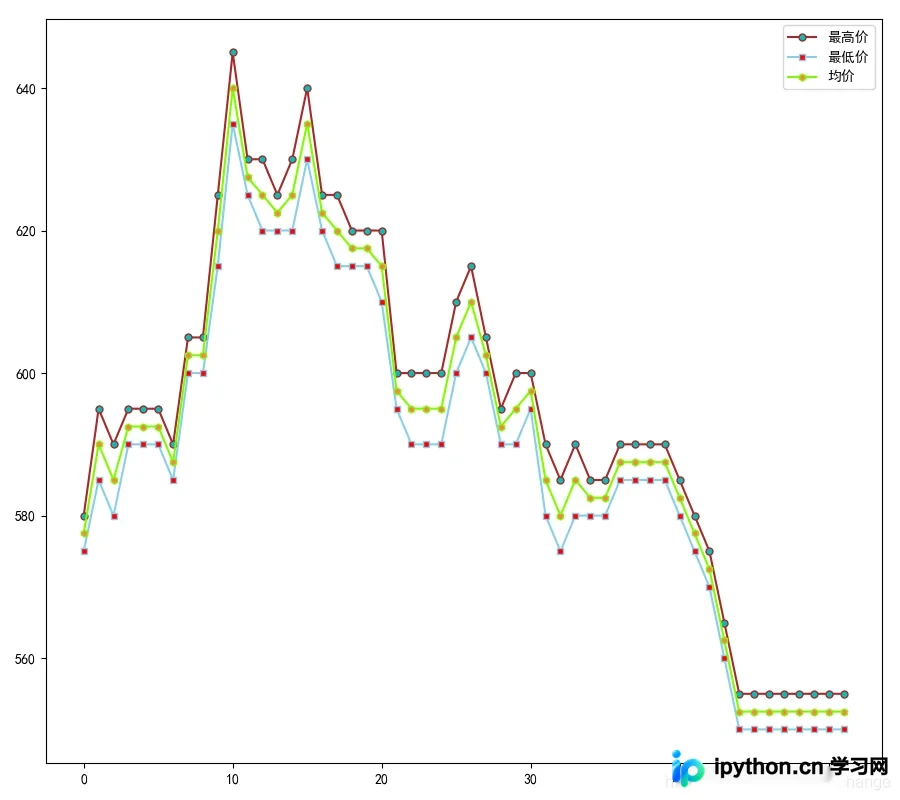
替换x轴坐标点,将其更改为日期显示。
此处使用到plt.xticks()函数。
书写格式:
plt.xticks(被替换的数值(数据长的的列表),替换的数据,数据方向(默认横向))
plt.xticks(range(len(list_low)), list(reversed(list_days)), rotation='vertical')
vertical:数值方向,也可以写角度。
至此,全部代码编写完成。
结束:最终代码
import matplotlib.pyplot as plt
import re
plt.rcParams['font.sans-serif'] = ['SimHei'] # 设置字体
plt.rcParams['axes.unicode_minus'] = False # 设置正负号
# 导入数据,日期
with open('日期.csv', encoding='gbk') as oo:
  day = oo.read()
day_str = day.replace('\n', ',') # 换行替换成逗号
day_list = re.split('[,]', day_str)
list_days = []
for s in range(len(day_list)-1): # 获得时间
  list_days.append(day_list[s])
print(list_days)
# 将x转换成时间类型
# 导入数据,金额
with open('煤炭5500周价格波动数据.csv', encoding='gbk') as pp:
  sk = pp.read()
ll = sk.replace('\n', ',') # 换行替换成逗号
list_1 = re.split('[,]', ll) # 分割数据
list_2 = []
for s in range(len(list_1)-1):
  list_2.append(int(float(list_1[s])))
print(list_2)
list_high = [] # 最高
list_low = [] # 最低
list_average = [] # 均值
for k in range(len(list_2)):
  if k % 2 == 0:
    list_low.append(list_2[k])
    list_average.append((list_2[k]+list_2[k+1])/2)
  else:
    list_high.append(list_2[k])
aaa = reversed(list_average)
# 以上分割取得list_high,low,average
# 设置x轴,y轴标签,设置表格标题
plt.xlabel('时间')
plt.ylabel('价格')
plt.title('最高价/最低价/均价周期波动图')
# 设置标注

plt.figure(figsize=(9, 8))

plt.xticks(range(len(list_low)), list(reversed(list_days)), rotation='vertical')
# 设置折现图
plt.plot(range(len(list_low)), list(reversed(list_high)), label='最高价', color='brown',marker='o',markerfacecolor='c',markersize='5')
plt.plot(range(len(list_low)), list(reversed(list_low)), label='最低价', color='skyblue',marker='s',markerfacecolor='r',markersize='5')
plt.plot(range(len(list_low)), list(reversed(list_average)), label='均价', color='lawngreen',marker='h',markerfacecolor='coral',markersize='5')
# 设置标注
plt.legend(loc='upper right')
plt.show()
结果示意图:
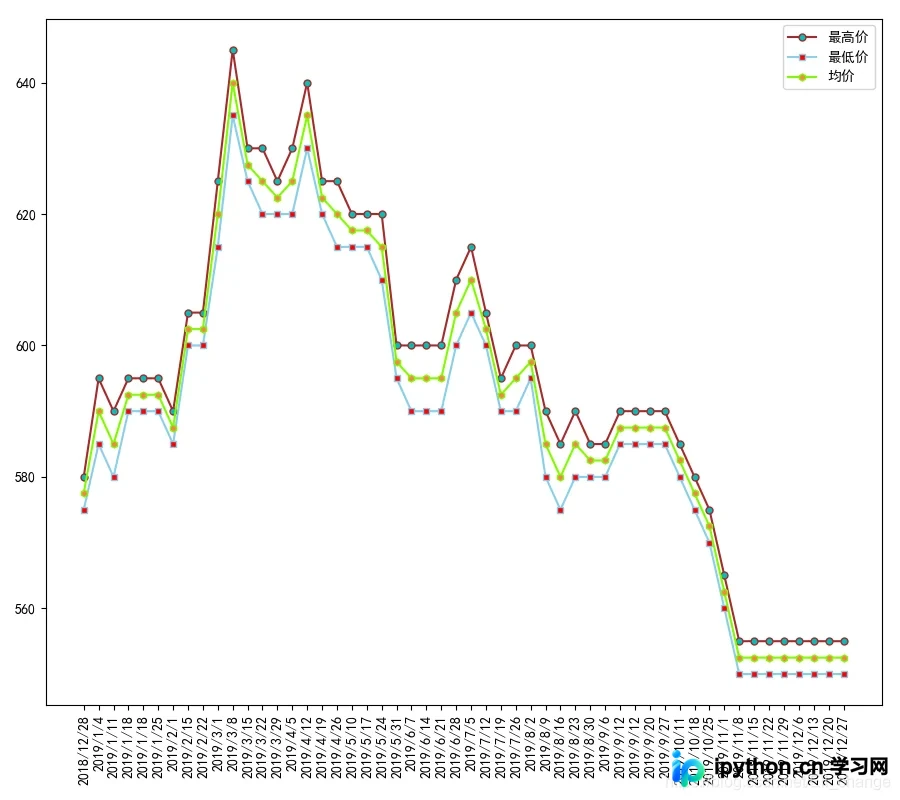
总结
到此这篇关于Python读取多列数据以及用matplotlib制作图片的文章就介绍到这了,更多相关Python读取多列数据用matplotlib制作图片内容请搜索本站以前的文章或继续浏览下面的相关文章希望大家以后多多支持本站!
本站声明
本文内容仅供参考,不代表本站观点。转载或引用请注明出处。如发现内容问题,请通过联系我们页面反馈。















