


Python使用ctypes调用C++ DLL动态链接库完整指南

本文详细介绍如何使用Python的ctypes库调用C++编译生成的DLL动态链接库。内容涵盖基础函数调用、通过实例方法更新全局变量、指定函数参数与返回类型(argtypes/restype),以及处理数组和结构体指针。通过Visual Studio生成64位DLL并结合Python代码示例,帮助开发者解决跨语言调用的常见类型转换与内存管理问题。
Python调用DLL动态链接库概述
近期项目需要利用Python调用由C++编译生成的DLL动态链接库,因此对ctypes库的基础用法进行了学习与实践。
ctypes是Python标准库中用于调用外部函数的组件,它提供了与C语言兼容的数据类型,并支持在DLL或共享库中调用函数。
调用DLL中的导出函数
一、Python调用DLL中的导出函数
1. 使用Visual Studio生成DLL
1.1 新建动态链接库项目
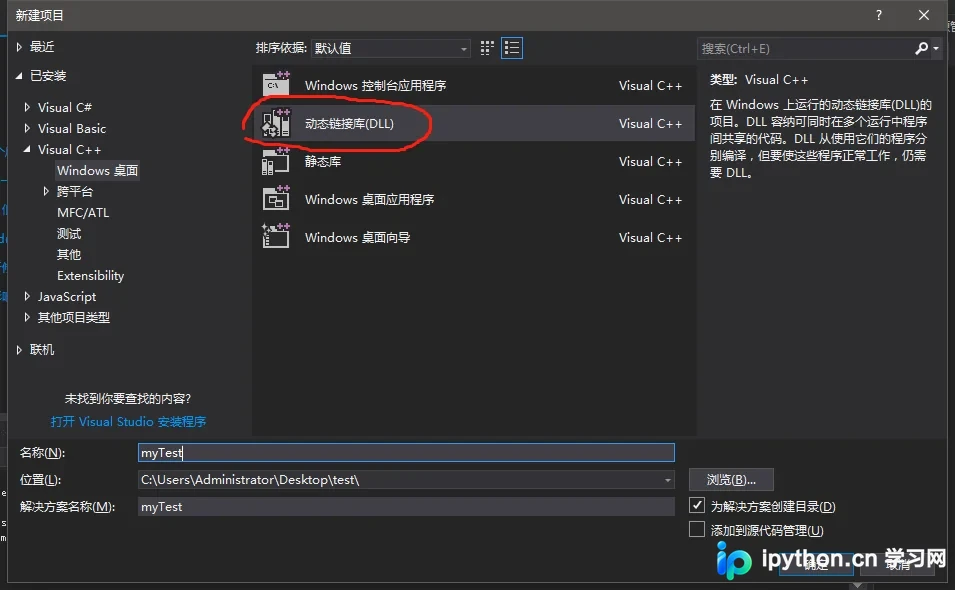
1.2 在myTest.cpp文件中编写以下代码:
// myTest.cpp : 定义 DLL 应用程序的导出函数。
//
#include "stdafx.h"
#define DLLEXPORT extern "C" __declspec(dllexport) //放在 #include "stdafx.h" 之后
//两数相加
DLLEXPORT int sum(int a, int b) {
  return a + b;
}
注意:导出函数声明前必须添加 extern "C" __declspec(dllexport)。这是因为ctypes仅能调用C风格的函数。若不使用extern "C",编译后的动态链接库将不包含这些函数的符号表。对于C++工程,导出接口需使用extern "C"修饰,以便Python能够正确识别导出的函数。
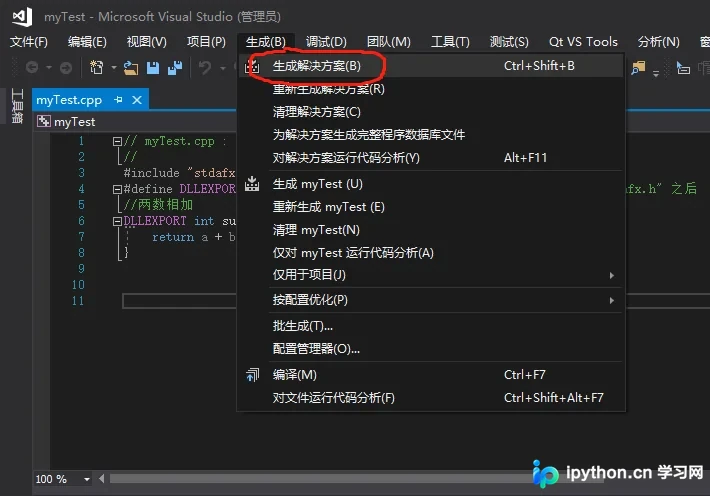
1.3 生成DLL动态链接库
由于本例使用的Python 3环境为64位版本,因此在Visual Studio中生成DLL时,必须选择64位平台配置,具体设置如下:
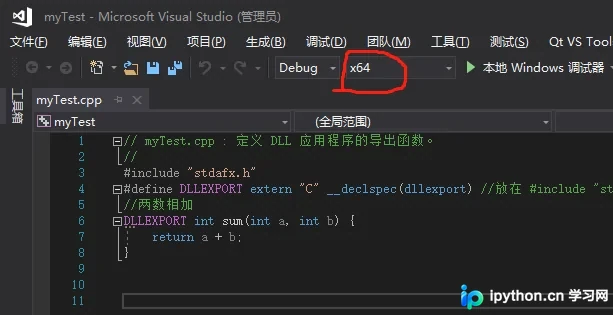
点击菜单栏的“生成”选项,随后选择“生成解决方案”。
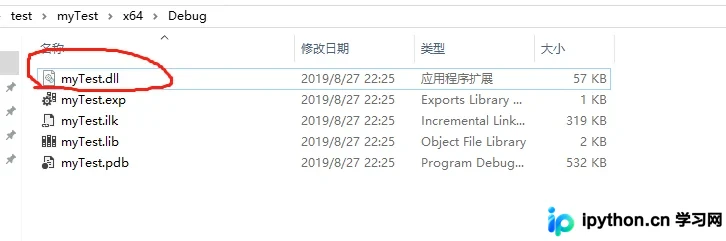
1.4 查看生成的DLL动态链接库
2. Python导入DLL动态链接库
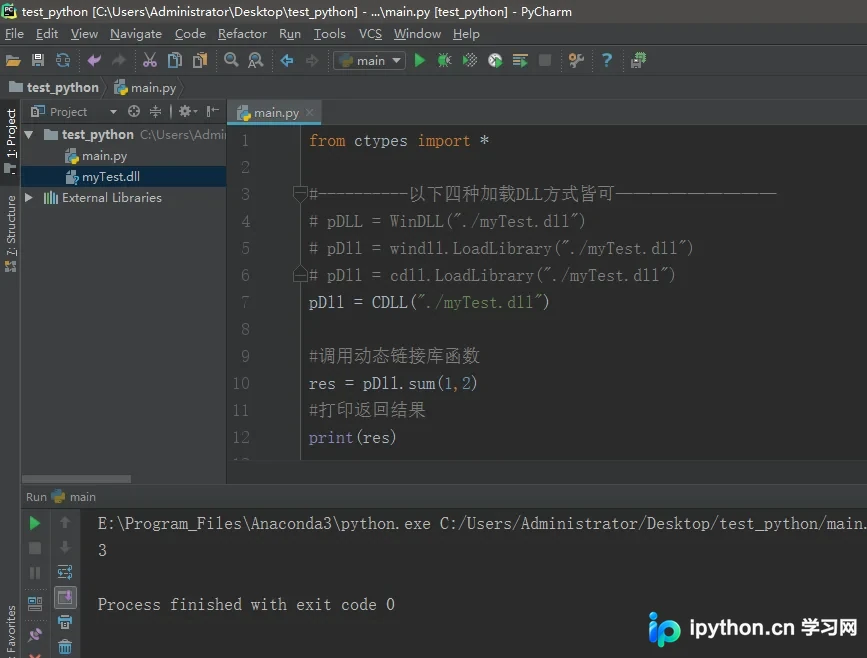
在Python中加载动态链接库并调用其内部函数。为此,新建main.py文件,输入以下代码:
from ctypes import *

#----------以下四种加载DLL方式皆可—————————
# pDLL = WinDLL("./myTest.dll")
# pDll = windll.LoadLibrary("./myTest.dll")
# pDll = cdll.LoadLibrary("./myTest.dll")
pDll = CDLL("./myTest.dll")

#调用动态链接库函数
res = pDll.sum(1,2)
#打印返回结果
print(res)
运行上述代码后,结果如下所示:
通过实例方法更新全局变量
二、Python调用DLL中的实例方法以更新全局变量值
1. 使用Visual Studio生成DLL
1.1 添加mainClass类,具体代码如下:
mainClass.h头文件内容:
#pragma once

extern int dta;
class mainClass
{
public:
  mainClass();
  ~mainClass();
  void produceData();
};
mainClass.cpp实现文件内容:
#include "stdafx.h"
#include "mainClass.h"

int dta = 0;

mainClass::mainClass()
{
}

mainClass::~mainClass()
{
}

void mainClass::produceData() {
  dta = 10;
}
1.2 修改myTest.cpp文件内容
myTest.cpp代码:
#include "stdafx.h"
#define DLLEXPORT extern "C" __declspec(dllexport) //放在 #include "stdafx.h" 之后
#include "mainClass.h"

//返回实例方法里面更新数据后的值
DLLEXPORT int getRandData() {
  mainClass dataClass = mainClass();
  dataClass.produceData();
  return dta;
}
1.3 生成64位DLL
2. Python导入DLL动态链接库
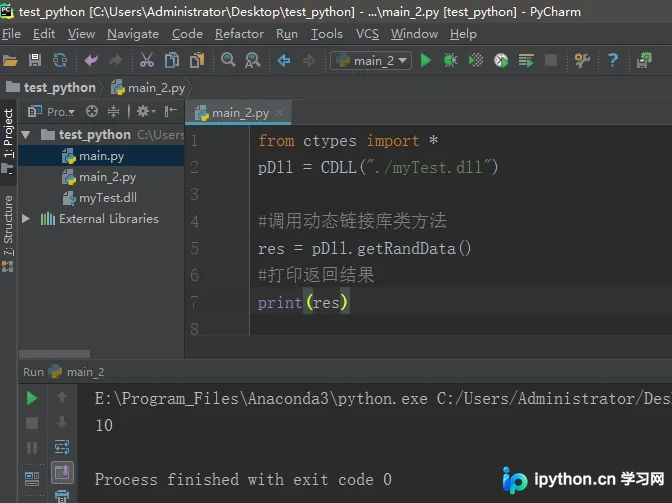
从运行结果可以明显看出,C++中设置的全局变量值已从0变为10。这证明Python可以通过调用DLL中的实例方法来更新全局变量的值。
指定函数参数与返回类型
三、Python ctypes指定函数参数类型和返回类型
在前两个示例中,C++动态链接库导出函数的返回类型均为int型。由于Python默认将函数参数和返回类型视为int型,因此Python理所当然地认为DLL导出函数返回了一个int类型的值。然而,如果C++动态链接库导出的函数返回类型不是int型,而是其他特定类型,就需要指定ctypes的函数返回类型restype。同样地,通过ctypes向函数传递参数时,若参数类型默认为int型,但实际传递的是其他特定类型,就需要指定ctypes的函数形参类型argtypes。
接下来,通过一个简单的示例来说明这一过程。
myTest.cpp代码:
#include "stdafx.h"
#define DLLEXPORT extern "C" __declspec(dllexport) //放在 #include "stdafx.h" 之后
#include <string>  //使用string类型 需要包含头文件 <string>
using namespace std; //string类是一个模板类,位于名字空间std中
//字符串
DLLEXPORT char *getRandData(char *arg) {
  return arg;
}
Python调用代码:
from ctypes import *
pDll = CDLL("./myTest.dll")

########## 指定 函数的参数类型 #################
pDll.getRandData.argtypes = [c_char_p]
#第一个参数
arg1 = c_char_p(bytes("hello", 'utf-8'))

########## 指定 函数的返回类型 #################
pDll.getRandData.restype = c_char_p

########### 调用动态链接库函数 ##################
res = pDll.getRandData(arg1)

#打印返回结果
print(res.decode()) #返回的是utf-8编码的数据,需要解码
或者采用以下简化形式:
from ctypes import *
pDll = CDLL("./myTest.dll")

########## 指定 函数的返回类型 #################
pDll.getRandData.restype = c_char_p

########### 调用动态链接库函数 ##################
res = pDll.getRandData(b'hello') # 或者变量.encode()

#打印返回结果
print(res.decode()) #返回的是utf-8编码的数据,需要解码
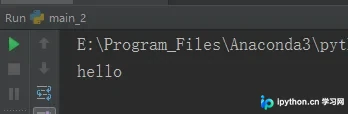
运行结果如下:
处理DLL返回的数组与结构体
四、Python ctypes处理DLL返回数组与结构体
在ctypes中,可以将数组指针传递给DLL,但我们无法直接通过DLL获取C++返回的数组指针。由于Python中没有对应的数组指针类型,因此要获取DLL返回的数组,我们需要借助结构体来实现。
myTest.cpp代码:
#include "stdafx.h"
#define DLLEXPORT extern "C" __declspec(dllexport) //放在 #include "stdafx.h" 之后
#include <string>  //使用string类型 需要包含头文件 <string>
using namespace std; //string类是一个模板类,位于名字空间std中


typedef struct StructPointerTest
{
  char name[20];
  int age;
  int arr[3];
  int arrTwo[2][3];
}StructTest, *StructPointer;


//sizeof(StructTest)就是求 struct StructPointerTest 这个结构体占用的字节数
//malloc(sizeof(StructTest))就是申请 struct StructPointerTest 这个结构体占用字节数大小的空间
//(StructPointer)malloc(sizeof(StructTest))就是将申请的空间的地址强制转化为 struct StructPointerTest * 指针类型
//StructPointer p = (StructPointer)malloc(sizeof(StructTest))就是将那个强制转化的地址赋值给 p
StructPointer p = (StructPointer)malloc(sizeof(StructTest));

//字符串
DLLEXPORT StructPointer test()  // 返回结构体指针
{
  strcpy_s(p->name, "Lakers");
  p->age = 20;
  p->arr[0] = 3;
  p->arr[1] = 5;
  p->arr[2] = 10;

  for (int i = 0; i < 2; i++)
    for (int j = 0; j < 3; j++)
      p->arrTwo[i][j] = i*10+j;

  return p;
}
Python调用代码:
# 返回结构体
import ctypes

path = r'./myTest.dll'
dll = ctypes.WinDLL(path)

#定义结构体
class StructPointer(ctypes.Structure): #Structure在ctypes中是基于类的结构体
  _fields_ = [("name", ctypes.c_char * 20), #定义一维数组
        ("age", ctypes.c_int),
        ("arr", ctypes.c_int * 3),  #定义一维数组
        ("arrTwo", (ctypes.c_int * 3) * 2)] #定义二维数组

#设置导出函数返回类型
dll.test.restype = ctypes.POINTER(StructPointer) # POINTER(StructPointer)表示一个结构体指针
#调用导出函数
p = dll.test()

print(p.contents.name.decode()) #p.contents返回要指向点的对象  #返回的字符串是utf-8编码的数据,需要解码
print(p.contents.age)
print(p.contents.arr[0]) #返回一维数组第一个元素
print(p.contents.arr[:]) #返回一维数组所有元素
print(p.contents.arrTwo[0][:]) #返回二维数组第一行所有元素
print(p.contents.arrTwo[1][:]) #返回二维数组第二行所有元素
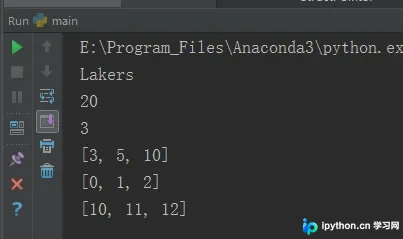
运行结果如下:
以上即为Python使用ctypes库调用DLL动态链接库的详细内容,更多关于Python调用DLL动态链接库的资料请关注本站其它相关文章!
本站声明
本文内容仅供参考,不代表本站观点。转载或引用请注明出处。如发现内容问题,请通过联系我们页面反馈。















