


Python实现定时爬取新闻、存入MySQL并发送邮件的完整教程

本文详细介绍如何使用Python编写一个自动化脚本,定时从北京工业大学官网抓取新闻数据。通过requests和BS4解析HTML,利用pymysql将数据存入MySQL数据库,并结合smtplib实现邮件自动发送。文章涵盖环境配置、代码逻辑分析及schedule定时器的使用方法,适合初学者参考。
本文档记录了一个简单的学校作业项目,旨在帮助初学者理解相关库的使用。代码逻辑较为基础,希望能为其他入门者提供一定的启发和参考。
项目需求概述
一、项目需求概述
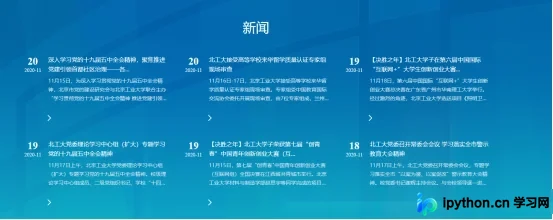
1. 程序需能够从北京工业大学官方网站(http://www.bjut.edu.cn)抓取新闻内容。
2. 程序需具备将抓取到的数据写入本地MySQL数据库的功能。
3. 程序需支持将抓取到的数据通过电子邮件发送出去。
4. 程序需支持定时自动执行上述操作。
技术方案分析
二、技术方案分析
1. 爬虫部分:使用requests库获取HTML源码,利用bs4库中的BeautifulSoup解析HTML,提取所需信息。
2. 数据库操作:使用pymysql库连接MySQL数据库,执行建表及数据插入操作。
3. 邮件发送:使用smtplib库建立邮箱连接,结合email库将文本格式化为邮件消息并发送。
4. 定时执行:使用schedule库实现程序的周期性自动运行。
代码实现详解
三、代码实现详解
依赖库导入
1. 导入必要的依赖库:
# 爬虫相关模块
import requests
from bs4 import BeautifulSoup
import pymysql

# 发邮件相关模块
import smtplib
from email.mime.text import MIMEText
from email.header import Header
import time

# 定时模块
import schedule
获取HTML页面
2. 获取HTML页面内容:
# 连接获取html文本
def getHTMLtext(url):
  try:
    headers={
        "user-agent":"Mozilla/5.0 (Windows NT 10.0; Win64; x64) AppleWebKit/537.36 (KHTML, like Gecko) Chrome/80.0.3987.149 Safari/537.36",
      } # 浏览器请求头
    r = requests.get(url, headers = headers, timeout = 30) # 获取连接
    r.raise_for_status() # 测试连接是否成功,若失败则报异常
    r.encoding = r.apparent_encoding # 解析编码
    return r.text
  except:
    return ""
在发起GET请求时,必须设置请求头headers,否则可能返回错误页面。\n\n调用raise_for_status()方法可根据HTTP状态码判断连接状态,若成功则继续执行,若失败则抛出异常,因此建议使用try-except结构进行捕获处理。\n\n使用apparent_encoding()方法可以解析并判断网页可能的编码格式。
解析HTML与数据提取
3. 解析HTML并提取数据:
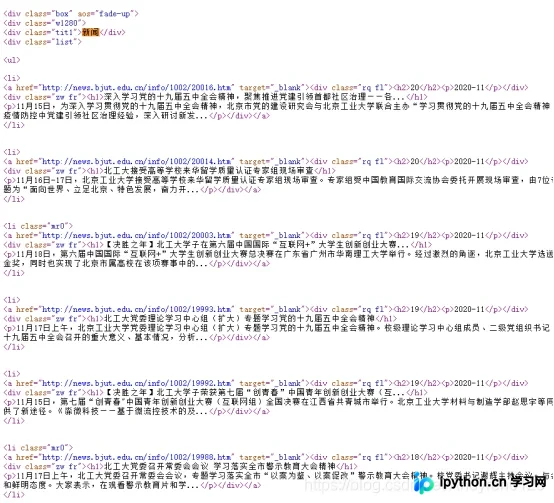
首先检查网页源码以确定新闻标签的具体位置:
# 解析html提取数据
def parseHTML(news, html):
  soup = BeautifulSoup(html, "html.parser") # 获取soup
  for i in soup.find(attrs = {'class' : 'list'}).find_all('li'): # 存放新闻的li标签
    date = i.p.string + '-' + i.h2.string # 日期
    href = i.a['href'] # 链接
    title = i.find('h1').string # 标题
    content = i.find_all('p')[1].string # 梗概
    news.append([date, href, title, content]) # 添加到列表中
观察可知,所有新闻内容均存储在class属性为“list”的div标签内,而每条新闻则分别存储在li标签中。因此,利用find和find_all方法遍历所有li标签即可获取数据。
在每个li标签中,a标签的href属性存储新闻链接,h1标签存储新闻标题,h2标签存储日期,第一个p标签存储年份和月份,第二个p标签存储新闻摘要。依次提取各标签中的文本内容,并将年月日拼接后存入news列表中。
数据库存储配置
4. 数据存入数据库:
# 存入数据库
def toMysql(news):
  conn = pymysql.connect(host = 'localhost', port = 3306, user = 'root', passwd = '数据库密码', db = '数据库名称',charset = 'gbk', connect_timeout = 1000)
  cursor = conn.cursor()

  sql = '''
  create table if not exists tb_news(
    日期 date,
    链接 varchar(400),
    标题 varchar(400),
    梗概 varchar(400))
  '''

  cursor.execute(sql) # 建表

  for new in news: # 循环存入数据
    sql = 'insert into tb_news(日期, 链接, 标题, 梗概) values(%s, %s, %s, %s)'
    date = new[0]
    href = new[1]
    title = new[2]
    content = new[3]
    cursor.execute(sql, (date, href, title, content))

  conn.commit()
  conn.close()
由于新闻内容字数较多,存储时可能出现乱码或数据过长导致存储失败的情况,这与数据库编码设置有关。建议在MySQL的my.ini配置文件中将默认编码修改为gbk以解决此问题。
邮件发送设置
5. 发送邮件功能:
# 发送邮件
def sendMail(news):
  from_addr = '发送邮箱' # 发送邮箱
  password = '16位授权码' # 邮箱授权码

  to_addr = '接收邮箱' # 接收邮箱

  mailhost = 'smtp.qq.com' # qq邮箱的smtp地址
  qqmail = smtplib.SMTP() # 建立SMTP对象
  qqmail.connect(mailhost, 25) # 25为SMTP常用端口
  qqmail.login(from_addr, password) # 登录邮箱

  content = ''
  for new in news: # 拼接邮件内容字符串
    content += '新闻时间:' + new[0] + '\n' + '新闻链接:' + new[1] + '\n' + '新闻标题:' + new[2] + '\n' + '新闻梗概:' + new[3] + '\n'
    content += '======================================================================\n'

  # 拼接题目字符串
  subject = time.strftime('%Y-%m-%d %X', time.localtime(time.time())) + '时爬取的北工大首页主要新闻\n'

  # 加工邮件message格式
  msg = MIMEText(content, 'plain', 'utf-8')
  msg['subject'] = Header(subject, 'utf-8')

  try:
    qqmail.sendmail(from_addr, to_addr, msg.as_string())
    print('发送成功')
  except:
    print('发送失败')
  qqmail.quit()
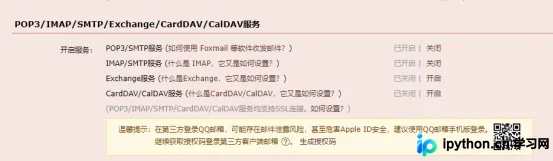
需要注意的是,代码中的password参数并非邮箱登录密码,而是邮箱的SMTP授权码。对于QQ邮箱,需在设置中开启SMTP服务并获取相应的授权码。
主函数逻辑
6. 主函数逻辑:
# 主函数
def main():
  news = []
  url = "http://www.bjut.edu.cn/"
  html = getHTMLtext(url)
	parseHTML(news, html)
	toMysql(news)
  print(news)
	sendMail(news)
输入北京工业大学官网的URL,并初始化一个名为news的列表用于存储新闻数据。随后依次调用函数完成新闻爬取、数据库存储及邮件发送。为了验证程序是否正常运行,先调用main()函数并打印news列表以检查结果:
main() #测试需要,之后会删除运行结果如下:
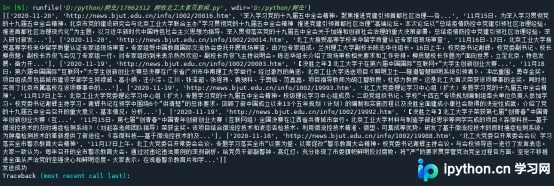
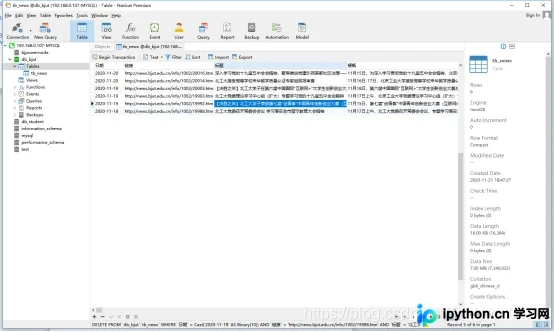
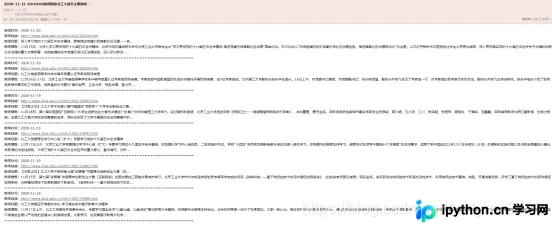
从结果可以看出,程序执行正常。
定时任务配置
7. 实现定时执行:
# 定时执行整个任务
schedule.every().monday.at("08:00").do(main) # 每周一早上八点执行main函数
while True:
  schedule.run_pending()
  time.sleep(1)
使用死循环确保schedule模块持续运行。设定程序在每周一早上8:00执行。
为了便于观察运行效果,先将执行间隔修改为每5秒运行一次:
schedule.every(5).seconds.do(main)
每5秒即可收到一封邮件,证明定时功能满足需求。至此,程序开发结束。
完整代码展示
四、完整代码展示
# 爬虫相关模块
import requests
from bs4 import BeautifulSoup
import pymysql

# 发邮件相关模块
import smtplib
from email.mime.text import MIMEText
from email.header import Header
import time

# 定时模块
import schedule

# 连接获取html文本
def getHTMLtext(url):
  try:
    headers={
        "user-agent":"Mozilla/5.0 (Windows NT 10.0; Win64; x64) AppleWebKit/537.36 (KHTML, like Gecko) Chrome/80.0.3987.149 Safari/537.36",
    } # 浏览器请求头
    r = requests.get(url, headers = headers, timeout = 30) # 获取连接
    r.raise_for_status() # 测试连接是否成功,若失败则报异常
    r.encoding = r.apparent_encoding # 解析编码
    return r.text
  except:
    return ""


# 解析html提取数据
def parseHTML(news, html):
  soup = BeautifulSoup(html, "html.parser") # 获取soup
  for i in soup.find(attrs = {'class' : 'list'}).find_all('li'): # 存放新闻的li标签
    date = i.p.string + '-' + i.h2.string # 日期
    href = i.a['href'] # 链接
    title = i.find('h1').string # 标题
    content = i.find_all('p')[1].string # 梗概
    news.append([date, href, title, content]) # 添加到列表中

# 存入数据库
def toMysql(news):
  conn = pymysql.connect(host = 'localhost', port = 3306, user = 'root', passwd = '数据库密码', db = '数据库名称',charset = 'gbk', connect_timeout = 1000)
  cursor = conn.cursor()

  sql = '''
  create table if not exists tb_news(
    日期 date,
    链接 varchar(400),
    标题 varchar(400),
    梗概 varchar(400))
  '''

  cursor.execute(sql) # 建表

  for new in news: # 循环存入数据
    sql = 'insert into tb_news(日期, 链接, 标题, 梗概) values(%s, %s, %s, %s)'
    date = new[0]
    href = new[1]
    title = new[2]
    content = new[3]
    cursor.execute(sql, (date, href, title, content))

  conn.commit()
  conn.close()

# 发送邮件
def sendMail(news):
  from_addr = '发送邮箱' # 发送邮箱
  password = '16位授权码' # 邮箱授权码

  to_addr = '接收邮箱' # 接收邮箱

  mailhost = 'smtp.qq.com' # qq邮箱的smtp地址
  qqmail = smtplib.SMTP() # 建立SMTP对象
  qqmail.connect(mailhost, 25) # 25为SMTP常用端口
  qqmail.login(from_addr, password) # 登录邮箱

  content = ''
  for new in news: # 拼接邮件内容字符串
    content += '新闻时间:' + new[0] + '\n' + '新闻链接:' + new[1] + '\n' + '新闻标题:' + new[2] + '\n' + '新闻梗概:' + new[3] + '\n'
    content += '======================================================================\n'

  # 拼接题目字符串
  subject = time.strftime('%Y-%m-%d %X', time.localtime(time.time())) + '时爬取的北工大首页主要新闻\n'

  # 加工邮件message格式
  msg = MIMEText(content, 'plain', 'utf-8')
  msg['subject'] = Header(subject, 'utf-8')

  try:
    qqmail.sendmail(from_addr, to_addr, msg.as_string())
    print('发送成功')
  except:
    print('发送失败')
  qqmail.quit()


# 主函数
def main():
  news = []
  url = "http://www.bjut.edu.cn/"
  html = getHTMLtext(url)
  parseHTML(news, html)
  print(news)
  sendMail(news)

# 定时执行整个任务
schedule.every().monday.at("08:00").do(main) # 每周一早上八点执行main函数
while True:
  schedule.run_pending()
  time.sleep(1)
以上就是关于Python定时爬取网页新闻、存入数据库并发送邮件的详细介绍。更多关于Python定时爬取网页内容的技巧,可搜索本站历史文章或继续浏览相关教程。希望大家多多支持本站!
本站声明
本文内容仅供参考,不代表本站观点。转载或引用请注明出处。如发现内容问题,请通过联系我们页面反馈。















