


Python实现百度网盘非会员批量上传:突破500文件限制

发布时间:2026-10-14 |
2人浏览过
本文介绍利用Python脚本解决百度网盘非会员上传500个文件限制的方法。通过遍历文件夹、按500个文件一组自动分割并创建新文件夹,用户可分批拖入客户端完成上传。脚本支持自定义路径,不删除原文件,兼容非英文命名,确保数据安全且操作简便。
案例背景:
对于百度网盘非会员用户,当尝试大量上传文件时,系统会提示“上传文件数量超出500个,现在开通超级会员后可继续上传”。这一限制实际上针对的是单次拖入操作的文件数量上限,而非总上传量的硬性封锁。

那么,如何将大量文件分割成每批500个的文件夹,从而绕过拖入数量的限制呢?
技术准备
- 使用os.walk()函数,可以对指定路径下的所有文件夹和文件进行树形遍历。
- 通过Path(路径).parent属性,可以获取指定路径的父目录。
- 利用os.path.relpath("D:\aaa\bbb\ccc", start="D:\aaa")函数,可以返回“bbb\ccc”字符串,从而实现路径的相对裁剪。
- os.sep变量代表当前系统的任何路径分隔符。
- os.rename()函数可用于实现文件的移动操作。
- 通过sys.argv[1]接收命令行输入的“待分割路径”参数。
采用Python面向对象类结构进行封装。
# python3.8
# coding=utf-8

import os
import sys
from pathlib import Path


class BaiduPanCutter(object):
  '''百度网盘500个文件分割器'''

  def __init__(self, root_path, count=500):
    self.root_path = root_path
    self.count = count
    self.folder_file_dict = {} # 文件夹与其文件列表的映射字典
    self.get_folders_files() # 获取该根路径下的所有文件夹列表和文件列表

  def get_folders_files(self):
    '''获取该根路径下的所有文件夹列表和文件列表'''
    for folders, _, files in os.walk(self.root_path):
      self.folder_file_dict[folders] = files

  def _split(self, arr, count):
    '''分割文件列表,每500算一份'''
    arrs = []
    while len(arr) > count:
      piece = arr[:count]
      arrs.append(piece)
      arr = arr[count:]
    arrs.append(arr)
    return arrs

  # 分割文件并放到新的文件去
  def cut_file(self):
    '''分割并移动到新的文件夹'''
    for each_folder in self.folder_file_dict.keys():
      num = 1 # 以500为倍数,这是1倍

      # 将文件路径(摒弃当前路径)转成字符串,用_隔开
      temp_path = os.path.relpath(each_folder, Path(self.root_path).parent)
      temp_path = temp_path.replace(os.sep, "_")
      print(temp_path)

      files_list = self.folder_file_dict[each_folder]
      file_group = self._split(files_list, self.count) # 按500来分割

      if len(file_group) > 1: # 有超过500个的文件列表
        for each_group in file_group: # 遍历每500份的文件列表
          new_folder = os.path.join(self.root_path, temp_path + "_" + str(num)) # 新路径
          if not os.path.exists(new_folder):
            os.mkdir(new_folder)
          for each_file in each_group:
            old_file = os.path.join(each_folder, each_file)
            new_file = os.path.join(new_folder, each_file)
            print("正在将%s 移动到 %s" % (old_file, new_file))
            os.rename(old_file, new_file)
          num = num + 1
      else: # 无超过500个的文件列表
        new_folder = os.path.join(self.root_path, temp_path) # 新路径
        if not os.path.exists(new_folder):
          os.mkdir(new_folder)
        for each_file in file_group[0]: #
          old_file = os.path.join(each_folder, each_file)
          new_file = os.path.join(new_folder, each_file)
          print("正在将%s 移动到 %s" % (old_file, new_file))
          os.rename(old_file, new_file)


if __name__ == '__main__':
  try:
    arg1 = sys.argv[1]
    if os.path.isdir(arg1):
      b_obj = BaiduPanCutter(arg1, 500)
      b_obj.cut_file()
    else:
      print("非文件夹,运行方法:python %s 路径文件夹" % sys.argv[0])
  except IndexError:
    print("未输入待分割的路径文件夹, 运行方法:python %s 路径文件夹" % sys.argv[0])
  os.system("pause")
运行方式与效果展示
运行方式:将上述代码保存为baidu_pan_500_cutter.py,并通过命令:python baidu_pan_500_cutter.py D:\DCIM\Photos 执行。
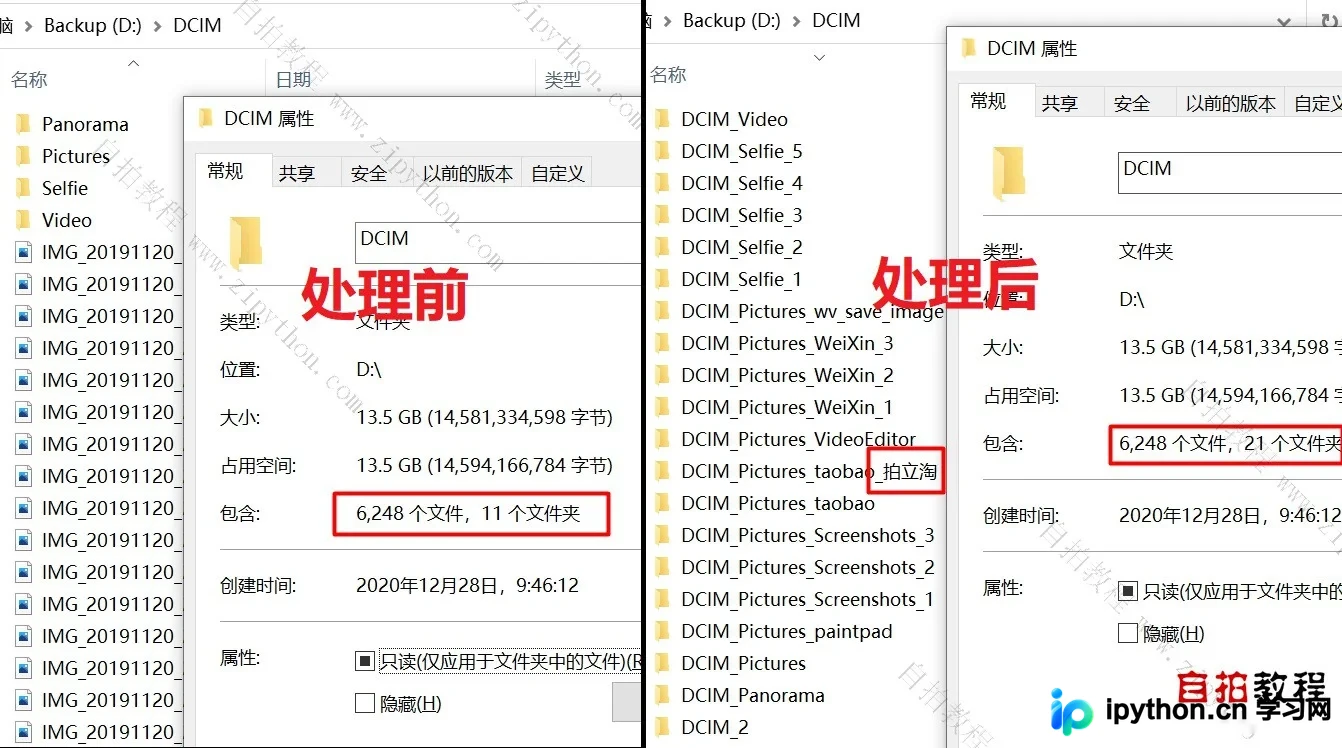
生成的每个新文件夹内文件数量均不超过500个,随后只需将这些文件夹逐一拖入百度网盘电脑客户端即可完成上传。
注意事项
- 本脚本仅进行文件移动和文件夹创建操作,不涉及任何删除文件或文件夹的行为,因此不会导致文件丢失。
- 脚本兼容包含非英文字符的文件夹或文件名的分割操作。
以上就是Python实现百度网盘非会员上传超过500个文件的详细内容,更多关于Python百度网盘上传超过500个文件的资料请关注本站其它相关文章!
本站声明
本文内容仅供参考,不代表本站观点。转载或引用请注明出处。如发现内容问题,请通过联系我们页面反馈。















