


使用matplotlib.subplot()绘制子图并共享Y轴

发布时间:2026-10-15 |
4人浏览过
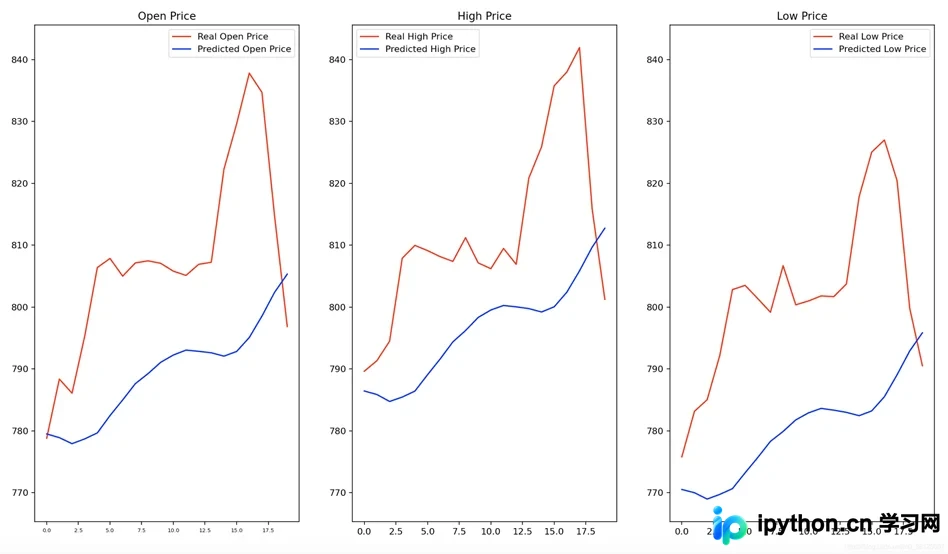
本文介绍如何利用matplotlib库的subplot函数绘制1x3子图,并通过sharey参数实现Y轴共享。示例展示了将DataFrame与ndarray数据的对应列分别绘制在同一子图中,对比真实与预测价格,适用于多变量趋势分析。
在数据可视化中,有时需要将多张图表组合在一起以便进行直观对比。虽然subplot和subplots函数均可实现这一目标,但具体差异可参考相关技术博文。本文以matplotlib库中的subplot函数为例进行演示。
数据示例
本例涉及两类数据:第一类为DataFrame格式,第二类为ndarray格式。每类数据均包含3列,目标是构建一个1行3列的折线子图布局,即将第一个数据的第n列与第二个数据的第n列绘制在同一个子图中。为便于展示,仅列出前5行数据。
In [1]: testing_set.head()  # DataFrame类型
Out [1]:     Open    High     Low
		 0  778.81  789.63  775.80
		 1  788.36  791.34  783.16
		 2  786.08  794.48  785.02
		 3  795.26  807.90  792.20
		 4  806.40  809.97  802.83  # ndarray类型

In [2]: predicted_stock_price  #这里就只看前5行
Out [2]: [[790.6911  796.39215 779.3191 ]
 		 [790.24524 796.0866  778.9673 ]
 		 [789.5737  795.52606 778.3751 ]
		 [790.1047  796.10864 778.92395]
 		 [790.8686  796.94104 779.7281 ]]
实现步骤
注意:plt.setp()函数在此用于设置共享Y轴的相关属性。
# 创建画布
fig = plt.figure(figsize = (30,10), dpi = 80)
# 子图1
ax1 = plt.subplot(131)
ax1.set_title('Open Price')
ax1.plot(testing_set.values[:,0], color = 'red', label = 'Real Open Price')
ax1.plot(predicted_stock_price[:,0], color = 'blue', label = 'Predicted Open Price')
plt.setp(ax1.get_xticklabels(), fontsize=6)
ax1.legend()
# 子图2
ax2 = plt.subplot(132,sharey=ax1)
ax2.set_title('High Price')
ax2.plot(testing_set.values[:,1], color = 'red', label = 'Real High Price')
ax2.plot(predicted_stock_price[:,1], color = 'blue', label = 'Predicted High Price')
ax2.legend()
# 子图3
ax3 = plt.subplot(133,sharey=ax1)
ax3.set_title('Low Price')
ax3.plot(testing_set.values[:,2], color = 'red', label = 'Real Low Price')
ax3.plot(predicted_stock_price[:,2], color = 'blue', label = 'Predicted Low Price')
ax3.legend()
plt.show()
最终效果:
至此,关于使用matplotlib.subplot()绘制子图并共享Y轴的方法介绍完毕。如需了解更多subplot相关技巧,可查阅本站过往文章或继续浏览后续内容,感谢支持。
本站声明
本文内容仅供参考,不代表本站观点。转载或引用请注明出处。如发现内容问题,请通过联系我们页面反馈。















