


Python自动化实战:定时抓取天气与微博热搜并推送至微信

发布时间:2026-10-15 |
4人浏览过
本文介绍如何使用Python结合Selenium和Requests库,动态渲染并爬取中国天气网实时数据及微博热搜榜。通过win32gui模拟键鼠操作,实现指定时间自动向微信好友发送天气详情与热榜信息,并支持打包为exe文件运行。
一、系统环境
1.python 3.8.2
2.webdriver(用于驱动edge)
3.微信电脑版
4.windows10
二、爬取中国天气网
由于中国天气网采用动态页面生成技术,直接抓取无法获取完整数据。因此,需借助webdriver驱动浏览器打开网页,等待页面渲染完成后保存源代码,再利用beautifulsoup解析提取数据。需要获取的八项关键数据包括:实时温度、最高与最低温度、污染状况、风向与湿度、紫外线指数以及穿衣指南。
def getZZWeatherAndSendMsg():
	HTML1='http://www.weather.com.cn/weather1dn/101190201.shtml'
	driver=webdriver.Edge()
	driver.get(HTML1)
	soup=BeautifulSoup(driver.page_source,'html5lib')

	#获取实时温度
	tem=soup.find('span',class_='temp').string
	#获取最高温度与最低温度
	maxtem=soup.find('span',id='maxTemp').string
	mintem=soup.find('span',id='minTemp').string
	#获取污染状况
	poll=soup.find('a',href='http://www.weather.com.cn/air/?city=101190201').string
	#获取风向和湿度
	win=soup.find('span',id='wind').string
	humidity=soup.find('span',id='humidity').string
	#获取紫外线状况
	sun=soup.find('div',class_='lv').find('em').string
	#获取穿衣指南
	cloth=soup.find('dl',id='cy').find('dd').string

	HTML2='http://www.weather.com.cn/weathern/101190201.shtml'
	driver.get(HTML2)
	soup=BeautifulSoup(driver.page_source,'html5lib')
	#获取天气情况
	wea=soup.find_all('p',class_='weather-info')[1].string
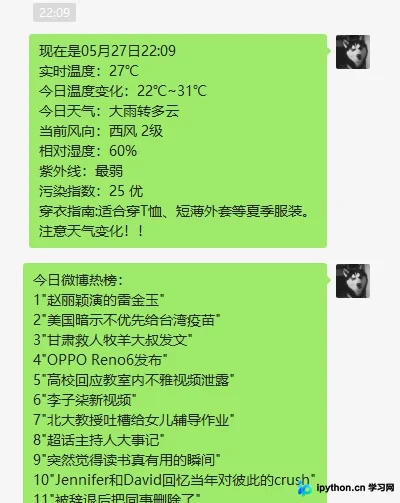
	weatherContent='实时温度:'+tem+'℃'+'\n'+'今日温度变化:'+mintem+'~'+maxtem+'\n'+'今日天气:'+wea+'\n'+'当前风向:'+win+'\n'+'相对湿度:'+humidity+'\n'+'紫外线:'+sun+'\n'+'污染指数:'+poll+'\n'+'穿衣指南:'+cloth+'\n'+'注意天气变化!!'
	driver.quit()
	return weatherContent
三、爬取微博热搜
相比天气网,微博热搜的抓取更为直接。通过requests库获取数据包,使用beautifulsoup进行解析。解析完成后,利用for循环遍历前50条数据并保存为文本格式。
def getWeibo():
	url='https://s.weibo.com/top/summary'
	headers={'User-Agent': 'Mozilla/5.0 (Windows NT 10.0; Win64; x64) AppleWebKit/537.36 (KHTML, like Gecko) Chrome/90.0.4430.72 Safari/537.36 Edg/90.0.818.41'}
	r=requests.get(url,headers=headers)
	r.raise_for_status()
	r.encoding = r.apparent_encoding
	soup = BeautifulSoup(r.text, "html.parser")
	tr=soup.find_all('tr')
	weiboContent='今日微博热榜:'+'\n'
	for i in range(2,52):
		text=tr[i].find('td',class_='td-02').find('a').string
		weiboContent=weiboContent+str(i-1)+'"'+text+'"'+'\n'
	return weiboContent
四、微信自动发送消息
利用win32gui库实现微信消息的自动化发送。首先通过窗口名称定位微信句柄,随后模拟键鼠操作进行搜索联系人、打开聊天窗口、发送消息及关闭窗口等步骤。若需发送给多个联系人,只需重复上述流程即可。
if __name__=="__main__":
	target_a=['06:55','11:55','19:53']
	target_b=['07:00','12:00','19:54']
	name_list=['Squirrel B','Squirrel B']
	while True:
		now=time.strftime("%m月%d日%H:%M",time.localtime())
		print(now)
		if now[-5:] in target_a:
			base_weatherContent=getZZWeatherAndSendMsg()
			weiboContent=getWeibo()
		if now[-5:] in target_b:
			hwnd=win32gui.FindWindow("WeChatMainWndForPC", '微信')
			win32gui.ShowWindow(hwnd,win32con.SW_SHOW)
			win32gui.MoveWindow(hwnd,0,0,1000,700,True)
			time.sleep(1)
			for name in name_list:
				movePos(28,147)
				click()
				#2.移动鼠标到搜索框,单击,输入要搜索的名字
				movePos(148,35)
				click()
				time.sleep(1)
				setText(name)
				ctrlV()
				time.sleep(1)  # 等待联系人搜索成功
				enter()
				time.sleep(1)
				now=time.strftime("%m月%d日%H:%M",time.localtime())
				weatherContent='现在是'+now+'\n'+base_weatherContent
				setText(weatherContent)
				ctrlV()
				time.sleep(1)
				altS()
				time.sleep(1)
				setText(weiboContent)
				ctrlV()
				time.sleep(1)
				altS()
				time.sleep(1)
			win32gui.PostMessage(hwnd, win32con.WM_CLOSE, 0, 0)
		time.sleep(60)
五、源代码
import win32clipboard as w
import win32con
import win32api
import win32gui
import ctypes
import time
import requests
from urllib.request import urlopen
from bs4 import BeautifulSoup
from selenium import webdriver

#把文字放入剪贴板
def setText(aString):
	w.OpenClipboard()
	w.EmptyClipboard()
	w.SetClipboardData(win32con.CF_UNICODETEXT,aString)
	w.CloseClipboard()

#模拟ctrl+V
def ctrlV():
	win32api.keybd_event(17,0,0,0) #ctrl
	win32api.keybd_event(86,0,0,0) #V
	win32api.keybd_event(86,0,win32con.KEYEVENTF_KEYUP,0)#释放按键
	win32api.keybd_event(17,0,win32con.KEYEVENTF_KEYUP,0)

#模拟alt+s
def altS():
	win32api.keybd_event(18,0,0,0)
	win32api.keybd_event(83,0,0,0)
	win32api.keybd_event(83,0,win32con.KEYEVENTF_KEYUP,0)
	win32api.keybd_event(18,0,win32con.KEYEVENTF_KEYUP,0)
# 模拟enter
def enter():
	win32api.keybd_event(13,0,0,0)
	win32api.keybd_event(13,0,win32con.KEYEVENTF_KEYUP,0)
#模拟单击
def click():
	win32api.mouse_event(win32con.MOUSEEVENTF_LEFTDOWN, 0, 0, 0, 0)
	win32api.mouse_event(win32con.MOUSEEVENTF_LEFTUP, 0, 0, 0, 0)
#移动鼠标的位置
def movePos(x,y):
	win32api.SetCursorPos((x,y))

def getZZWeatherAndSendMsg():
	HTML1='http://www.weather.com.cn/weather1dn/101190201.shtml'
	driver=webdriver.Edge()
	driver.get(HTML1)
	soup=BeautifulSoup(driver.page_source,'html5lib')

	#获取实时温度
	tem=soup.find('span',class_='temp').string
	#获取最高温度与最低温度
	maxtem=soup.find('span',id='maxTemp').string
	mintem=soup.find('span',id='minTemp').string
	#获取污染状况
	poll=soup.find('a',href='http://www.weather.com.cn/air/?city=101190201').string
	#获取风向和湿度
	win=soup.find('span',id='wind').string
	humidity=soup.find('span',id='humidity').string
	#获取紫外线状况
	sun=soup.find('div',class_='lv').find('em').string
	#获取穿衣指南
	cloth=soup.find('dl',id='cy').find('dd').string

	HTML2='http://www.weather.com.cn/weathern/101190201.shtml'
	driver.get(HTML2)
	soup=BeautifulSoup(driver.page_source,'html5lib')
	#获取天气情况
	wea=soup.find_all('p',class_='weather-info')[1].string
	weatherContent='实时温度:'+tem+'℃'+'\n'+'今日温度变化:'+mintem+'~'+maxtem+'\n'+'今日天气:'+wea+'\n'+'当前风向:'+win+'\n'+'相对湿度:'+humidity+'\n'+'紫外线:'+sun+'\n'+'污染指数:'+poll+'\n'+'穿衣指南:'+cloth+'\n'+'注意天气变化!!'
	driver.quit()
	return weatherContent

def getWeibo():
	url='https://s.weibo.com/top/summary'
	headers={'User-Agent': 'Mozilla/5.0 (Windows NT 10.0; Win64; x64) AppleWebKit/537.36 (KHTML, like Gecko) Chrome/90.0.4430.72 Safari/537.36 Edg/90.0.818.41'}
	r=requests.get(url,headers=headers)
	r.raise_for_status()
	r.encoding = r.apparent_encoding
	soup = BeautifulSoup(r.text, "html.parser")
	tr=soup.find_all('tr')
	weiboContent='今日微博热榜:'+'\n'
	for i in range(2,52):
		text=tr[i].find('td',class_='td-02').find('a').string
		weiboContent=weiboContent+str(i-1)+'"'+text+'"'+'\n'
	return weiboContent

if __name__=="__main__":
	target_a=['06:55','11:55','19:53']
	target_b=['07:00','12:00','19:54']
	name_list=['Squirrel B','Squirrel B']
	while True:
		now=time.strftime("%m月%d日%H:%M",time.localtime())
		print(now)
		if now[-5:] in target_a:
			base_weatherContent=getZZWeatherAndSendMsg()
			weiboContent=getWeibo()
		if now[-5:] in target_b:
			hwnd=win32gui.FindWindow("WeChatMainWndForPC", '微信')
			win32gui.ShowWindow(hwnd,win32con.SW_SHOW)
			win32gui.MoveWindow(hwnd,0,0,1000,700,True)
			time.sleep(1)
			for name in name_list:
				movePos(28,147)
				click()
				#2.移动鼠标到搜索框,单击,输入要搜索的名字
				movePos(148,35)
				click()
				time.sleep(1)
				setText(name)
				ctrlV()
				time.sleep(1)  # 等待联系人搜索成功
				enter()
				time.sleep(1)
				now=time.strftime("%m月%d日%H:%M",time.localtime())
				weatherContent='现在是'+now+'\n'+base_weatherContent
				setText(weatherContent)
				ctrlV()
				time.sleep(1)
				altS()
				time.sleep(1)
				setText(weiboContent)
				ctrlV()
				time.sleep(1)
				altS()
				time.sleep(1)
			win32gui.PostMessage(hwnd, win32con.WM_CLOSE, 0, 0)
		time.sleep(60)
六、运行效果
七、总结
- 爬取中国天气网数据
- 爬取微博热搜
- 自动发送微信消息
- 打包为exe并写个简单的GUI
- 代码编写较为简略,但基本功能已满足需求。暂未进行更复杂的开发,希望能为读者提供参考。
github地址 https://github.com/gudu12306/auto_for_wechat
到此这篇关于python趣味挑战之爬取天气与微博热搜并自动发给微信好友的文章就介绍到这了,更多相关python爬取天气与微博热搜内容请搜索本站以前的文章或继续浏览下面的相关文章希望大家以后多多支持本站!
本站声明
本文内容仅供参考,不代表本站观点。转载或引用请注明出处。如发现内容问题,请通过联系我们页面反馈。















