


Python利用pywin32控制MicroSIP自动拨号并打包为EXE

发布时间:2026-10-14 |
3人浏览过
本文介绍如何使用Python结合pywin32库控制MicroSIP软件,实现从TXT文件读取手机号并自动填写、拨打的功能。通过tkinter构建图形界面,利用Windows API模拟输入与回车操作。最后使用PyInstaller将脚本打包为独立的EXE可执行文件,方便无Python环境用户直接使用。
自动化控制前提与界面交互
执行该自动化流程的前提是MicroSIP.exe必须处于运行状态。
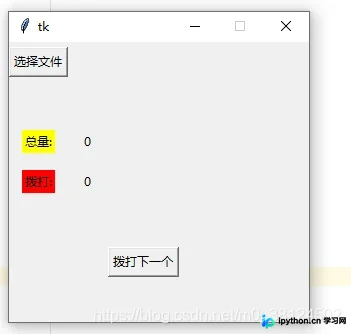
操作界面首先提供文件选择功能,
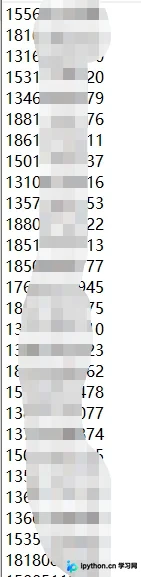
用户需指定一个TXT格式的文件,该文件内每行包含一个手机号码,格式示例如下所示。
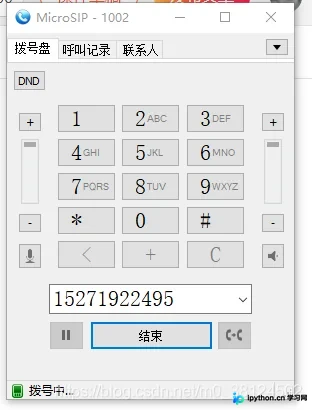
点击界面上的“拨打下一个”按钮后,程序会自动将当前号码填入MicroSIP输入框并触发拨打动作。
相关实现代码如下:
核心代码实现逻辑
import tkinter
import win32gui
import win32con
from tkinter import filedialog
import tkinter.messagebox
import os
import time
def next_phone(phone):
    win = win32gui.FindWindow('MicroSIP',None)
    tid = win32gui.FindWindowEx(win,None,'#32770',None)
    tid = win32gui.FindWindowEx(tid,None,'ComboBox',None)
    tid = win32gui.FindWindowEx(tid,None,'Edit',None)
    win32gui.SendMessage(tid, win32con.WM_SETTEXT, None, phone)
    win32gui.PostMessage(tid,win32con.WM_KEYDOWN,win32con.VK_RETURN,0)
def openfile():
    sfname = filedialog.askopenfilename(title='选择txt文件', filetypes=[ ('All Files', '*')])
    return sfname
class MicroSIP:
    def __init__(self):
        self.c_window()

    def c_window(self):
        self.win = tkinter.Tk()
        self.win.geometry("300x280")
        self.win.resizable(width=False, height=False)
        self.win.protocol('WM_DELETE_WINDOW', self.customized_function)
        self.total = 0
        self.used = 0
        self.res = []
        self.Button1 = tkinter.Button(self.win, text="选择文件", command=self.helloCallBack)
        self.Button_next = tkinter.Button(self.win, text="拨打下一个", command=self.next)
        self.label1 = tkinter.Label(self.win, text="",)
        self.label2 = tkinter.Label(self.win, text="总量:", bg="yellow")
        self.label3 = tkinter.Label(self.win, text="拨打:", bg="red")
        self.label2_2 = tkinter.Label(self.win, text=self.total, )
        self.label3_3 = tkinter.Label(self.win, text=self.used, )
        # label4 = tkinter.Label(win, text="小猪佩奇", bg="green")
        self.Button1.grid(row=0, column=0)
        self.label1.grid(row=0, column=1)
        self.label2.grid(row=2, column=0)
        self.label2_2.grid(row=2, column=1)
        self.label3.grid(row=3, column=0)
        self.label3_3.grid(row=3, column=1)
        self.Button_next.grid(row=5, column=2)
        col_count, row_count = self.win.grid_size()
        for col in range(col_count):
            self.win.grid_columnconfigure(col, minsize=40)
        for row in range(row_count):
            self.win.grid_rowconfigure(row, minsize=40)
        self.win.mainloop()
    def next(self):
        if self.res:
            phone = self.res.pop()

            self.used+=1
            self.label3_3['text'] = self.used
            next_phone(phone.strip())
        else:
            res = tkinter.messagebox.showerror(title='文件!', message='选择文件啊!不然打鸡毛!')
    def helloCallBack(self):
        # print("Hello Python", "Hello Runoob")
        file_name = openfile()
        if file_name:
            print(file_name)
            self.label1['text']=file_name.split('/')[-1]
            with open(file_name, 'r', encoding='utf-8')as f:
                self.res = [x.replace('\n', '') for x in f.readlines()]
                self.total = len(self.res)
                self.label2_2['text']=str(len(self.res))
        else:
            res = tkinter.messagebox.showerror(title='文件!', message='选择文件啊!不然打鸡毛!')
    def customized_function(self):

        result = tkinter.messagebox.askyesno(title = '离开',message='确定要离开了吗?如没有打完,会把没打完的生成新文件,下次选择新文件就行了!')
        if result:
            if self.total==self.used:
                pass
            else:
                name = time.strftime("%Y_%m_%d_%H_%M_%S_", time.localtime())+"剩余_"+str(self.total-self.used)
                with open(name+'.txt','w',encoding='utf-8')as f:
                    for i in self.res:
                        f.write(i+'\n')
        self.win.destroy()

if __name__ == '__main__':
    MicroSIP()
代码逻辑较为简洁,用户可根据实际需求进行优化。使用前请确保已安装pywin32库。
程序打包与资源下载
完成代码编写后,即可将其打包生成为EXE可执行文件。
生成EXE文件需要预先安装pyinstaller库。
执行打包命令:pyinstaller -F -w xxx.py
作者已生成好的EXE文件可供下载:
链接: https://pan.baidu.com/s/1IAx0pgr4ze2jYusisQBXIA
提取码: a3s2
以上即为利用Python生成EXE控制MicroSIP实现自动填号与拨打的完整教程,更多Python生成EXE的相关技术文章请持续关注本站。
本站声明
本文内容仅供参考,不代表本站观点。转载或引用请注明出处。如发现内容问题,请通过联系我们页面反馈。















