


Python使用Pygame实现模拟时钟动画

发布时间:2026-10-14 |
4人浏览过
本文介绍了如何使用Python的Pygame库创建一个动态的模拟时钟。通过结合datetime模块获取实时时间,并利用数学函数计算时针、分针和秒针的角度,在屏幕上绘制出完整的时钟界面。代码展示了窗口初始化、事件处理及图形绘制的具体实现,适合Python初学者参考学习。
Python Pygame 模拟时钟实现
本文分享了一个使用Python和Pygame库制作模拟时钟效果的具体代码示例,供读者参考学习。
核心代码解析
import pygame,sys,math,random
from pygame.locals import *
from datetime import datetime,date,time
def print_text(font,x,y,text,color=(255,255,255)):
    imgText=font.render(text,True,color)
    screen.blit(imgText,(x,y))
def wrap_angle(angle):
    return angle%360
#main program begins
pygame.init()
screen=pygame.display.set_mode((600,500))
pygame.display.set_caption("Analog Clock Demo")
font=pygame.font.Font(None,36)
orange=220,180,0
white=255,255,255
yellow=255,255,0
pink=255,100,100

pos_x=300
pos_y=250
radius=250
angle=360
while True:
    for event in pygame.event.get():
        if event.type==QUIT:
            sys.exit()
    keys=pygame.key.get_pressed()
    if keys[K_ESCAPE]:
        sys.exit()
    screen.fill((0,0,100))
    #draw one step around the circle
    pygame.draw.circle(screen,white,(pos_x,pos_y),radius,6)
    #draw the block number 1~12
    for n in range(1,13):
        angle=math.radians(n*(360/12)-90)
        x=math.cos(angle)*(radius-20)-10
        y=math.sin(angle)*(radius-20)-10
        print_text(font,x+pos_x,y+pos_y,str(n))
    #get the time of day
    today=datetime.today()
    hours=today.hour%12
    minutes=today.minute
    seconds=today.second
    #draw the hours hand
    hour_angle=wrap_angle(hours*(360/12)-90)
    hour_angle=math.radians(hour_angle)
    hour_x=math.cos(hour_angle)*(radius-80)
    hour_y=math.sin(hour_angle)*(radius-80)
    target=(pos_x+hour_x,pos_y+hour_y)
    pygame.draw.line(screen,pink,(pos_x,pos_y),target,25)
    #draw the minute hand
    min_angle=wrap_angle(minutes*(360/60)-90)
    min_angle=math.radians(min_angle)
    min_x=math.cos(min_angle)*(radius-60)
    min_y=math.sin(hour_angle)*(radius-60)
    target=(pos_x+min_x,pos_y+min_y)
    pygame.draw.line(screen,orange,(pos_x,pos_y),target,12)

    #draw the second hand
    sec_angle=wrap_angle(seconds*(360/60)-90)
    sec_angle=math.radians(sec_angle)
    sec_x=math.cos(sec_angle)*(radius-40)
    sec_y=math.sin(sec_angle)*(radius-40)
    target=(pos_x+sec_x,pos_y+sec_y)
    pygame.draw.line(screen,yellow,(pos_x,pos_y),target,6)

    #cover the center
    pygame.draw.circle(screen,white,(pos_x,pos_y),20)
    print_text(font,0,0,str(hours)+":"+str(minutes)+":"+str(seconds))
    pygame.display.update()
运行效果展示
程序运行后的界面效果如下所示:
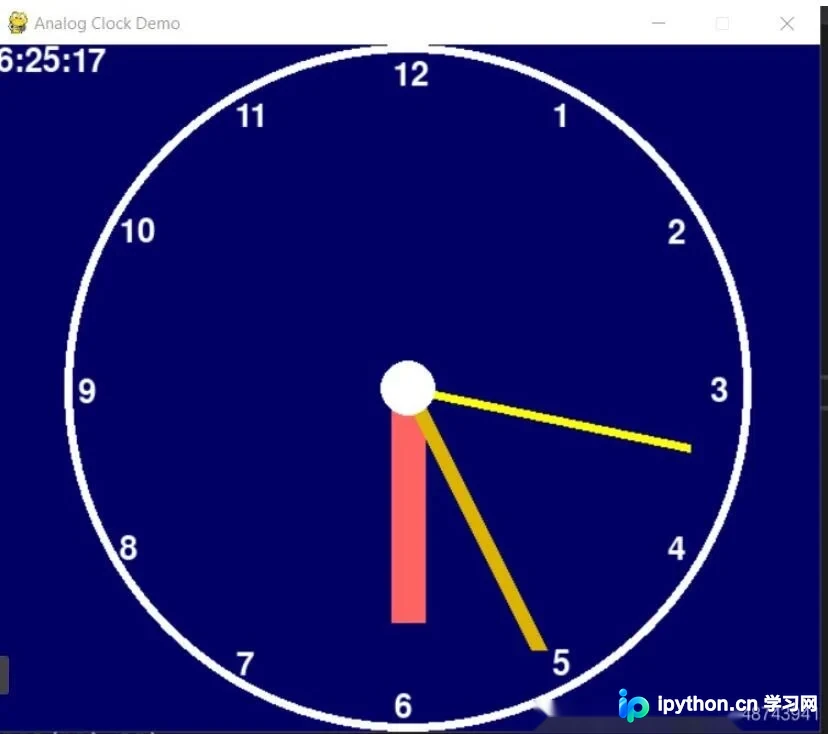
以上内容即为该Python时钟实现的全部代码与说明,希望能为读者的学习提供有益帮助,同时也感谢大家的支持。
本站声明
本文内容仅供参考,不代表本站观点。转载或引用请注明出处。如发现内容问题,请通过联系我们页面反馈。















