


OpenCV实现简单标准数字识别完整教程

发布时间:2026-10-14 |
3人浏览过
本文介绍如何利用OpenCV的ml模块中的KNearest算法实现标准数字识别。通过图像预处理、自适应阈值化及轮廓提取构建训练集,保存特征数据后加载模型进行预测。文中提供完整的Python代码示例,涵盖从数据生成到识别输出的全过程,适合OpenCV初学者参考学习。
OpenCV数字识别概述
在OpenCV的学习过程中,笔者发现了一个关于数字识别的问答案例,其中提供了相关代码并运用了OpenCV内置的ml模块,具有较高的学习价值。
参考链接:https://stackoverflow.com/questions/9413216/simple-digit-recognition-ocr-in-opencv-python#
训练数据构建与预处理
import sys
import numpy as np
import cv2

im = cv2.imread('t.png')
im3 = im.copy()

gray = cv2.cvtColor(im,cv2.COLOR_BGR2GRAY)   #先转换为灰度图才能够使用图像阈值化

thresh = cv2.adaptiveThreshold(gray,255,cv2.ADAPTIVE_THRESH_GAUSSIAN_C,cv2.THRESH_BINARY,11,2)  #自适应阈值化

##################      Now finding Contours         ###################
#
image,contours,hierarchy = cv2.findContours(thresh,cv2.RETR_LIST,cv2.CHAIN_APPROX_SIMPLE)
#边缘查找,找到数字框,但存在误判

samples =  np.empty((0,900))    #将每一个识别到的数字所有像素点作为特征,储存到一个30*30的矩阵内
responses = []                  #label
keys = [i for i in range(48,58)]    #48-58为ASCII码
count =0
for cnt in contours:
    if cv2.contourArea(cnt)>80:     #使用边缘面积过滤较小边缘框
        [x,y,w,h] = cv2.boundingRect(cnt)
        if  h>25 and h < 30:        #使用高过滤小框和大框
            count+=1
            cv2.rectangle(im,(x,y),(x+w,y+h),(0,0,255),2)
            roi = thresh[y:y+h,x:x+w]
            roismall = cv2.resize(roi,(30,30))
            cv2.imshow('norm',im)
            key = cv2.waitKey(0)
            if key == 27:  # (escape to quit)
                sys.exit()
            elif key in keys:
                responses.append(int(chr(key)))
                sample = roismall.reshape((1,900))
                samples = np.append(samples,sample,0)
            if count == 100:        #过滤一下过多边缘框,后期可能会尝试极大抑制
                break
responses = np.array(responses,np.float32)
responses = responses.reshape((responses.size,1))
print ("training complete")

np.savetxt('generalsamples.data',samples)
np.savetxt('generalresponses.data',responses)
#
cv2.waitKey()
cv2.destroyAllWindows()
训练数据的准备过程如下:
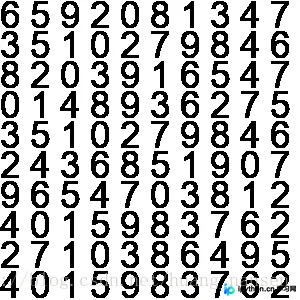
测试数据示例如下:

本例采用OpenCV自带的ML模块,具体使用KNearest(K近邻)算法进行识别。
模型训练与识别实现
import sys
import cv2
import numpy as np
 #######   training part    ###############
samples = np.loadtxt('generalsamples.data',np.float32)
responses = np.loadtxt('generalresponses.data',np.float32)
responses = responses.reshape((responses.size,1))

model = cv2.ml.KNearest_create()
model.train(samples,cv2.ml.ROW_SAMPLE,responses)


def getNum(path):
    im = cv2.imread(path)
    out = np.zeros(im.shape,np.uint8)
    gray = cv2.cvtColor(im,cv2.COLOR_BGR2GRAY)

    #预处理一下
    for i in range(gray.__len__()):
        for j in range(gray[0].__len__()):
            if gray[i][j] == 0:
                gray[i][j] == 255
            else:
                gray[i][j] == 0
    thresh = cv2.adaptiveThreshold(gray,255,1,1,11,2)

    image,contours,hierarchy = cv2.findContours(thresh,cv2.RETR_LIST,cv2.CHAIN_APPROX_SIMPLE)
    count = 0
    numbers = []
    for cnt in contours:
        if cv2.contourArea(cnt)>80:
            [x,y,w,h] = cv2.boundingRect(cnt)
            if  h>25:
                cv2.rectangle(im,(x,y),(x+w,y+h),(0,255,0),2)
                roi = thresh[y:y+h,x:x+w]
                roismall = cv2.resize(roi,(30,30))
                roismall = roismall.reshape((1,900))
                roismall = np.float32(roismall)
                retval, results, neigh_resp, dists = model.findNearest(roismall, k = 1)
                string = str(int((results[0][0])))
                numbers.append(int((results[0][0])))
                cv2.putText(out,string,(x,y+h),0,1,(0,255,0))
                count += 1
        if count == 10:
            break
    return numbers

numbers = getNum('1.png')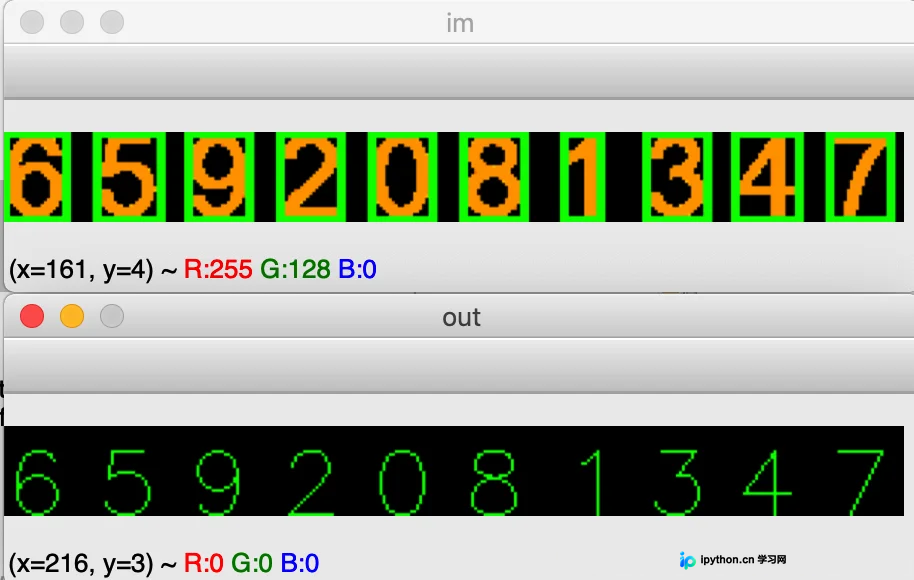
总结
至此,关于OpenCV简单标准数字识别的介绍已完毕。如需了解更多OpenCV标准数字识别相关内容,建议搜索本站过往文章或继续浏览后续文章。感谢大家的支持!
本站声明
本文内容仅供参考,不代表本站观点。转载或引用请注明出处。如发现内容问题,请通过联系我们页面反馈。















