


Python列表与元组核心用法:创建、增删改查及排序详解

本文详解Python中列表与元组的特性与操作。列表作为可变序列,支持动态增删改、切片、索引及多种排序方式(sort与sorted)。元组为不可变序列,强调内存安全与引用特性。内容涵盖创建方法、遍历技巧、元素查找计数及常见内置函数,帮助开发者掌握基础数据结构。
Python列表(list)
1.序列基础概念
序列是Python中最基础的数据结构类型。序列中的每个元素都对应一个数字索引,索引从0开始,依次为1、2……以此类推。
Python内置了6种序列类型,其中最常用的是列表和元组。
所有序列类型均支持索引、切片、拼接(加)、重复(乘)以及成员资格检查等操作。
此外,Python内置了获取序列长度、最大值和最小值的方法。
Python中的可变序列与不可变序列
可变序列包括列表、集合和字典,支持增删改操作,且对象内存地址保持不变。
不可变序列包括元组和字符串,不支持增删改操作。
#可变序列:列表、字典、集合
list_1 = [10,20,30]
print(id(list_1))   #list_1的地址为:2927159489792
list_1.append(40)
print(id(list_1))   #list_1的地址为:2927159489792 改变了值,列表地址并没有改变

#不可变序列:字符串、元组
str_1 = "HelloWorld"
print(id(str_1))    #str_1的地址为:2244899454896
str_1 = str_1+"1"
print(id(str_1))    #str_1的地址为:2244900762928  改变了值,字符串地址也发生了变化
2.列表概述
列表是一个包含0个或多个元素的有序序列,属于序列类型。
主要特点如下:
a.列表长度和内容可变,支持自由增加、删除或替换元素。
b.列表没有长度限制。
c.列表元素类型可以混合,包含基本数据类型或列表、元组、字典、集合及自定义对象。
3.创建列表
将逗号分隔的不同数据项放入方括号中即可创建列表,示例如下:
#创建列表方式一
list_0 = []  #空列表
list_1 = ['elephan','monkey','tiger']
list_2 = [1,2,3]
list_3 = [1,2.2,'tiger',True,list_1]   #列表可存储不同的数据类型

#创建列表方式二:使用list()内置函数  list(obj)函数将字符串、range()对象、元组等对象转换为列表。
list_4 = list("python")
list_5 = list([1,2,3,4,5])
list_6 = list((1,2,3))
list_7 = list(range(1,5,2))
4.列表索引
#列表的索引
list_1 = [1,2.2,'tiger',True]
print(list_1[0])
print(list_1[3])
#print(list_1[4])  报错,超出列表的长度
5.列表切片
#列表的分片
list_1 = [1,2.2,'tiger',True]
print(list_1[1:3])
print(list_1[0:3:2])
print(list_1[-1:0:-1])    #反向分片的时候,注意步长要为负数
6.列表切片赋值
x = [1,2,3,4]
x[1] = 1    #替换下角标为1的索引
print(x)
x[2:] = 5,6 #从下角标为2的索引开始替换
print(x)
x[1:1] = [1,2,3,4,5,6,7]    #在变量索引为1的位置插入 “1,2,3,4,5,6,7”
print(x)

#运行结果
[1, 1, 3, 4]
[1, 1, 5, 6]
[1, 1, 2, 3, 4, 5, 6, 7, 1, 5, 6]
7.遍历列表
为逐一输出列表数据,可使用while循环或for循环进行遍历。
使用while循环遍历列表:
x = [1,2,3,4,5,6,7,8,9]
length = len(x)
i = 0
while i<length:
    print(x[i])
    i+=1
使用for循环遍历列表:
x = [1,2,3,4,5,6,7,8,9]
for n in x:
    print(n)
8.查找元素与统计计数
index(obj)方法:返回指定元素在列表中首次出现的索引位置,若元素不存在则抛出异常。
animal = ['elephant','monkey','snake','tiger',(1,2,3)]
print(animal.index((1,2,3))
print(animal.index("snake"))
#print(animal.index("喵喵"))   #找不到喵喵会抛出异常
x = input("请输入您要查找的动物")
if x in animal:
    a = animal.index(x) #返回索引值
    print('元素{0}在列表中的索引为:{1}'.format(x,a))
else:
    print("列表中不存在该元素")
count(obj)方法:统计指定元素在列表中出现的次数。
x = [1,2,2,2,3,4,[1,2,3,4],(1,2),(1,2)]
a = x.count(2)
print(a)
b = x.count((1,2))
print(b)
#运行结果 3 2
9.向列表添加元素
常用方法包括append(obj)、extend(seq)和insert(index, obj)。
append(obj):在列表末尾添加新元素或对象。
add_list = [0,1,2,3,4]
add_list.append(5)  #在末尾添加一个元素5
print(add_list)
add_list.append([6,7])  #在末尾添加一个列表对象[6,7]
print(add_list)
x = [8,9]
add_list.append(x)  #在末尾添加一个列表对象x
print(add_list)
#运行结果 [0, 1, 2, 3, 4, 5] [0, 1, 2, 3, 4, 5, [6, 7]] [0, 1, 2, 3, 4, 5, [6, 7], [8, 9]]
extend(seq):在列表末尾一次性追加另一个序列中的多个值(即用新列表扩展原列表)。
list_1 = [1,2,3]
list_2 = [4,5,6]
list_1.extend("python") #将序列python与list_1合并
print(list_1)
list_1.extend(list_2) #将list_2看作一个序列,将这个序列和list_1合并
print(list_1)
insert(index, obj):将指定对象插入到指定的索引位置。
#insert()方法
number = [1,2,4,5]
number.insert(2,3)  #在索引为2的位置添加元素3
print(number)
number.insert(5,[6,7])  #在索引为5的位置添加对象[6,7]
print(number)
x = [8,9]
number.insert(6,x)  #在索引为6的位置添加对象x
print(number)
#运行结果 [1, 2, 3, 4, 5] [1, 2, 3, 4, 5, [6, 7]] [1, 2, 3, 4, 5, [6, 7], [8, 9]]
10.从列表删除元素
常用方式包括del命令、pop()方法和remove()方法。
del命令:根据索引删除列表中的元素(可删除一个或多个)。
number = [1,2,3,4,5,6,7,8,9]
del number[2]   #删除索引为2的元素
print(number)
del number[1:3] #分片删除索引1:3的元素
print(number)
del number[-1:0:-2] #分片删除索引-1:0:-2的元素
print(number)
pop([obj])方法:移除列表中的一个元素(默认为最后一个),并返回该元素的值(仅删除一个)。
number = [1,2,3,4,5,6,7,8,9]
print(number.pop())  #默认删除最后一个元素,并返回该元素的值
print(number)
print(number.pop(0) )  #删除索引为0的元素
print(number)
remove(obj)方法:移除列表中第一个匹配指定值的元素。
#使用remove方法删除列表x中的所有'abc'
x = ["123",'abc',"ABC",'python','abc']
while 'abc' in x:
    x.remove('abc')
print(x)
#运行结果 ['123', 'ABC', 'python']
11.列表排序
reverse()方法:将列表中的元素反向存放(直接修改原列表)。
x = [1,2,3,4]
x.reverse()
print(x)
#运行结果 [4, 3, 2, 1]
sort([key=None], [reverse=False])方法:对原列表进行排序(默认为升序),排序后的新列表会覆盖原列表。
key参数:接收一个函数,指定根据该函数的返回值对元素进行排序。
reverse参数:表示是否反向排序,默认为False。
# 这里先看一个不带key参数的sort()函数,大家很容易知道结果
li = [[1, 7], [1, 5], [2, 4], [1, 1]]
li.sort()
print(li)
# [[1, 1], [1, 5], [1, 7], [2, 4]] 默认按照0维排序 再按照1维排序


def fun(li):
    return li[1]
# 这时将函数fun传递给参数key 得出结果
li.sort(key=fun)
print(li) # [[1, 1], [2, 4], [1, 5], [1, 7]]
#是li中每个子元素的第二个数进行排序
#无参数排序
x = [1,2,3,4,5]
x.sort()
print(x)
#指定参数排序,长度,反向
x_1 = ['a','abc','abcd','ab']
x_1.sort(key=len,reverse=True)
print(x_1)
#运行结果 [1, 2, 3, 4, 5] ['abcd', 'abc', 'ab', 'a']
sorted(iterable, [key=None], [reverse=False])函数:排序逻辑与sort相同,但返回一个新列表,不修改原列表。
iterable参数:表示可迭代对象,此处指列表名。
#无参数排序
x_1 = [1,5,2,3,4]
x_2 = sorted(x_1)
print(x_1)
print(x_2)

#指定参数排序
x_1 = ['a','abc','abcd','ab']
x_2 = sorted(x_1,key=len,reverse=True)
print(x_1)
print(x_2)
#运行结果 [1, 5, 2, 3, 4] [1, 2, 3, 4, 5] ['a', 'abc', 'abcd', 'ab'] ['abcd', 'abc', 'ab', 'a']
Python元组(tuple)
元组是不可变序列,因此不支持增删改操作。
1.为何设计元组为不可变序列
- 在多任务环境下,操作不可变对象无需加锁。
- 在程序中建议尽量使用不可变序列。
注意:元组存储的是对象的引用。
- 如果元组中存储的对象本身是不可变对象,则不能引用其他对象。
- 如果元组中存储的对象本身是可变对象,则该对象的引用地址不可改变,但其内部数据可以修改。
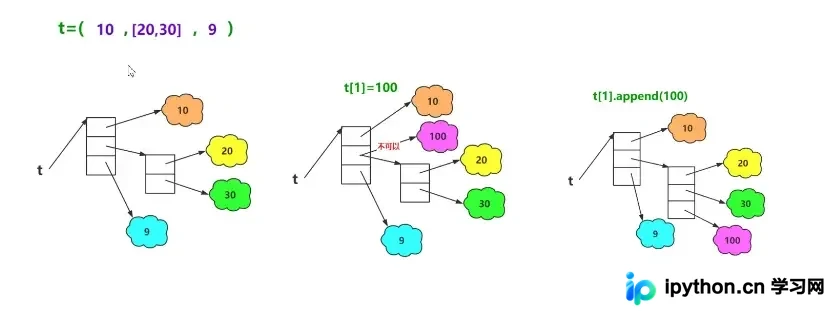
tuple_1 = (10,[20,30],"string")
print("1",tuple_1[0],type(tuple_1[0]),id(tuple_1[0]))
print("2",tuple_1[1],type(tuple_1[1]),id(tuple_1[1]))
print("3",tuple_1[2],type(tuple_1[2]),id(tuple_1[2]))
#tuple_1[0] = 1
#tuple_1[1] = 1       这三行代码报错,不能修改元组的值
#tuple_1[2] = 1
tuple_1[1].insert(2,40)  #使用list的方法修改list的值,但是列表的引用地址并没有改变
print("4",tuple_1[1],type(tuple_1[1]),id(tuple_1[1]))
#运行结果 1 10 <class 'int'> 2698032015952 2 [20, 30] <class 'list'> 2698040063232 3 string <class 'str'> 2698040230832 4 [20, 30, 40] <class 'list'> 2698040063232
2.创建元组
#方式一:直接使用()创建
tuple_1 = (1,2.2,"Python",True)
print(tuple_1)          #运行结果(1, 2.2, 'Python', True)
#()可以省略不写
tuple_1 = 1,2.22,"Python",True
print(tuple_1)          #运行结果(1, 2.22, 'Python', True)

#方式二:使用内置函数tuple(obj)函数将字符串、range()对象、元组等对象转换为元组
tuple_2 = tuple("python")
tuple_3 = tuple([1,2,3,4,5])
tuple_4 = tuple((1,2,3))
tuple_5 = tuple(range(1,5,2))
tuple_6 = tuple({"a":"张三",True:1})
print(tuple_2)      #运行结果('p', 'y', 't', 'h', 'o', 'n')
print(tuple_3)      #运行结果(1, 2, 3, 4, 5)
print(tuple_4)      #运行结果(1, 2, 3)
print(tuple_5)      #运行结果(1, 3)
print(tuple_6)      #运行结果('a', True)

#注意:当元组的值,只包含一个元素的时候,一定要加入一个逗号
tuple_7 = (1,)
tuple_8 = (1)
tuple_9 = ("你",)
tuple_10 = ("你")
print(tuple_7)      #运行结果(1,)
print(tuple_8)      #运行结果1
print(tuple_9)      #运行结果('你',)
print(tuple_10)     #运行结果你
3.元组遍历
tuple_1 = ('python','world',94)
#方法一:使用循环利用索引,获取全部元组的元素
i = 0
length = len(tuple_1)
while i<length:
    print(tuple_1[i])
    i += 1
#方法二
for x in tuple_1:
    print(x)
4.元组内置函数
- 序列通用的三个函数:len()、max()、min()。
- tuple():功能是以一个序列为参数,将其转换为元组;若参数本身已是元组,则原样返回(参考上文元组知识点2,创建元组)。
到此这篇关于Python数据结构之列表与元组详解的文章就介绍到这了,更多相关Python 列表内容请搜索本站以前的文章或继续浏览下面的相关文章希望大家以后多多支持本站!
本站声明
本文内容仅供参考,不代表本站观点。转载或引用请注明出处。如发现内容问题,请通过联系我们页面反馈。















