


python-redis-lock 分布式锁实战与 Celery 并发冲突解决

本文介绍使用 python-redis-lock 库解决 Celery 多 Worker 并发执行时的数据冲突问题。通过对比数据库悲观锁、乐观锁及 Redis 方案,重点讲解 python-redis-lock 的灵活配置(超时、刷新、阻塞),并提供基于 Lua 脚本原子操作的代码示例,帮助开发者根据场景选择最优锁机制。
python-redis-lock
官方文档 不错的博文可参考
问题背景
在使用 celery 执行我们的异步任务时,为了提高效率,celery 可以开启多个进程来启动对应的 worker。 但是会出现这么一种情况:在获取到数据源之后要对数据库进行扫描,根据 UUID 来断定是插入还是更新,两个 worker 同时 (相差0.001S) 拿到了 UUID 但是在其中一个没插入时,另一个也扫描完了数据库,这时这两个 worker 都会认为自己拿到的 UUID 是在数据库中没有存在过的,所以都会调用 INSERT 方法来进行插入操作。
几种解决方案
为了解决这个问题,一般有如下解决方案. 分布式锁家族:
数据库:
- 排它锁(悲观锁)
- 乐观锁
Redis
- 自己实现Redis SET SETNX 操作,结合Lua脚本确保原子操作
- RedLock Redis里分布式锁实现的算法,争议比较大,谨慎使用
- python-redis-lock 本文将要介绍的技术。这个库提供的分布式锁很灵活,是否需要超时?是否需要自动刷新?是否要阻塞?都是可选的。没有最好的算法,只有最合适的算法,开发人员应该根据实际需求场景谨慎选择具体用哪一种技术去实现。
设计思路:
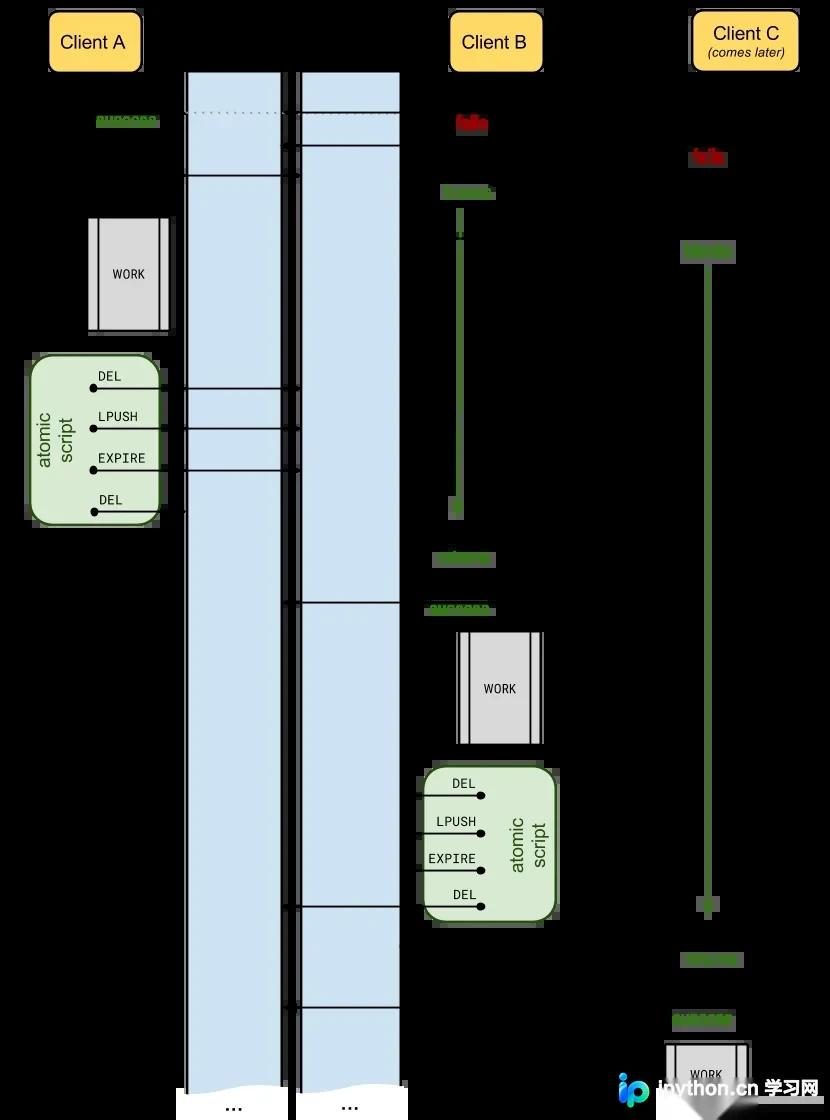
Zookeeper 这个应该是功能最强大的,比较专业,稳定性好。我还没使用过,日后玩明白了再写篇文章总结一下。
扩展思路
在celery的场景下也可以使用celery_once进行任务去重操作, celery_once底层也是使用redis进行实现的。 可以参考这篇
Talk is cheap, show me your code!
一个简单的demo
import random
import time
import threading
import redis_lock
import redis

HOST = 'YOUR IP LOCATE'
PORT = '6379'
PASSWORD = 'password'


def get_redis():
    pool = redis.ConnectionPool(host=HOST, port=PORT, password=PASSWORD, decode_responses=True, db=2)
    r = redis.Redis(connection_pool=pool)
    return r


def ask_lock(uuid):
    lock = redis_lock.Lock(get_redis(), uuid)
    if lock.acquire(blocking=False):
        print(" %s Got the lock." % uuid)
        time.sleep(5)
        lock.release()
        print(" %s Release the lock." % uuid)
    else:
        print(" %s Someone else has the lock." % uuid)


def simulate():
   for i in range(10):
        id = random.randint(0, 5)
        t = threading.Thread(target=ask_lock, args=(str(id)))
        t.start()


simulate()
Output:
4 Got the lock. 5 Got the lock. 3 Got the lock. 5 Someone else has the lock. 5 Someone else has the lock. 2 Got the lock. 5 Someone else has the lock. 4 Someone else has the lock. 3 Someone else has the lock. 3 Someone else has the lock. 2 Release the lock. 5 Release the lock. 4 Release the lock. 3 Release the lock.
到此这篇关于python-redis-lock分布式锁的文章就介绍到这了,更多相关python分布式锁内容请搜索本站以前的文章或继续浏览下面的相关文章希望大家以后多多支持本站!
本站声明
本文内容仅供参考,不代表本站观点。转载或引用请注明出处。如发现内容问题,请通过联系我们页面反馈。















