


Python OpenCV实现图像叠加:背景去除与多场景合成详解

本文详解如何利用Python和OpenCV实现图像覆盖。通过读取背景与对象图像,利用掩码生成布尔数组以去除对象背景,并基于中心坐标计算不同位置(如左上、右下等)的图像重叠区域。文章提供了完整的代码实现与五种典型场景的合成示例,帮助开发者掌握图像合成的核心逻辑。
前言
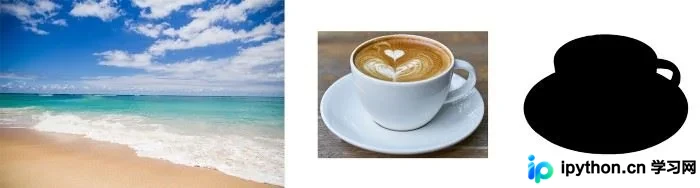
本文将演示如何将特定对象从一张图像中提取并叠加到另一张背景图像上。实现这一过程主要依赖以下三个要素:
1. 原始背景图像;
2. 需要叠加的对象图像;
3. 对象的掩码(Mask),其中对象区域为黑色,背景区域为白色。
在本示例中,背景选用一张大海照片,对象为一杯咖啡。具体图像如下:
1. 导入相关库
首先,在Jupyter Notebook中创建新文件,并导入所需的Python模块:
import cv2 # OpenCV
import numpy as np
import matplotlib.pyplot as plt
2. 使用OpenCV读取和显示图像
接下来,利用cv2.imread()函数加载图像并进行展示。
注意!
OpenCV默认以BGR格式读取图像(即蓝色和红色通道互换)。因此,必须使用cv2.cvtColor()函数将BGR格式转换为RGB格式,以便正确显示颜色。
# Original image, which is the background
background = cv2.imread('background.jpg')
background = cv2.cvtColor(background, cv2.COLOR_BGR2RGB)

# Image of the object
img = cv2.imread('cup.png')
img = cv2.cvtColor(img, cv2.COLOR_BGR2RGB)

# Image the object's mask
mask = cv2.imread('cup_mask.png')
mask = cv2.cvtColor(mask, cv2.COLOR_BGR2RGB)

print("Background shape:", background.shape)
print("Image shape:", img.shape)
print("Mask shape:", img.shape)
# Background shape: (1280, 1920, 3)
# Image shape: (860, 1151, 3)
# Mask shape: (860, 1151, 3)
经检测,背景图像尺寸为高1280像素、宽1920像素;目标对象图像尺寸为高860像素、宽1151像素。
图像展示如下:
plt.figure(figsize=(16,16))
plt.title("Background", fontsize=18)
plt.imshow(background);

fig, ax = plt.subplots(1, 2, figsize=(16, 7))
ax[0].imshow(img)
ax[0].set_title('Object', fontsize=18)
ax[1].imshow(mask)
ax[1].set_title('Mask', fontsize=18);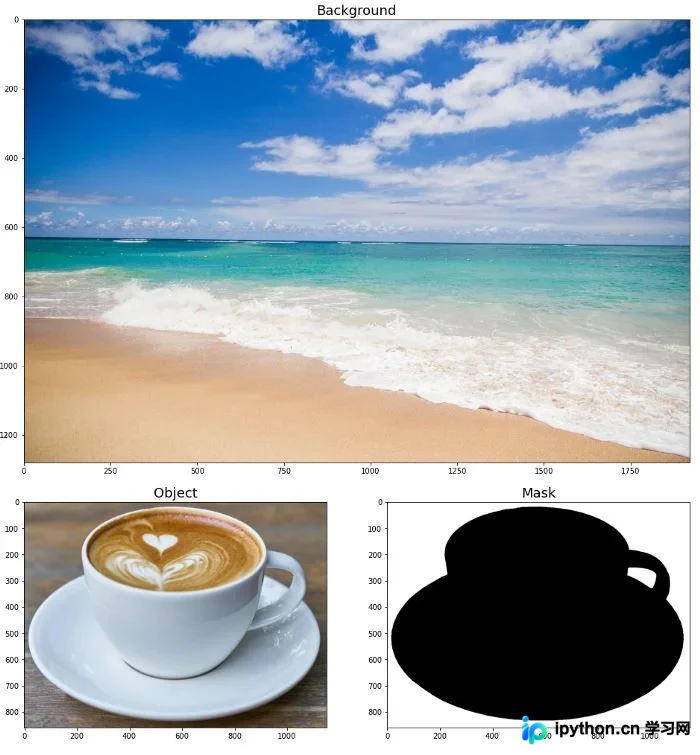
3. 从对象图像中去除背景
接下来定义一个函数,将对象的掩码转换为布尔数组。
在原始掩码中,对象区域填充为黑色,背景区域填充为白色。
生成的布尔数组具有与原始掩码相同的高度和宽度,但仅包含一个通道。若像素属于对象区域,其值为True;若属于背景区域,则值为False。
该布尔掩码将用于剔除所有背景像素,仅保留对象部分。
def remove_obj_background(img_path, mask_path):
    '''
    Function returns:
    - image of the object with removed background in CV2 RGB format (numpy array with dimensions (width, height, 3))
    - boolean mask of the object (numpy array with dimensions (width, height))
    '''
    img = cv2.imread(img_path)
    img = cv2.cvtColor(img, cv2.COLOR_BGR2RGB)

    mask = cv2.imread(mask_path)
    mask = cv2.cvtColor(mask, cv2.COLOR_BGR2RGB)

    h, w = mask.shape[0], mask.shape[1]

    # Boolean mask is a numpy array with two dimensions: width and height.
    # On the original mask, object area is filled with black color, background area is filled with white color.
    # On the boolean mask, object area is filled with True, background area is filled with False.
    mask_boolean = mask[:,:,0] == 0
    img_with_removed_background = img * np.stack([mask_boolean, mask_boolean, mask_boolean], axis=2)

    return img_with_removed_background, mask_boolean

img_with_removed_background, mask_boolean = remove_obj_background('cup.png', 'cup_mask.png')
print("Shape of the image of the object:", img_with_removed_background.shape)
print("Shape of the boolean mask:", mask_boolean.shape)
print("\n")
# Image with removed background shape: (860, 1151, 3)
# Boolean mask shape: (860, 1151)

fig, ax = plt.subplots(1, 2, figsize=(16, 7))
ax[0].imshow(img_with_removed_background)
ax[0].set_title('Object with removed background', fontsize=18)
ax[1].imshow(mask_boolean)
ax[1].set_title('Boolean mask', fontsize=18);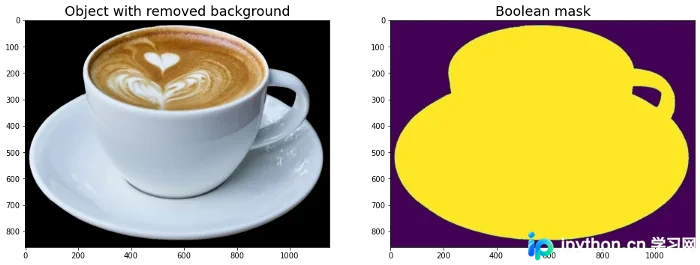
4. 将对象添加到背景图像
在定义叠加函数之前,需解释并可视化几种图像重叠的情况。
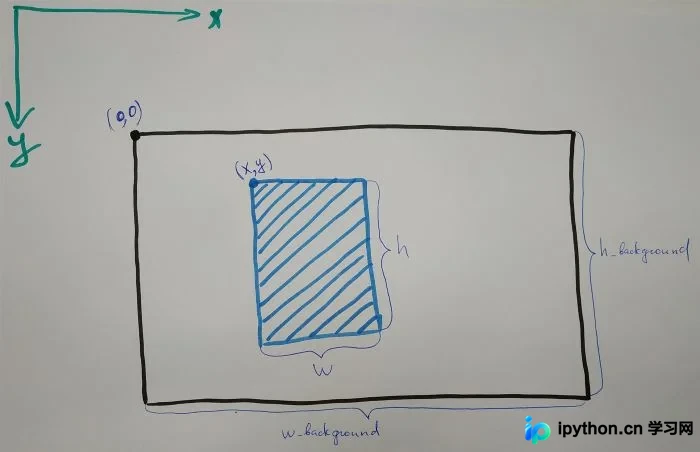
假设背景图像的高度为h_background,宽度为w_background;目标对象图像的高度为h,宽度为w。
通常情况下,h应小于h_background,且w应小于w_background。
情况1:若将对象放置在背景中心,处理较为简单:需将背景中大小为h x w的区域替换为对象。
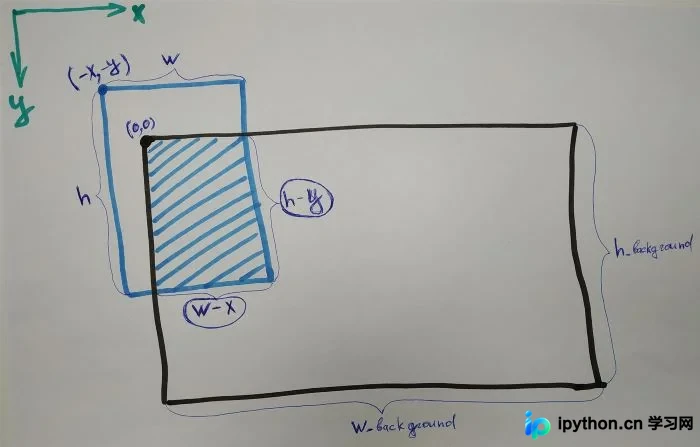
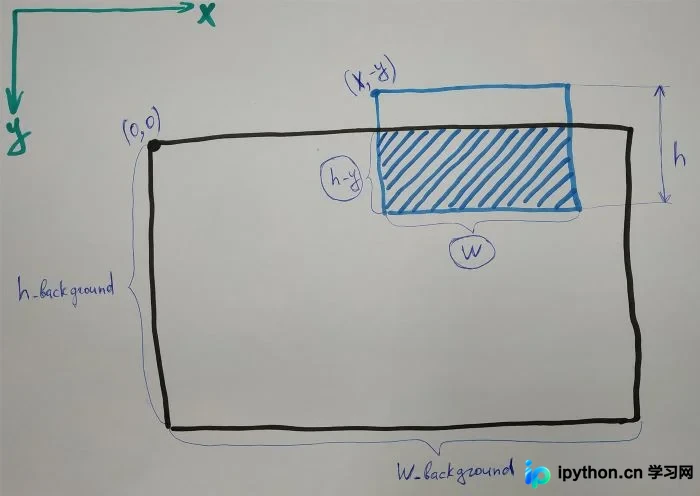
情况2:若将对象放置在背景的左上角,对象部分区域可能超出背景范围。此时,需替换的背景区域大小为(h - y) x (w - x)。
这里的-x和-y表示对象图像左上角相对于背景左上角的坐标偏移。由于背景左上角坐标为x=0, y=0,对象左上角若位于背景左上角之外,其x坐标为负值,y坐标也为负值。
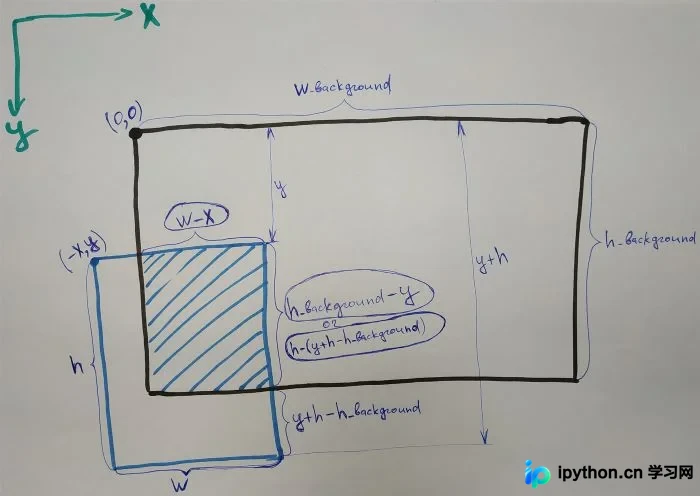
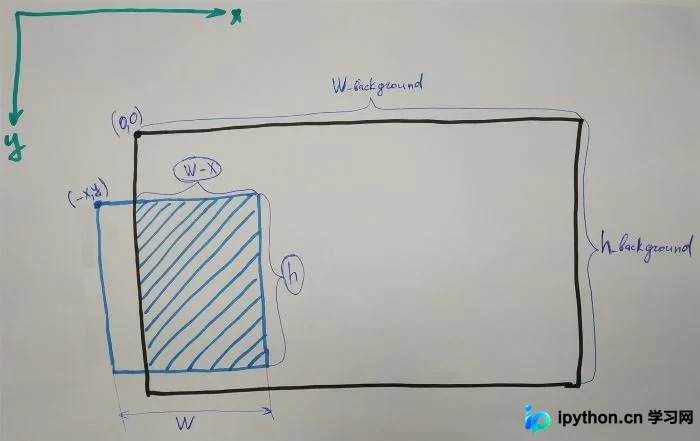
情况3:若将对象放置在背景的左下角,对象部分区域可能超出背景范围。此时,需替换的背景区域大小为(h_background - y) x (w - x)。
通用计算公式为:(h - max(0, y + h - h_background)) x (w - x)。这是因为如果目标图像的下边界高于背景的下边界,则需替换的区域为h x (w - x)。
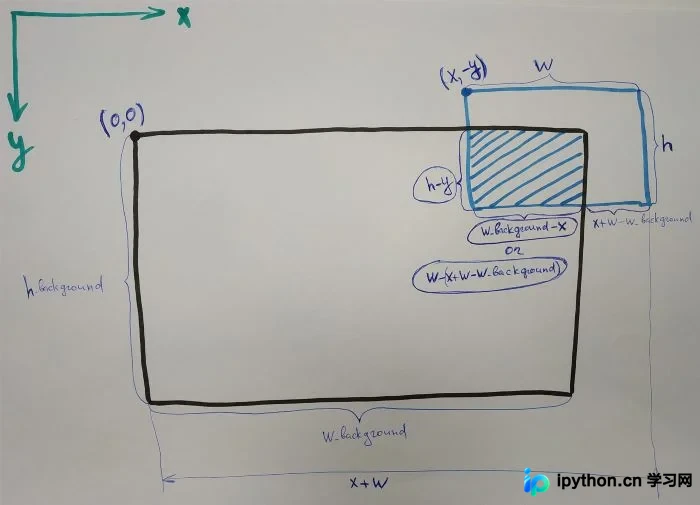
情况4:若将对象放置在背景的右上角,对象部分区域可能超出背景范围。此时,需替换的背景区域大小为(h - y) x (w_background - x)。
通用计算公式为:(h - y) x (w - max(0, x + w - w_background))。这是因为如果对象图像的右边界在背景右边界左侧,则需替换的区域为(h - y) x w。
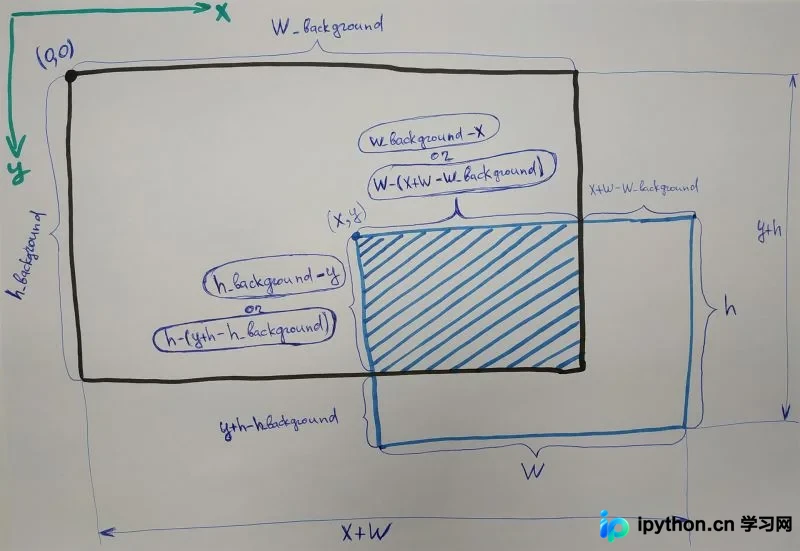
情况5:若将对象放置在背景的右下角,对象部分区域可能超出背景范围。此时,需替换的背景区域大小为(h_background - y) x (w_background - x)。
通用计算公式为:(h - max(0, y + h - h_background)) x (w - max(0, x + w - w_background))。这涵盖了对象图像右侧和下侧均超出背景范围的情况,需替换的区域为h x w(当对象完全在背景内时)或相应交集区域。
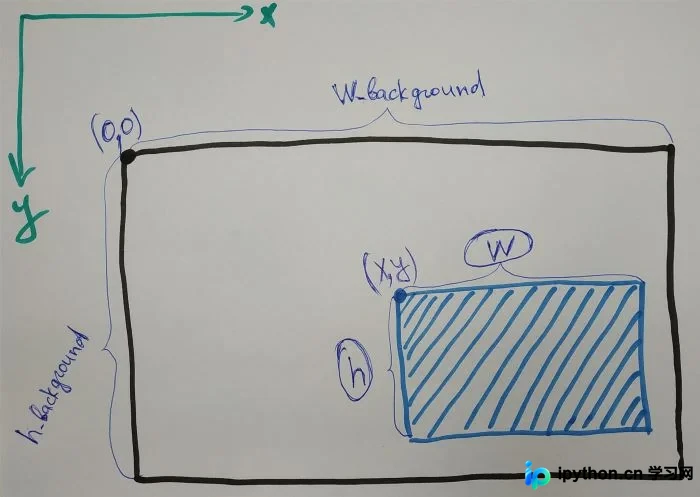
综合上述所有情况,定义叠加函数如下:
def add_obj(background, img, mask, x, y):
    '''
    Arguments:
    background - background image in CV2 RGB format
    img - image of object in CV2 RGB format
    mask - mask of object in CV2 RGB format
    x, y - coordinates of the center of the object image
    0 < x < width of background
    0 < y < height of background

    Function returns background with added object in CV2 RGB format

    CV2 RGB format is a numpy array with dimensions width x height x 3
    '''

    bg = background.copy()

    h_bg, w_bg = bg.shape[0], bg.shape[1]

    h, w = img.shape[0], img.shape[1]

    # Calculating coordinates of the top left corner of the object image
    x = x - int(w/2)
    y = y - int(h/2)

    mask_boolean = mask[:,:,0] == 0
    mask_rgb_boolean = np.stack([mask_boolean, mask_boolean, mask_boolean], axis=2)

    if x >= 0 and y >= 0:

        h_part = h - max(0, y+h-h_bg) # h_part - part of the image which overlaps background along y-axis
        w_part = w - max(0, x+w-w_bg) # w_part - part of the image which overlaps background along x-axis

        bg[y:y+h_part, x:x+w_part, :] = bg[y:y+h_part, x:x+w_part, :] * ~mask_rgb_boolean[0:h_part, 0:w_part, :] + (img * mask_rgb_boolean)[0:h_part, 0:w_part, :]

    elif x < 0 and y < 0:

        h_part = h + y
        w_part = w + x

        bg[0:0+h_part, 0:0+w_part, :] = bg[0:0+h_part, 0:0+w_part, :] * ~mask_rgb_boolean[h-h_part:h, w-w_part:w, :] + (img * mask_rgb_boolean)[h-h_part:h, w-w_part:w, :]

    elif x < 0 and y >= 0:

        h_part = h - max(0, y+h-h_bg)
        w_part = w + x

        bg[y:y+h_part, 0:0+w_part, :] = bg[y:y+h_part, 0:0+w_part, :] * ~mask_rgb_boolean[0:h_part, w-w_part:w, :] + (img * mask_rgb_boolean)[0:h_part, w-w_part:w, :]

    elif x >= 0 and y < 0:

        h_part = h + y
        w_part = w - max(0, x+w-w_bg)

        bg[0:0+h_part, x:x+w_part, :] = bg[0:0+h_part, x:x+w_part, :] * ~mask_rgb_boolean[h-h_part:h, 0:w_part, :] + (img * mask_rgb_boolean)[h-h_part:h, 0:w_part, :]

    return bg
该函数除接收背景、对象和掩码图像外,还需接收坐标x和y,用于定义对象在背景中的中心位置。
坐标(0,0)对应背景的左上角。
w_bg和h_bg分别代表背景的宽度和高度。
坐标x和y需满足条件:0 < x < w_bg 且 0 < y < h_bg。
5. 结果展示
以下展示该函数的实际运行效果。
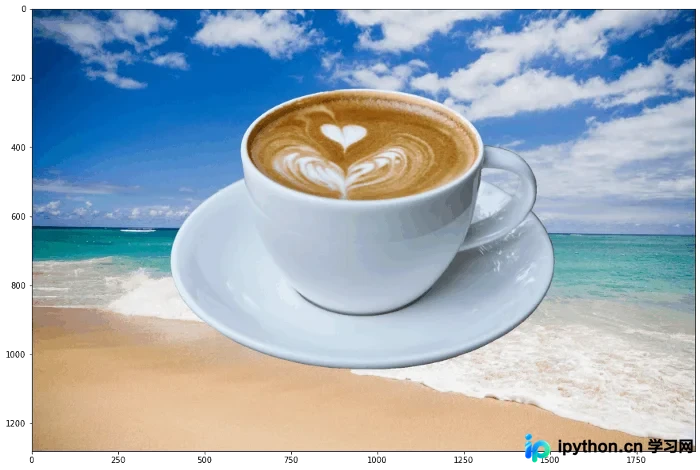
示例1:将咖啡杯置于背景中央。背景宽1920,高1280,因此对象中心坐标设为x=1920/2=960,y=1280/2=640。
composition_1 = add_obj(background, img, mask, 960, 640)
plt.figure(figsize=(15,15))
plt.imshow(composition_1);
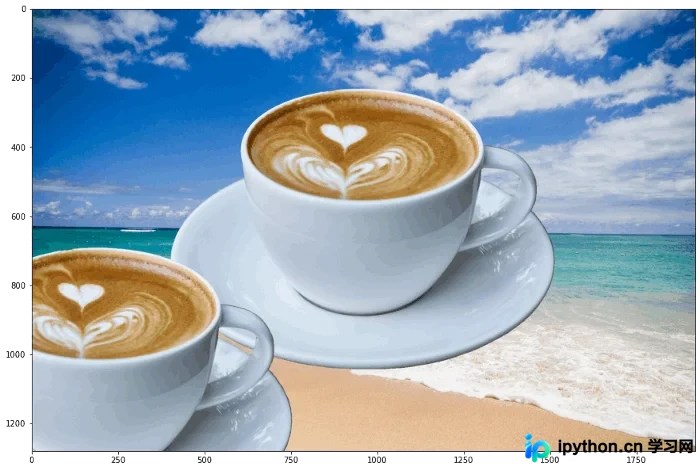
示例2:将咖啡杯置于背景左下角。此时对象中心坐标设为x=200,y=1100。
composition_2 = add_obj(composition_1, img, mask, 200, 1100)
plt.figure(figsize=(15,15))
plt.imshow(composition_2);
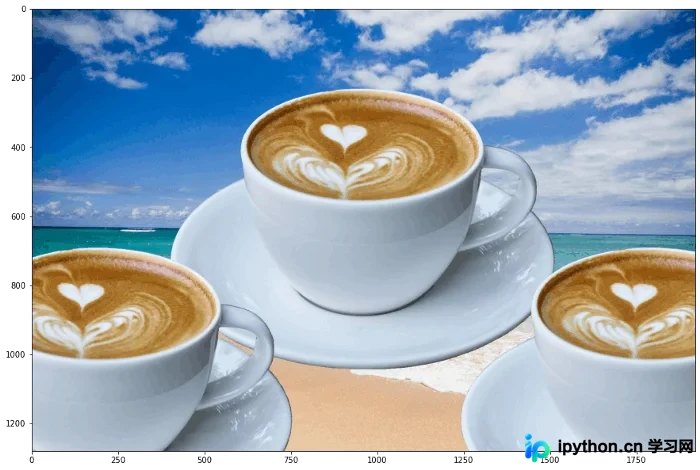
示例3:将咖啡杯置于背景右下角。此时对象中心坐标设为x=1800,y=1100。
composition_3 = add_obj(composition_2, img, mask, 1800, 1100)
plt.figure(figsize=(15,15))
plt.imshow(composition_3);
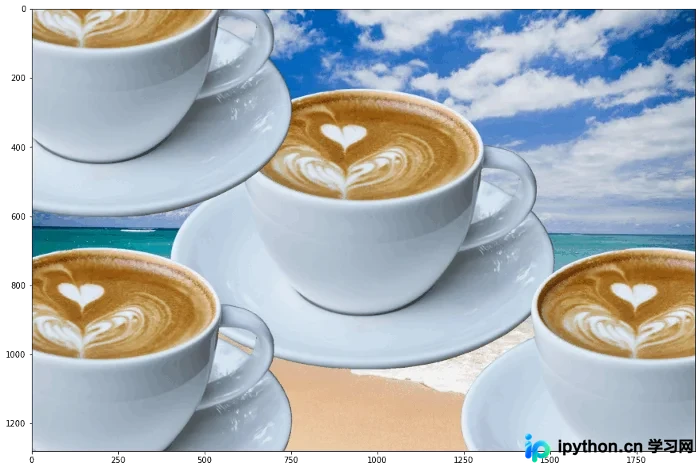
示例4:将咖啡杯置于背景左上角。此时对象中心坐标设为x=200,y=200。
composition_4 = add_obj(composition_3, img, mask, 200, 200)
plt.figure(figsize=(15,15))
plt.imshow(composition_4);
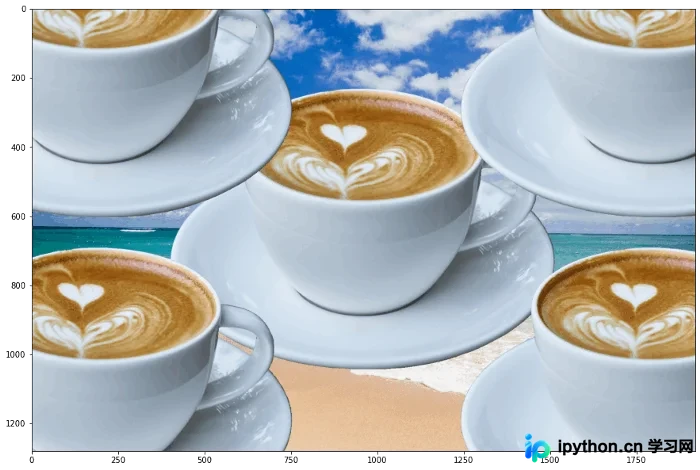
示例5:将咖啡杯置于背景右上角。此时对象中心坐标设为x=1800,y=200。
composition_5 = add_obj(composition_4, img, mask, 1800, 200)
plt.figure(figsize=(15,15))
plt.imshow(composition_5);
以上即为基于Python OpenCV实现图像覆盖的完整流程。如需更多Python OpenCV图像处理资料,请关注本站其他相关文章。
本站声明
本文内容仅供参考,不代表本站观点。转载或引用请注明出处。如发现内容问题,请通过联系我们页面反馈。















