


Python自定义封装带颜色的Logging模块详解

本文介绍如何在Python接口自动化框架中二次封装logging模块,实现带颜色的控制台输出与文件记录。通过自定义Logger类,配置不同日志等级的颜色及详细格式(含文件名、行号等),并分享使用示例与避坑指南,帮助开发者提升日志可读性与调试效率。
Python自定义封装带颜色的Logging模块详解
Python自定义封装带颜色的logging模块
封装背景与实现思路
在搭建Python接口自动化框架的过程中,为了提升日志的可读性与调试效率,我尝试基于标准logging库进行二次封装,实现了一个自定义的logger方法。具体实现代码如下:
核心代码实现
import logging
import os
import time
import colorlog
from logging.handlers import RotatingFileHandler
# 创建文件目录
cur_path = os.path.dirname(os.path.realpath(__file__))  # log_path是存放日志的路径
log_path = os.path.join(os.path.dirname(cur_path), 'logs')
if not os.path.exists(log_path): os.mkdir(log_path)  # 如果不存在这个logs文件夹,就自动创建一个
# 修改log保存位置
timestamp = time.strftime("%Y-%m-%d", time.localtime())
logfile_name = '%s.log' % timestamp
logfile_path = os.path.join(log_path, logfile_name)
# 定义不同日志等级颜色
log_colors_config = {
   'DEBUG': 'bold_cyan',
   'INFO': 'bold_green',
   'WARNING': 'bold_yellow',
   'ERROR': 'bold_red',
   'CRITICAL': 'red',
}


class Logger(logging.Logger):
   def __init__(self, name, level='DEBUG', file=None, encoding='utf-8'):
       super().__init__(name)
       self.encoding = encoding
       self.file = file
       self.level = level
       # 针对所需要的日志信息 手动调整颜色
       formatter = colorlog.ColoredFormatter(
           '%(log_color)s%(levelname)1.1s %(asctime)s %(reset)s| %(message_log_color)s%(levelname)-8s %(reset)s| %('
           'log_color)s[%(filename)s%(reset)s:%(log_color)s%(module)s%(reset)s:%(log_color)s%(funcName)s%('
           'reset)s:%(log_color)s%(''lineno)d] %(reset)s- %(white)s%(message)s',
           reset=True,
           log_colors=log_colors_config,
           secondary_log_colors={
               'message': {
                   'DEBUG': 'blue',
                   'INFO': 'blue',
                   'WARNING': 'blue',
                   'ERROR': 'red',
                   'CRITICAL': 'bold_red'
               }
           },
           style='%'
       )  # 日志输出格式
       # 创建一个FileHandler,用于写到本地
       rotatingFileHandler = logging.handlers.RotatingFileHandler(filename=logfile_path,
                                                                  maxBytes=1024 * 1024 * 50,
                                                                  backupCount=5)
       rotatingFileHandler.setFormatter(formatter)
       rotatingFileHandler.setLevel(logging.DEBUG)
       self.addHandler(rotatingFileHandler)
       # 创建一个StreamHandler,用于输出到控制台
       console = colorlog.StreamHandler()
       console.setLevel(logging.DEBUG)
       console.setFormatter(formatter)
       self.addHandler(console)
       self.setLevel(logging.DEBUG)


logger = Logger(name=logfile_path, file=logfile_path)
使用示例与效果展示
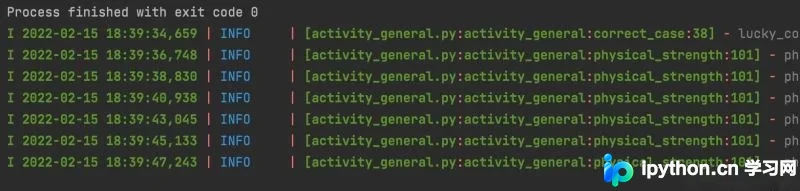
在实际使用中,只需引入封装好的类即可调用,界面直观且视觉效果清晰美观。
实际调用代码示例
# 引入封装好的logger模块
from common.logger_handler import logger

def physical_strength(self, abnormal):
  """兑换体力异常通用方法"""
  if self.attrs.__contains__('costType'):
      attrs_Type = {
          "costType": abnormal,
          "count": self.attrs["count"]
      }
      response_Type = r().response(self.send_uid, self.code, self.event, attrs_Type)
      # 使用时直接调用logger.info()就行
      logger.info(f"physical_strength_{abnormal},response_Type:{response_Type}")
      assert response_Type["code"] != 0
      time.sleep(2)
      attrs_count = {
          "costType": self.attrs["costType"],
          "count": abnormal
      }
      response_count = r().response(self.send_uid, self.code, self.event, attrs_count)
      logger.info(f"physical_strength_{abnormal},response_count:{response_count}")
      assert response_count["code"] != 0
      time.sleep(2)
      attrs_all = {
          "costType": abnormal,
          "count": abnormal
      }
      response_all = r().response(self.send_uid, self.code, self.event, attrs_all)
      logger.info(f"physical_strength_{abnormal},response_all:{response_all}")
      assert response_all["code"] != 0
      time.sleep(2)
  else:
      attrs_count = {
          "count": abnormal
      }
      response_count = r().response(self.send_uid, self.code, self.event, attrs_count)
      logger.info(f"physical_strength_{abnormal},response_count:{response_count}")
      assert response_count["code"] != 0
      time.sleep(2)
日志格式化参数详解
输出效果支持按日期、时间、日志等级、文件名、类名、方法名及代码行号进行展示。若觉得默认格式过长,可通过调整formatter参数自定义显示内容。具体格式化符号含义如下: %(levelno)s:打印日志级别的数值 %(levelname)s:打印日志级别名称 %(pathname)s:打印当前执行程序的路径,对应sys.argv[0] %(filename)s:打印当前执行程序的文件名 %(funcName)s:打印调用日志的当前函数名 %(lineno)d:打印日志所在的当前行号 %(asctime)s:打印日志生成的时间 %(thread)d:打印线程ID %(threadName)s:打印线程名称 %(process)d:打印进程ID %(message)s:打印具体的日志信息
常见错误与避坑指南
注意事项:调用日志等级方法时,应避免使用某些特定方式,否则可能导致日志打印时的路径定位错误,使得日志只能定位到log封装类当前的方法下,而非实际调用位置。
日志等级方法定义
  def debug(self, message):
      self.__console('debug', message)

  def info(self, message):
      self.__console('info', message)

  def warning(self, message):
      self.__console('warning', message)

  def error(self, message):
      self.__console('error', message)
至此,关于Python自定义封装带颜色的logging模块的介绍已完成。如需了解更多Python logging模块相关内容,可搜索本站历史文章或继续浏览后续相关文章。感谢大家的支持!
本站声明
本文内容仅供参考,不代表本站观点。转载或引用请注明出处。如发现内容问题,请通过联系我们页面反馈。















