


Python Pygame实战:从零开发赛车躲避游戏

发布时间:2026-10-15 |
6人浏览过
本文详细介绍如何使用Python和Pygame库开发一款赛车躲避游戏。内容涵盖从环境搭建、模块安装到核心代码逻辑的完整实现过程,包括游戏窗口设置、玩家控制、障碍物生成及碰撞检测机制,帮助开发者快速掌握Pygame基础应用。
导语
大家好,欢迎阅读本文。
当前游戏市场种类繁多,NBA 2K系列和FIFA系列堪称经典之作。然而,赛车类游戏同样拥有庞大的用户群体,例如《跑跑卡丁车》、《QQ飞车》以及主机平台上的《极品飞车》系列,均深受玩家喜爱。
回顾过往,许多玩家最初被赛车游戏中精美的人物角色设计所吸引。
赛车游戏通常凭借多样化的车型、丰富的赛道场景以及高拟真度体验来吸引玩家。在游戏中,玩家需要操控各类赛车在全球各地的赛道上驰骋,体验高速驾驶带来的刺激感。
接下来,我们将通过代码编写一款名为《赛车CAR》的小游戏,共同探索其实现原理。
一、环境安装
1)运行环境
本项目使用的运行环境为Python 3.7及PyCharm社区版2021。Pygame游戏模块及其部分依赖模块可直接导入,无需额外安装。
模块安装命令如下:pip install -i https://pypi.douban.com/simple/ +模块名
2)素材环境
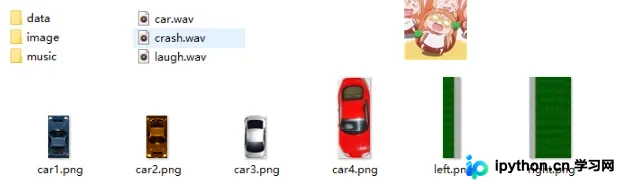
游戏所需的背景音乐及图片素材等资源准备如下:
二、代码展示
import pygame, random, sys ,os,time
from pygame.locals import *
WINDOWWIDTH = 800
WINDOWHEIGHT = 600
TEXTCOLOR = (255, 255, 255)
BACKGROUNDCOLOR = (0, 0, 0)
FPS = 40
BADDIEMINSIZE = 10
BADDIEMAXSIZE = 40
BADDIEMINSPEED = 8
BADDIEMAXSPEED = 8
ADDNEWBADDIERATE = 6
PLAYERMOVERATE = 5
count=3
def terminate():
pygame.quit()
sys.exit()
def waitForPlayerToPressKey():
while True:
for event in pygame.event.get():
if event.type == QUIT:
terminate()
if event.type == KEYDOWN:
if event.key == K_ESCAPE: #escape quits
terminate()
return
def playerHasHitBaddie(playerRect, baddies):
for b in baddies:
if playerRect.colliderect(b['rect']):
return True
return False
def drawText(text, font, surface, x, y):
textobj = font.render(text, 1, TEXTCOLOR)
textrect = textobj.get_rect()
textrect.topleft = (x, y)
surface.blit(textobj, textrect)
# set up pygame, the window, and the mouse cursor
pygame.init()
mainClock = pygame.time.Clock()
windowSurface = pygame.display.set_mode((WINDOWWIDTH, WINDOWHEIGHT))
pygame.display.set_caption('car 赛车游戏')
pygame.mouse.set_visible(False)
# fonts
font = pygame.font.SysFont(None, 30)
# sounds
gameOverSound = pygame.mixer.Sound('music/crash.wav')
pygame.mixer.music.load('music/car.wav')
laugh = pygame.mixer.Sound('music/laugh.wav')
# images
playerImage = pygame.image.load('image/car1.png')
car3 = pygame.image.load('image/car3.png')
car4 = pygame.image.load('image/car4.png')
playerRect = playerImage.get_rect()
baddieImage = pygame.image.load('image/car2.png')
sample = [car3,car4,baddieImage]
wallLeft = pygame.image.load('image/left.png')
wallRight = pygame.image.load('image/right.png')
# "Start" screen
drawText('Press any key to start the game.', font, windowSurface, (WINDOWWIDTH / 3) - 30, (WINDOWHEIGHT / 3))
drawText('And Enjoy', font, windowSurface, (WINDOWWIDTH / 3), (WINDOWHEIGHT / 3)+30)
pygame.display.update()
waitForPlayerToPressKey()
zero=0
if not os.path.exists("data/save.dat"):
f=open("data/save.dat",'w')
f.write(str(zero))
f.close()
v=open("data/save.dat",'r')
topScore = int(v.readline())
v.close()
while (count>0):
# start of the game
baddies = []
score = 0
playerRect.topleft = (WINDOWWIDTH / 2, WINDOWHEIGHT - 50)
moveLeft = moveRight = moveUp = moveDown = False
reverseCheat = slowCheat = False
baddieAddCounter = 0
pygame.mixer.music.play(-1, 0.0)
while True: # the game loop
score += 1 # increase score
for event in pygame.event.get():
if event.type == QUIT:
terminate()
if event.type == KEYDOWN:
if event.key == ord('z'):
reverseCheat = True
if event.key == ord('x'):
slowCheat = True
if event.key == K_LEFT or event.key == ord('a'):
moveRight = False
moveLeft = True
if event.key == K_RIGHT or event.key == ord('d'):
moveLeft = False
moveRight = True
if event.key == K_UP or event.key == ord('w'):
moveDown = False
moveUp = True
if event.key == K_DOWN or event.key == ord('s'):
moveUp = False
moveDown = True
if event.type == KEYUP:
if event.key == ord('z'):
reverseCheat = False
score = 0
if event.key == ord('x'):
slowCheat = False
score = 0
if event.key == K_ESCAPE:
terminate()
if event.key == K_LEFT or event.key == ord('a'):
moveLeft = False
if event.key == K_RIGHT or event.key == ord('d'):
moveRight = False
if event.key == K_UP or event.key == ord('w'):
moveUp = False
if event.key == K_DOWN or event.key == ord('s'):
moveDown = False
# Add new baddies at the top of the screen
if not reverseCheat and not slowCheat:
baddieAddCounter += 1
if baddieAddCounter == ADDNEWBADDIERATE:
baddieAddCounter = 0
baddieSize =30
newBaddie = {'rect': pygame.Rect(random.randint(140, 485), 0 - baddieSize, 23, 47),
'speed': random.randint(BADDIEMINSPEED, BADDIEMAXSPEED),
'surface':pygame.transform.scale(random.choice(sample), (23, 47)),
}
baddies.append(newBaddie)
sideLeft= {'rect': pygame.Rect(0,0,126,600),
'speed': random.randint(BADDIEMINSPEED, BADDIEMAXSPEED),
'surface':pygame.transform.scale(wallLeft, (126, 599)),
}
baddies.append(sideLeft)
sideRight= {'rect': pygame.Rect(497,0,303,600),
'speed': random.randint(BADDIEMINSPEED, BADDIEMAXSPEED),
'surface':pygame.transform.scale(wallRight, (303, 599)),
}
baddies.append(sideRight)
# Move the player around.
if moveLeft and playerRect.left > 0:
playerRect.move_ip(-1 * PLAYERMOVERATE, 0)
if moveRight and playerRect.right < WINDOWWIDTH:
playerRect.move_ip(PLAYERMOVERATE, 0)
if moveUp and playerRect.top > 0:
playerRect.move_ip(0, -1 * PLAYERMOVERATE)
if moveDown and playerRect.bottom < WINDOWHEIGHT:
playerRect.move_ip(0, PLAYERMOVERATE)
for b in baddies:
if not reverseCheat and not slowCheat:
b['rect'].move_ip(0, b['speed'])
elif reverseCheat:
b['rect'].move_ip(0, -5)
elif slowCheat:
b['rect'].move_ip(0, 1)
for b in baddies[:]:
if b['rect'].top > WINDOWHEIGHT:
baddies.remove(b)
# Draw the game world on the window.
windowSurface.fill(BACKGROUNDCOLOR)
# Draw the score and top score.
drawText('Score: %s' % (score), font, windowSurface, 128, 0)
drawText('Top Score: %s' % (topScore), font, windowSurface,128, 20)
drawText('Rest Life: %s' % (count), font, windowSurface,128, 40)
windowSurface.blit(playerImage, playerRect)
for b in baddies:
windowSurface.blit(b['surface'], b['rect'])
pygame.display.update()
# Check if any of the car have hit the player.
if playerHasHitBaddie(playerRect, baddies):
if score > topScore:
g=open("data/save.dat",'w')
g.write(str(score))
g.close()
topScore = score
break
mainClock.tick(FPS)
# "Game Over" screen.
pygame.mixer.music.stop()
count=count-1
gameOverSound.play()
time.sleep(1)
if (count==0):
laugh.play()
drawText('Game over', font, windowSurface, (WINDOWWIDTH / 3), (WINDOWHEIGHT / 3))
drawText('Press any key to play again.', font, windowSurface, (WINDOWWIDTH / 3) - 80, (WINDOWHEIGHT / 3) + 30)
pygame.display.update()
time.sleep(2)
waitForPlayerToPressKey()
count=3
gameOverSound.stop()三、效果展示
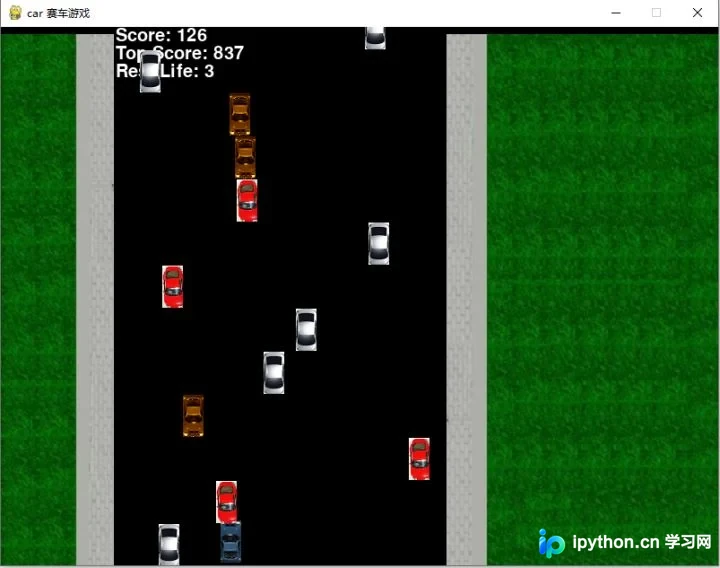
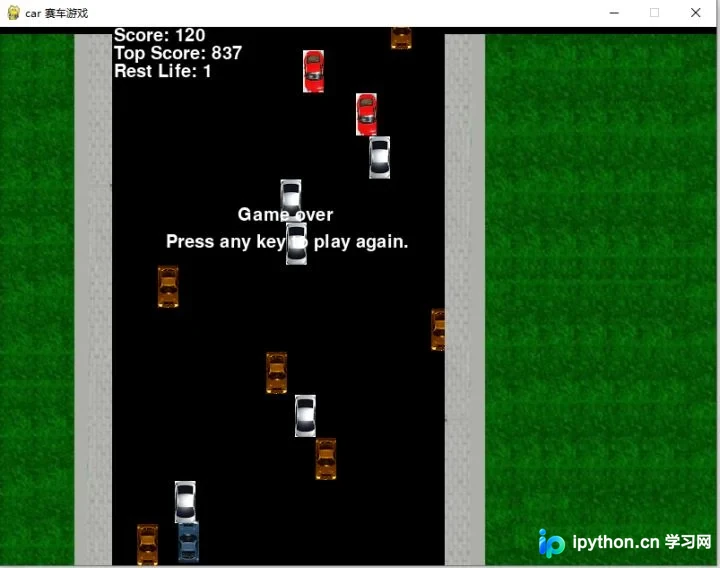
游戏设定每条赛车拥有三条生命值,生命值耗尽则游戏结束。成功躲避迎面而来的车辆可获得加分。玩家通过键盘左右方向键控制赛车移动。
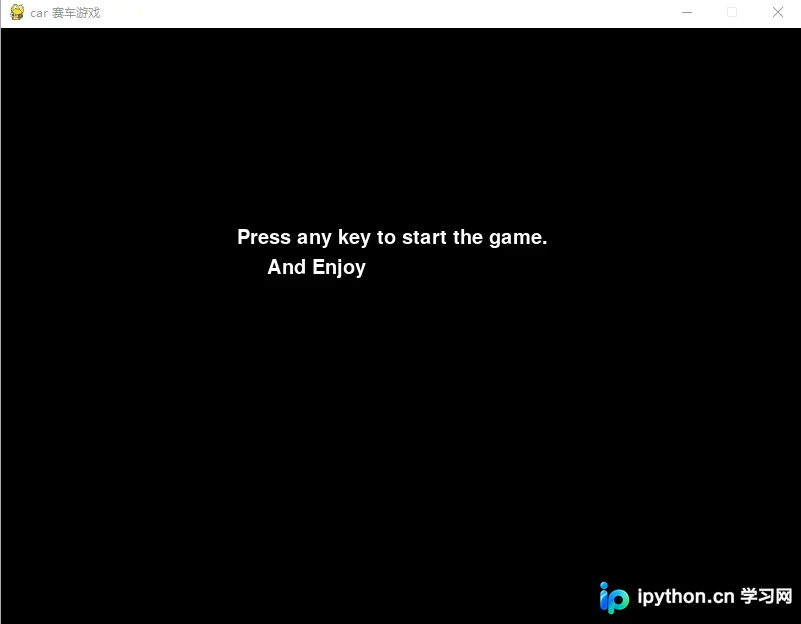
游戏开始界面——
游戏运行界面——
游戏结束界面——
至此,关于Python Pygame实现赛车游戏的教程介绍完毕。如需了解更多Python Pygame赛车游戏相关内容,请查阅本站往期文章或继续浏览后续内容,感谢大家的支持!
本站声明
本文内容仅供参考,不代表本站观点。转载或引用请注明出处。如发现内容问题,请通过联系我们页面反馈。















