


Python实现将Excel内容批量导出为PDF文件

发布时间:2026-10-15 |
2人浏览过
本文介绍如何使用Python将Excel表格数据批量导出为独立的PDF文件。主要涉及安装wkhtmltopdf工具,结合openpyxl读取Excel数据,并通过pdfkit将HTML模板渲染为PDF。文章提供了完整的代码示例和效果展示,帮助开发者实现自动化文档生成。
前言
在前一篇文章中,我们演示了如何将多个表格数据合并到一个Excel文件中。今天,我们将学习一个新的技巧:如何将表格中的数据拆分,并分别导出为独立的PDF文件。
首先,我们需要查看待处理的部分数据源。
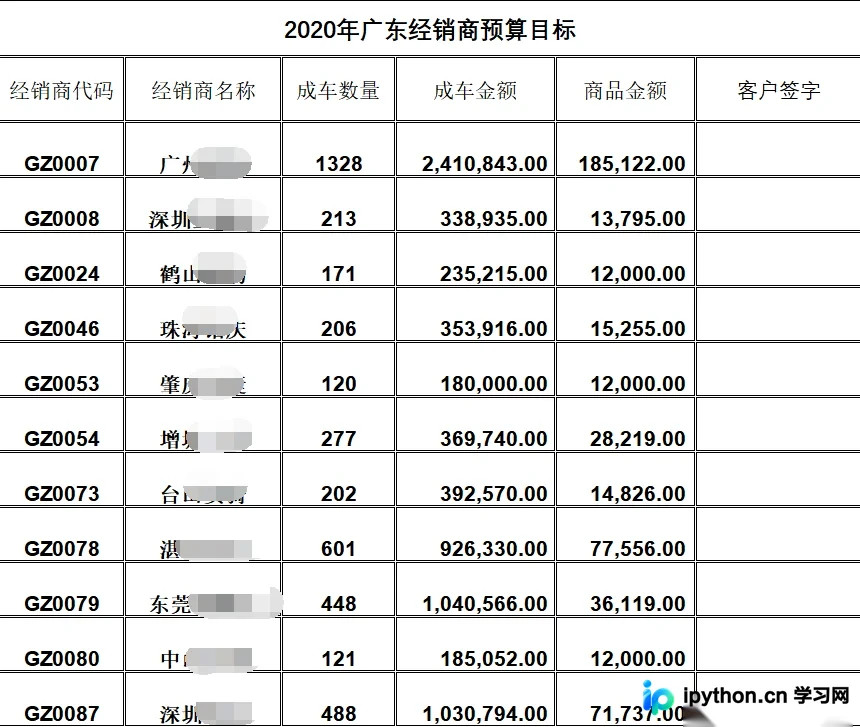
为了完成这一转换,系统需要安装wkhtmltopdf软件。
如果您不清楚如何下载该工具,可以在电脑端左侧扫描相关二维码,找到“我要下载”入口进行获取。
接下来,我们看一下最终生成的效果。
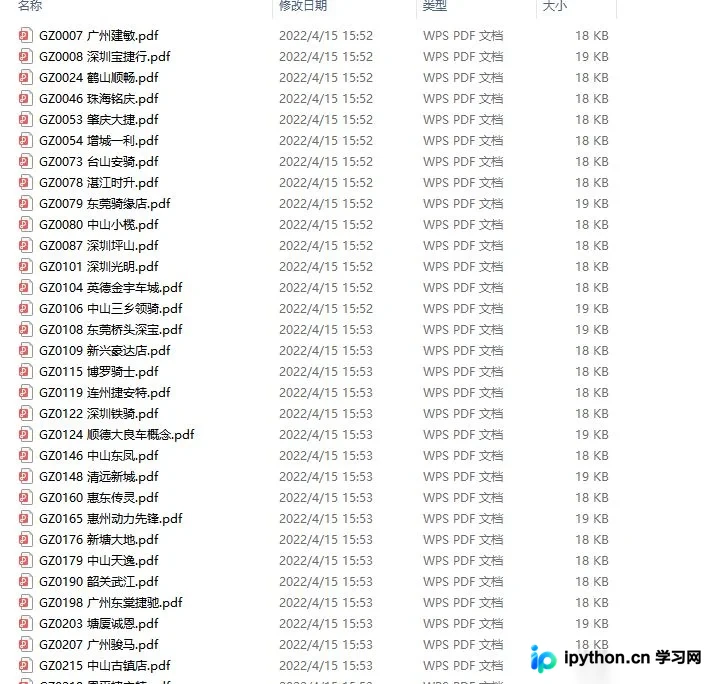
可以看到,原始数据中的每一项都被单独导出为了一个PDF文件。
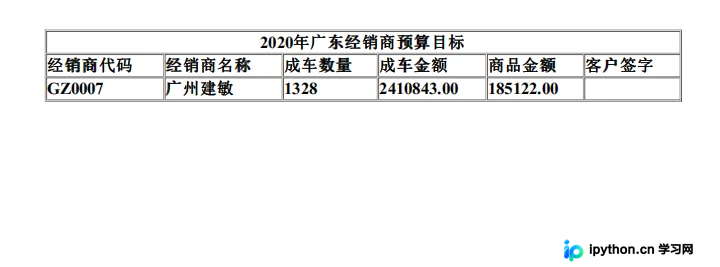
以下是实现该功能的具体代码。
import pdfkit
import openpyxl
import os

target_dir = '经销商预算'

if not os.path.exists(target_dir):
    os.mkdir(target_dir)

html = """
<!DOCTYPE html>
<html lang="en">
<head>
    <meta charset="UTF-8">
    <style>
        table {
            font-size: 22px;
            font-weight: bolder;
            width: 850px;
        }
    </style>
</head>
<body>
<table border="1" align="center" cellspacing="1">
    <tr>
        <td class='title' align="center" colspan="6">2020年广东经销商预算目标</td>
    </tr>
    <tr>
        <td>经销商代码</td>
        <td>经销商名称</td>
        <td>成车数量</td>
        <td>成车金额</td>
        <td>商品金额</td>
        <td>客户签字</td>
    </tr>
    <tr>
        <td>[code]</td>
        <td>{name}</td>
        <td>{number}</td>
        <td>{money}</td>
        <td>{total}</td>
        <td></td>
    </tr>
</table>
</body>
</html>
"""


def html_to_pdf(filename_html, filename_pdf):
    """HTML 2 PDF"""
    config = pdfkit.configuration(wkhtmltopdf='D:\\wkhtmltopdf\\bin\\wkhtmltopdf.exe')
    pdfkit.from_file(filename_html, filename_pdf, configuration=config)


wb = openpyxl.load_workbook('2020经销商目标.xlsx')

sheet = wb['Sheet1']

print(sheet.rows)

for row in list(sheet.rows)[3:]:
    data = [value.value for value in row]
    data = data[1:-1]
    format_html = html.replace('[code]', data[0])
    format_html = format_html.replace('{name}', data[1])
    format_html = format_html.replace('{number}', str(data[2]))
    format_html = format_html.replace('{money}', f'{data[3]:.2f}')
    format_html = format_html.replace('{total}', f'{data[4]:.2f}')
    with open('example.html', mode='w', encoding='utf-8') as f:
        f.write(format_html)
    html_to_pdf('example.html', target_dir + os.path.sep + data[0] + " " + data[1] + '.pdf')
到这里,关于Python实现将Excel内容批量导出为PDF文件的介绍就结束了。如果您需要了解更多关于Python处理Excel导出为PDF的内容,建议搜索本站之前的文章或继续浏览下方的相关文章。希望大家今后能多多支持本站!
本站声明
本文内容仅供参考,不代表本站观点。转载或引用请注明出处。如发现内容问题,请通过联系我们页面反馈。















